Table of contents
Sign and send unlimited e-signatures with Xodo Sign.
Redacting sensitive information in a contract is an essential and yet effective way to prevent data breaches before a file is shared or signed.
If you manage onboarding, review terms, or handle documents with confidential fields, you need a way to hide that information and remove it permanently.
This guide explains how to redact sensitive information in contracts and other business documents in Xodo Sign, a secure document preparation and eSignature platform.
How to redact a document in Xodo Sign
Use these steps to remove sensitive content before sharing a document that needs to be signed.
1. Sign up with Xodo Sign
- Create a free trial account with Xodo Sign. No CC required.
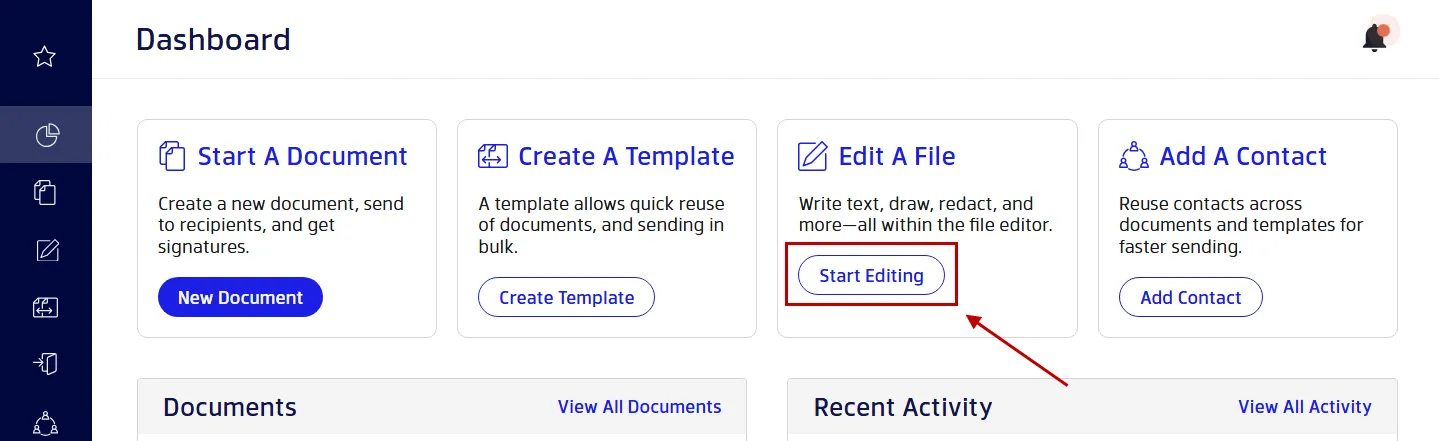
2. Open your contract in the PDF Editor
- Click on Start Editing from the dashboard.
- Drag and drop your file.
- Or, click on Upload File.
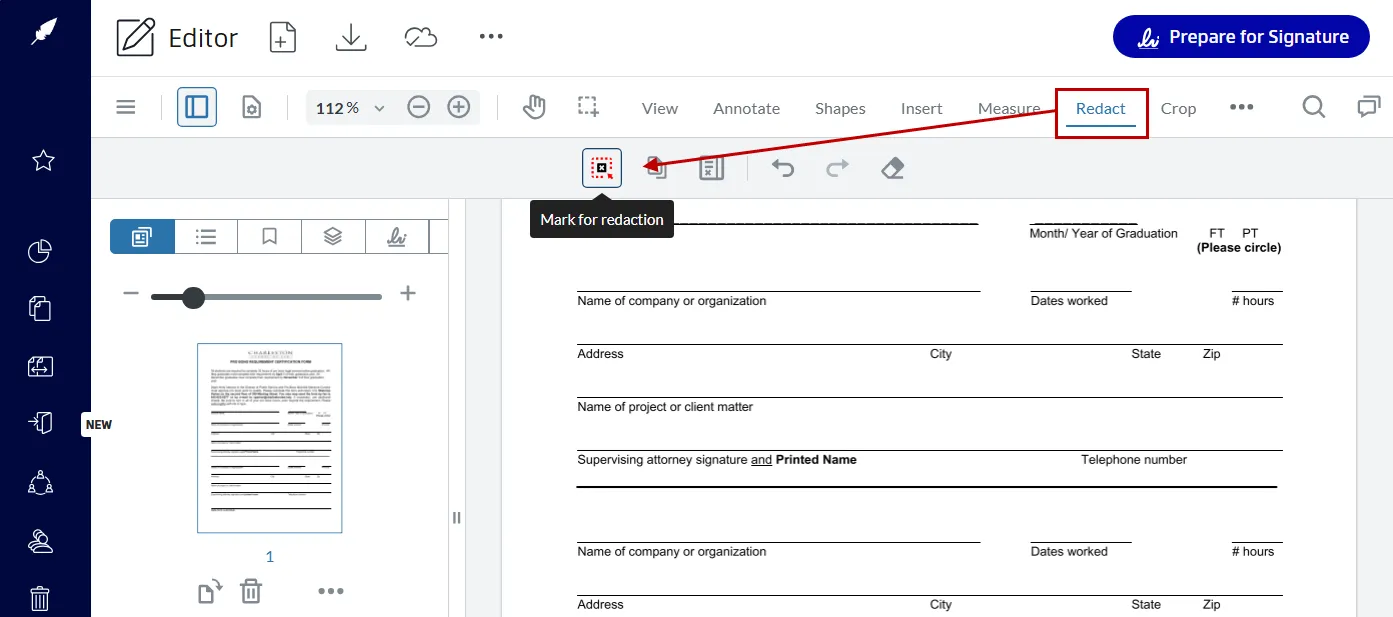
3. Open the redaction tool
In the editor toolbar:
- Select Redact
- Choose Mark for Redaction
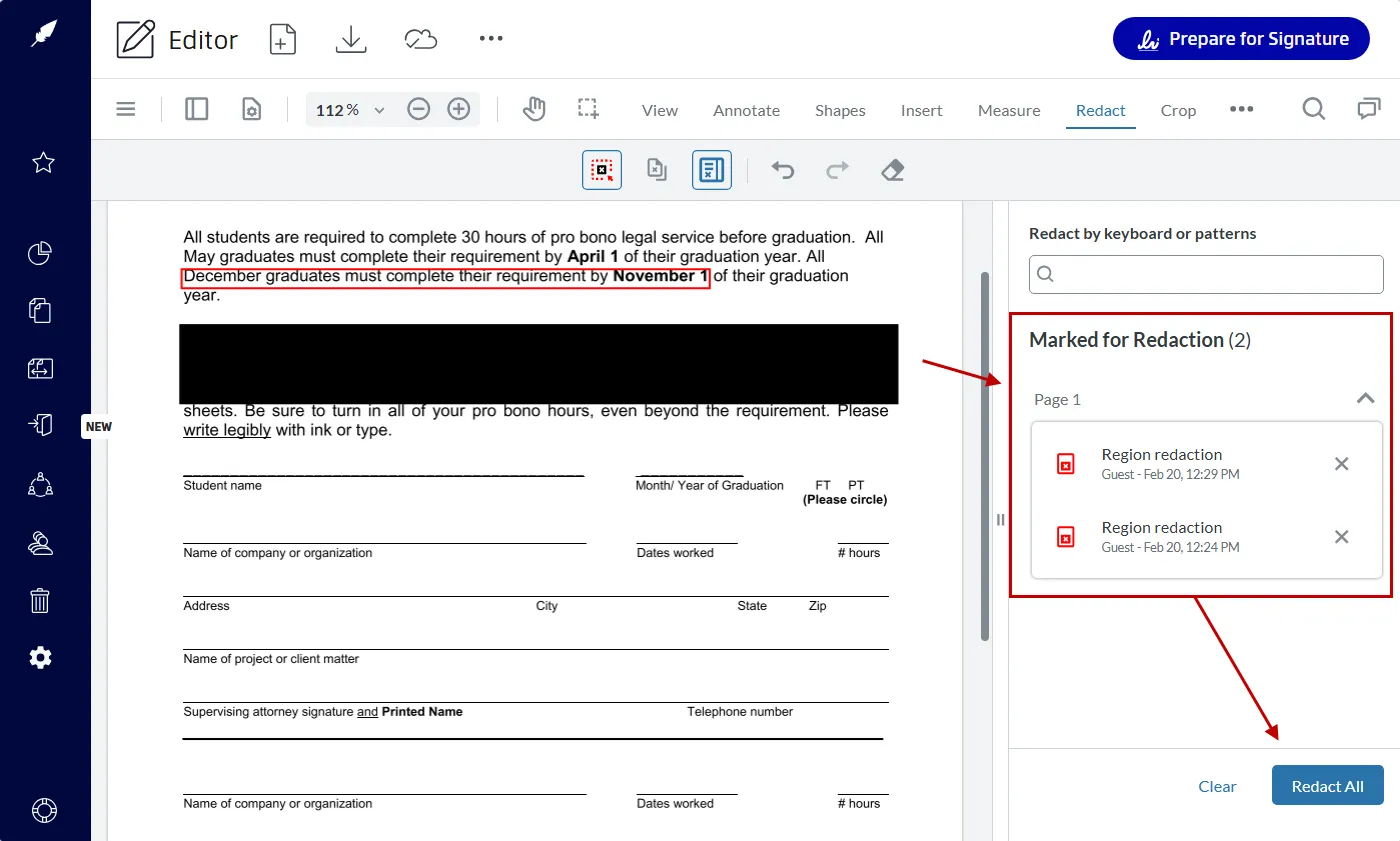
4. Highlight the content to redact
- Click and drag over the information you want to redact.
- Redact single words, lines, or paragraphs.
- The tool will mark the selection for redaction.
- Hover over the selection to preview it.
- Adjust the selection if needed.
- Repeat the above steps for the data you wish to redact.
- Click on Redact All to confirm the redaction process.
Pro Tip: You can automate redaction with Xodo Sign. In the search box, select the options to search for credit card numbers, phone numbers, or emails. You can then mark the results for redaction or redact them instantly. This helps remove that data from the document quickly and error-free.
Note that improper redaction (using a black rectangle to visually cover text) can be recovered and accessed. Depending on the data, poorly redacted text can lead to legal consequences and compliance issues. Proper redaction can keep sensitive content protected and permanently removed.
5. Redact entire pages (optional)
- Click on the Redact Pages tool.
- You can redact specific pages, the current page, or odd or even pages.
- Click on Add Mark to mark the pages for redaction
- Or, click on Redact to redact the pages instantly.
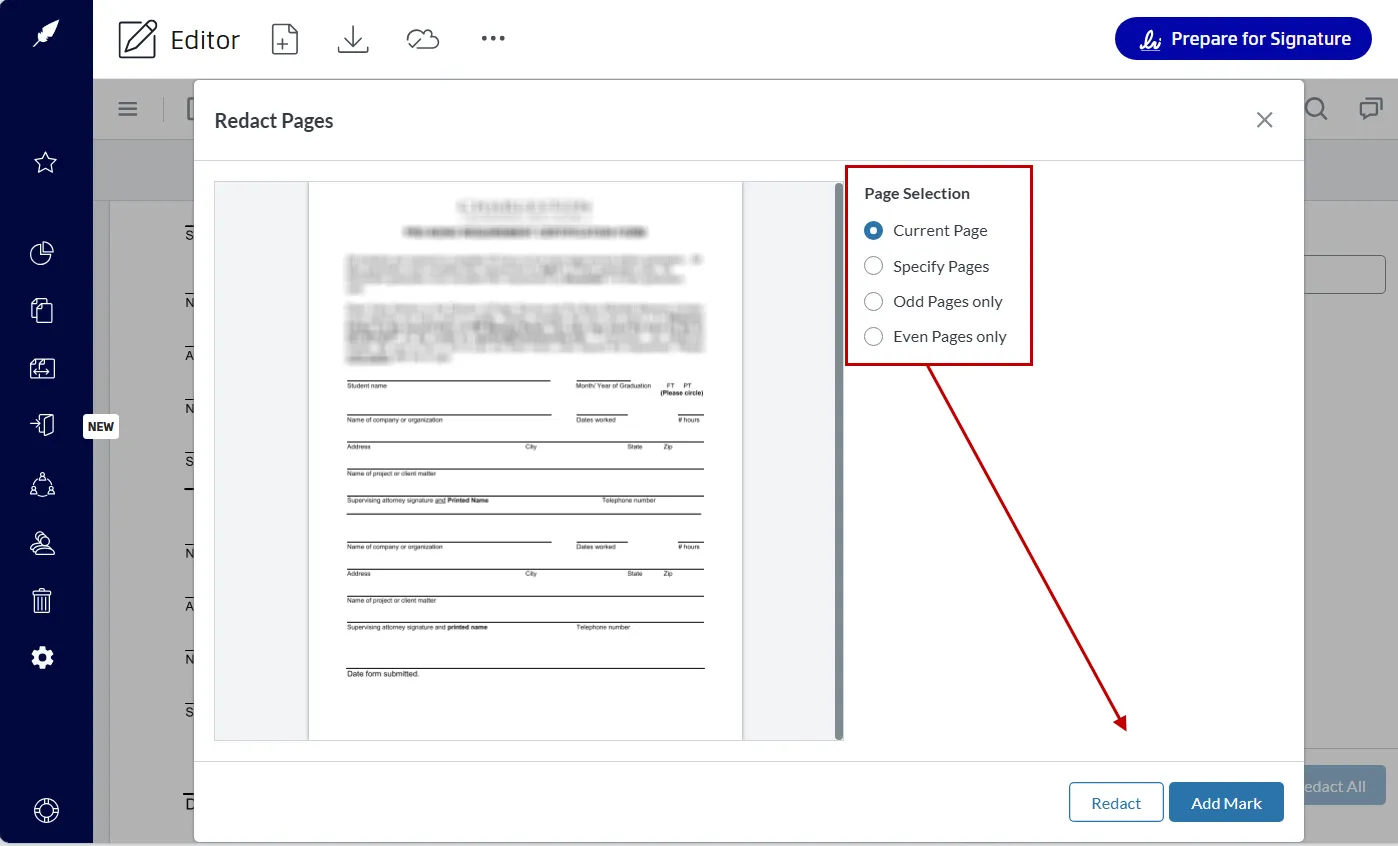
Page-level redaction is useful when handling multiple documents. It reduces human error during the redaction process for larger sections that are under review.
Continue editing before signing
You can continue to edit your redacted document before signing it. There are other editing tools available within Xodo Sign that let you:
- Edit text
- Annotate content
- Add measurements
- Rearrange pages
- Insert stamps
You and your team don't have to switch tools for additional edits, features, or revisions. Xodo Sign streamlines the entire editing workflow.
Sign your redacted contract
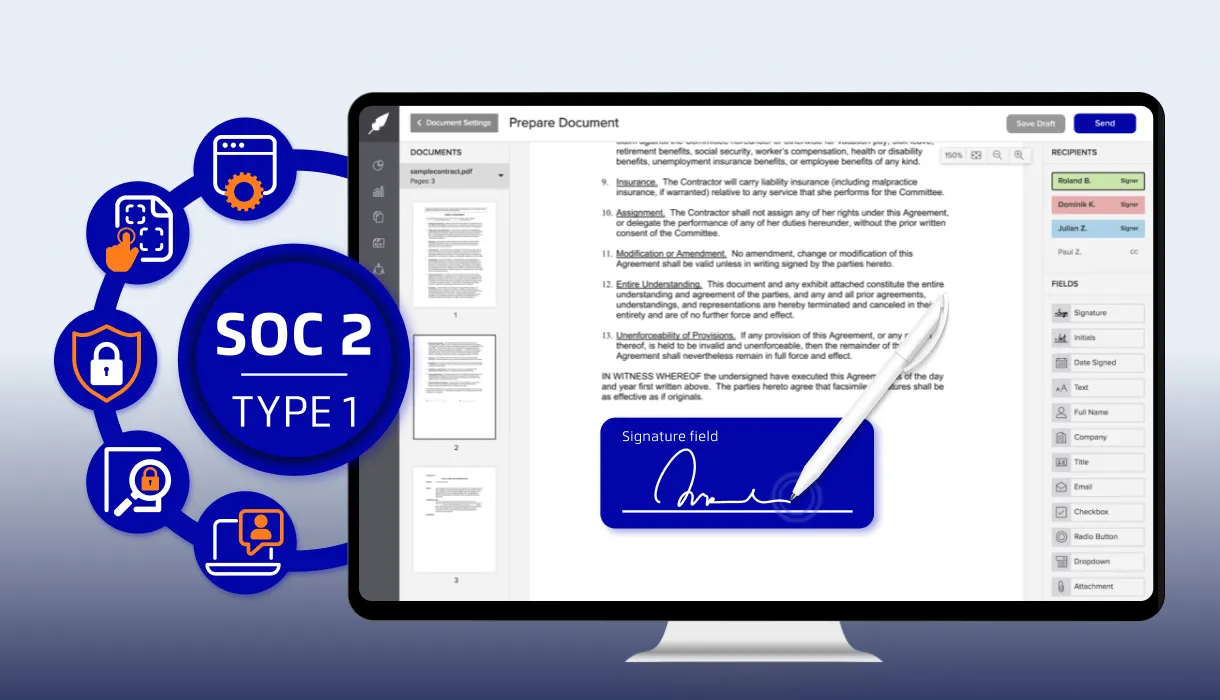
After redacting or editing your contract, you can easily move to the signing process. Xodo Sign lets you set up your redacted file for signatures by letting you add:
- Signers and CC recipients
- Signer roles to keep the signing flow organized.
- Instructions or notes for the document.
- Document settings for auto-reminders and expiration dates.
- Fillable fields for capturing information.
- Signature and date fields for finalizing approvals.
The entire process is uninterrupted and seamless. You can edit, prepare, and sign the same file with redacted information in one workspace.
When teams need to redact information
Redaction comes up in workflows where a team needs to redact sensitive data. This is often to maintain a controlled disclosure of information. The most common examples include:
- Legal documents
Privileged content, commercially sensitive information, and clauses that shouldn't be shared outside the legal team. - HR files
Personal identifiers in onboarding packets, social security numbers, employee records, driver's license numbers, and performance documents. - Financial documents
Bank statements, invoices, and financial information with account numbers or confidential figures. - Real estate contracts
Lease agreements passed between agents, landlords, buyers, and tenants that include commission details or internal notes. - Vendor contracts
Shared versions that remove pricing schedules, proprietary information, trade secrets, and internal revisions.
Teams can use Xodo Sign to redact personally identifiable information like home addresses and contact details, while the platform protects that data and maintains legal compliance.
Why use Xodo Sign for redaction and electronic signing?
Xodo Sign provides you with effective redaction and editing tools that work seamlessly with a secure eSignature workflow. You can sign redacted documents using advanced signing tools and features:
- Secure and legally binding eSignatures.
- Compliance with U.S. ESIGN Act and EU eIDAS regulations.
- Identity verification to protect against unauthorized parties.
- Detailed audit trails aligned with legal standards.
- Role-based access for an efficient signing process.
- Signing order option for organized approvals.
- Fast signing experience with templates and integrated apps.
- Scalable plans for individuals or large organizations.
You can reduce document errors, keep information contained, and gain full transparency with detailed audit logs within one secure platform.
Frequently asked questions
1. What is permanent redaction?
Permanent redaction removes sensitive information so it can't be revealed, copied, or restored. Xodo Sign completely deletes the underlying data and adds a blackout area in its place.
2. Can I redact a document and sign it in one platform?
Yes. Xodo Sign allows you to redact, edit, prepare, and sign within a single workspace.
3. Does redaction work on scanned PDFs?
Yes. You can redact both text‑based and scanned PDFs. For scanned files, manual redaction is applied to the selected visual area.
4. Can recipients see what I removed?
No. Proper redaction deletes the content in the original document. Recipients can't uncover or extract it. If you need to retain that data, be sure to save a copy first. Or, maintain a redaction log to keep track of the removed content for legal purposes.
5. Is Xodo Sign secure for confidential documents?
Yes. Xodo Sign provides encryption, audit trails, access controls, and compliance‑ready workflows that meet regulatory obligations for e-signature laws.
6. When should I redact instead of delete?
Redaction is best when sharing a file that contains confidential information or fields under privacy laws. Deleting is best when removing entire sections that don't need redacted content.
7. What if I need to share two versions of the same contract?
You can save both the original and the redacted copy in Xodo Sign. The platform keeps a clear history of each version.
8. Can teams collaborate on a document before redacting?
Yes. You can prepare documents with collaborators in mind. Add notes, markup, and finalize redactions before requesting signatures.
Redact, prepare, and sign in one workspace
Redacting sensitive information doesn’t need extra software or complex tools. With Xodo Sign, you can delete confidential data, prepare a contract, and send it for signing in one platform.
The build-in PDF editor supports permanent redaction, document prep, and secure signing to keep your approval workflows seamless and efficient.
Try Xodo Sign to simplify your contract workflows and protect sensitive information as you work.