Table of contents
Sign and send unlimited e-signatures with Xodo Sign.
Managing document and signing workflows can be time-consuming, especially when multiple apps and teams are involved.
That’s where integrating a platform like viaSocket into your Xodo Sign workflow comes in to help with the everyday tasks that go hand-in-hand with the signing process.
viaSocket is an AI-powered automation and integration platform that connects Xodo Sign with over 1,700 applications, enabling you and your business to automate document workflows end-to-end without a single line of code.
This integration combines Xodo Sign’s secure, reliable eSignature capabilities with viaSocket’s scalable automation engine.
With its drag-and-drop builder and AI prompts, viaSocket can design workflows that connect Xodo Sign to tools like Slack, HubSpot, Salesforce, Google Workspace, and more.
How to integrate viaSocket with Xodo Sign
As a Xodo Sign user, integrating viaSocket is simple. Here’s how:
1. Login to your viaSocket and Xodo Sign account
- Go to viaSocket.com and log into your account.
- Or, if you don’t have one yet, create a viaSocket account.
- Log into your Xodo Sign account.
2. Create a new flow from the dashboard
- Click on the Create New Flow button.
- You’ll get a full listing of apps and triggers available.
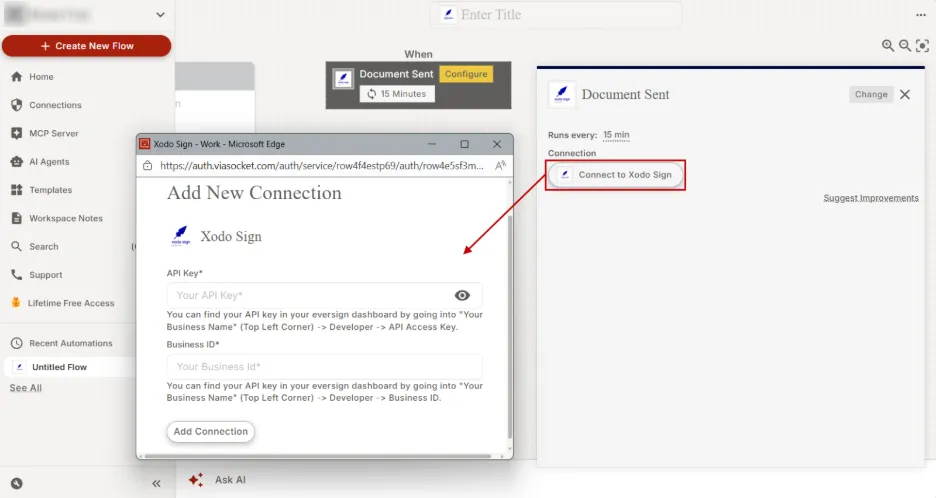
3. Choose the trigger from the available options
- Click on Select Trigger.
- Go to Signatures under the categories list.
- Select Xodo Sign.
- Select a trigger for your workflow (e.g. Document Sent, Document Completed).
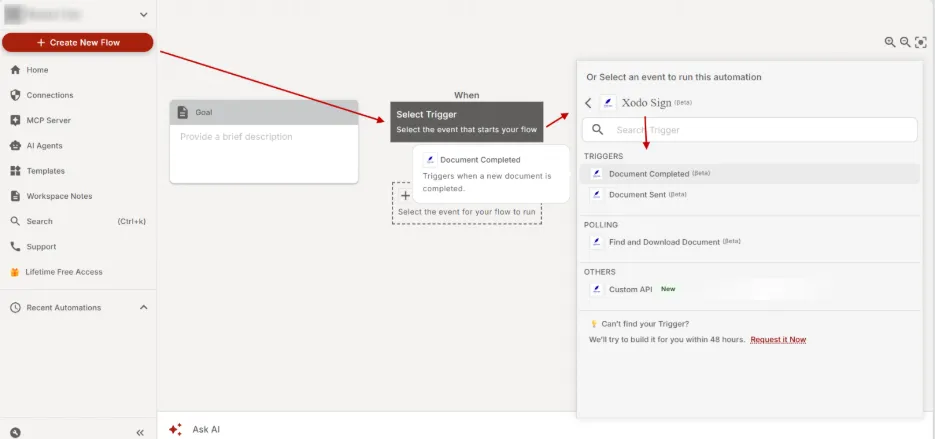
4. Add Xodo Sign as a Connection
- Click on the Connect to Xodo Sign button.
- Verify the Xodo Sign connection by entering your Xodo Sign API Key (go to your Xodo Sign dashboard > Your Business Name > Developer > API Access Key).
- Enter your Business ID (go to your Xodo Sign dashboard > Your Business Name).
- Click on Add Connection.
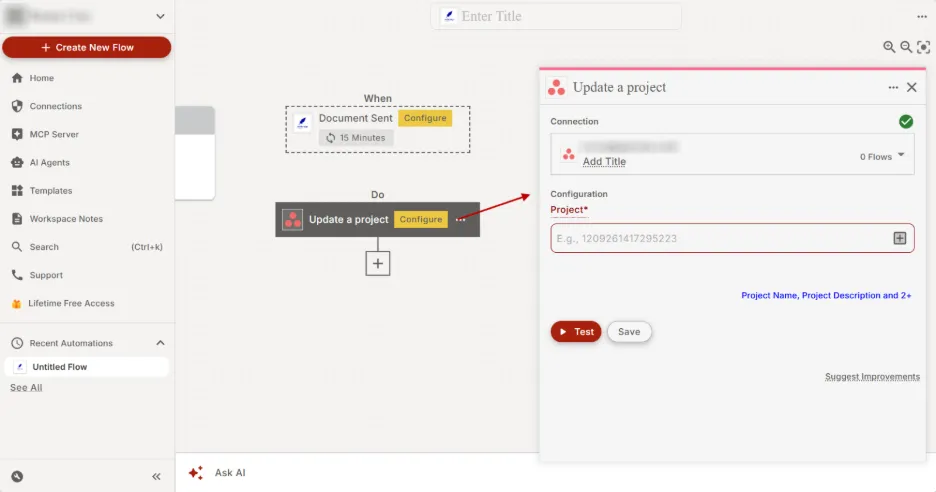
5. Configure actions with other apps
- Click on Add Step.
- Select another app to connect in your workflow.
- Choose what action happens with other apps (e.g. Send a Slack notification, Update a project).
- Configure and connect your app.
- Click on Test to test the workflow.
- Make any adjustments necessary.
6. Activate the workflow
- Once the workflow is successful, click on the Save button.
With a few clicks, you can automate post document signing tasks, reduce errors, and finalize deals faster.
Use cases of Xodo Sign integrations
This integration puts you in the driver's seat, letting you connect the apps you already use to your signing workflow. Here are some examples:
- Sync records and databases: Integrate Xodo Sign with Salesforce to sync signed records, ensuring that customer data is consistently updated across your CRM and Xodo Sign databases.
- Automate notifications: Integrate Xodo Sign with Slack to enable seamless collaboration, allowing team members to discuss, review, and update Xodo Sign contracts and agreements directly from Slack channels.
- Track projects and tasks: Integrate Xodo Sign with Asana to monitor task statuses and project approval milestones, enhancing project management and team collaboration.
- Automate signed data sharing: Integrate Xodo Sign with Microsoft Excel to collect signed data, automating approved data collaboration for your team.
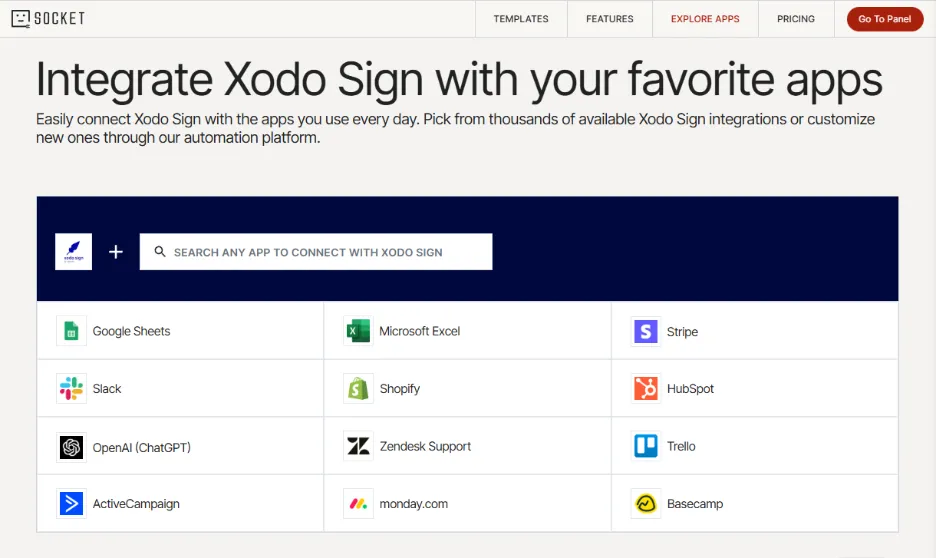
For a closer look at which other apps you can connect to your signing workflows, check out the main Xodo Sign integrations page on viaSocket.
Explore viaSocket features for advanced workflows
This simple integration can unlock advanced workflow capabilities. Here’s an overview of viaSocket features:
- Unified automation across teams: Streamline processes across HR, Sales, Marketing, Finance, and Support with intuitive drag-and-drop tools or AI-powered workflow suggestions.
- 1,700+ app integrations: Easily link and synchronize data across thousands of platforms. Integrate popular tools like Slack, Intercom, Dropbox, HubSpot, Salesforce, Pipedrive, Google Workspace, and even custom APIs.
- Data management with tables: Organize and leverage structured data directly within your workflows; there is no need for external databases.
- Custom UI components: Design user-friendly interfaces that allow teams to interact with workflows or manage processes in a tailored environment.
- AI workflow optimization: Use AI to build, refine, and optimize workflows based on your unique business requirements.
- Data analysis & insights: Gain clarity by analyzing API responses and workflow metrics to uncover trends, performance gaps, and optimization opportunities.
- AI-powered signing actions: Leverage MCP Server technology to integrate AI directly into your signing workflows. By connecting to the Xodo Sign MCP Server, AI clients like ChatGPT, Claude, or Cursor can instantly trigger actions such as sending documents, tracking status, or managing signing workflows, reducing manual effort and speeding up execution.

With just a few clicks, you can easily combine viaSocket's process automation with Xodo Sign's advanced e-signing features, secure audit trails, and fully compliant e-signatures to take your signing workflows to the next level.
Frequently asked questions
What if the app I want to use isn’t available?
You can request the app integration with the viaSocket team or build your own. You can use the HTTP app to connect any app with an API offering.
Is there a limit to how many integrations I can set up?
No. You can create unlimited integrations with different apps and automate your tasks as needed.
Can I automate tasks between multiple apps in one workflow?
Yes, viaSocket supports multi-step workflows. You can automate tasks across multiple apps.
Do I need a Xodo Sign account?
Yes. To integrate viaSocket with Xodo Sign, you’ll need an account. You can create a Xodo Sign account to get started or log in to your account as you set up your workflow with via Socket.
Do I need to pay extra to integrate viaSocket with Xodo Sign?
While there’s no extra cost to use the viaSocket integration with Xodo Sign, you’ll need a viaSocket account that offers a free plan to get started.
Start automating and integrating with viaSocket
The Xodo Sign and viaSocket integration is a game-changer for businesses looking to streamline document workflows and scale automation across teams.
Ready to transform your signing process? Explore all the possible viaSocket and Xodo Sign integrations today!