Table of contents
Sign and send unlimited e-signatures with Xodo Sign.
Signing a non‑disclosure agreement (NDA) no longer needs back‑and‑forth emails, printouts, or courier delays. You can complete the entire process online and keep your work moving.
Xodo Sign gives you a simple, secure way to prepare, send, sign and track NDAs. It includes identity checks, signer controls and an audit trail that your legal or compliance team can rely on.
This guide explains how to sign an NDA online and handle sensitive legal documents with confidence.
How to sign an NDA online with Xodo Sign
1. Create a Xodo Sign account
- Start a free trial to follow the steps. No credit card is required.
- If you're an existing user, log in to Xodo Sign.
2. Upload your NDA
- In the Documents section, click on the “+” icon in your dashboard.
- Click on Choose Files.
- Browse for and select your PDF file or document.
Your NDA will appear in your dashboard once uploaded.

3. Add signers and set up your document
- Choose who signs: Me Only, Me and Others, and Others Only.
- Add signer names and email addresses.
- Assign roles: Signer or CC.
- Set signing order when approvals need to follow a sequence.
- Add SMS or PIN authentication for an extra layer of security.
- Write a short message for your signers.
- Adjust settings like reminders, completion conditions, or expiration dates.
- Click on Prepare.

These steps help you prepare the NDA as a clean legal contract before sending it for review.
4. Place and assign signing fields
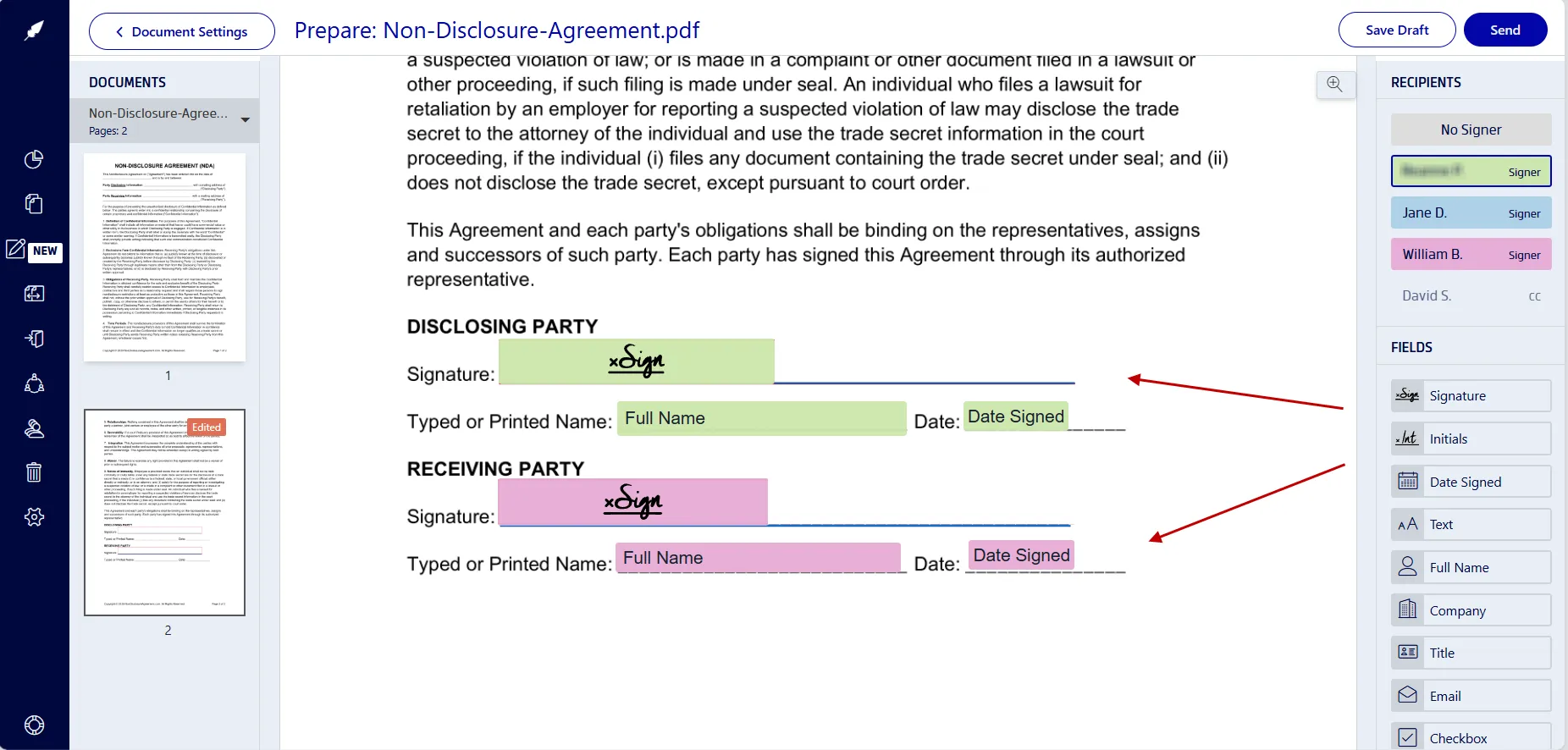
- Insert form fields you need: signature, date, initials, text fields...
- Assign each field to the correct signer.
- Click on your own signature field to sign the document. Type, draw or upload a signature image.
- Click on Sign.
- Select Send when everything is ready.
5. Track progress and download the signed NDA
After sending:
- Monitor progress in the document's audit history.
- View the audit trail and timestamps.
- Send reminders for outstanding signature.
- Download the completed PDF once all signatures are finished.
Once all signatures are complete, the PDF becomes a legally binding document you can store or forward to your team.
Why Xodo Sign works well for NDAs
NDAs need clear records, predictable workflows, and reliable identity data. Xodo Sign aligns with common practices in the legal industry and supports teams during early client engagement.
- Templates for recurring agreements
If you send the same NDA format often, save it as a template. Each new agreement will already include your fields and settings. It helps your team send repeat documents without starting from scratch. - Audit trails
Each completed NDA includes signer identity data, timestamps, IP addresses, and actions. The legally enforceable audit log gives your team a clear record of who signed and when. - Multi‑party signing
Add multiple parties, internal approvers, or witnesses. Set signing order when confidentiality terms need staged approvals. - Bulk sending
If you send identical NDAs to multiple recipients, use bulk send. Each signer receives their own copy and audit trail. - Document editing and AI tools
Xodo Sign includes a built-in PDF editor and AI summarization tool that help you review, edit, and prepare contracts and agreements. - API and integrations
Legal, compliance, and operations teams can automate NDA workflows with the API. Many law firm teams use this when they handle large volumes of routine agreements.
These tools and features give your legal team a clear workflow for NDAs and support the tasks that come up at the start of a new client matter.
Other legal documents you can sign online
If you handle other client‑facing agreements, the signing process is similar. You can follow our step‑by‑step guide for:
- How to sign a settlement agreement online
- How to sign a legal retainer agreement online
- How to sign a client engagement letter online
Frequently asked questions
What is an NDA?
An NDA (Non-Disclosure Agreement) is a confidentiality agreement that limits how sensitive information is shared. It often covers trade secrets, intellectual property, financial data, and other business information.
Can you digitally sign an NDA?
Yes. NDAs can be signed digitally if the electronic signature meets local signature law requirements. Xodo Sign records identity details, intent and a complete audit log.
Do electronic NDAs hold up in court?
Yes. Courts accept electronic NDAs that follow laws such as ESIGN, UETA or eIDAS. Judges often look at timestamps, identity checks and evidence of intent. Xodo Sign captures this information in the audit trail.
Does an NDA need to be notarized to be legally binding?
Most NDAs do not require notarization unless the agreement asks for it. Many NDAs are valid once both sides agree to the terms and sign.
What makes an NDA invalid?
An NDA can be invalid if it uses vague language, includes unreasonable restrictions, or lacks proper signatures. It may also fail if it tries to cover public information or illegal activity.
Can I sign an NDA without a lawyer?
Yes. Most NDAs are routine and don't require a lawyer to sign. If the document includes unfamiliar and unclear terms, ask a legal professional for help.
How should I sign an NDA correctly?
Read the document, complete your assigned fields, and confirm your signature and date in the final PDF. Many companies store the audit log with the signed file.
Am I allowed to tell someone I signed an NDA?
In most cases, yes. What you can’t share is the confidential information the NDA protects. Breaking an NDA can include fines or termination of employment.
Your next step for faster NDA signing
NDAs are often the first agreement two parties exchange. A simple workflow helps you track e-signatures, protect proprietary information and avoid costly delays.
Xodo Sign delivers advanced security, compliance, and intuitive workflows to sign NDAs online with confidence. Try it free or schedule a demo today!