Table of contents
Sign and send unlimited e-signatures with Xodo Sign.
Settlement agreements can be signed electronically, making the resolution process faster, easier to track, and simpler for everyone involved. These documents often bring a legal dispute to a close, so having a consistent process supports accurate records and smooth communication with the other party.
Xodo Sign gives firms and clients a straightforward way to prepare, send, and sign settlement agreements. Every step is logged with audit trails, identity controls, and role assignments. You can manage multi‑party approvals from one dashboard and follow the status through to completion.
Below is a clear walkthrough on how to sign a settlement agreement online using Xodo Sign.
How to sign a settlement agreement with Xodo Sign
1. Create an account or log in
- Start a free trial. No credit card is required.
- If you already have an account, log in to Xodo Sign.
2. Upload your settlement agreement
In your dashboard:
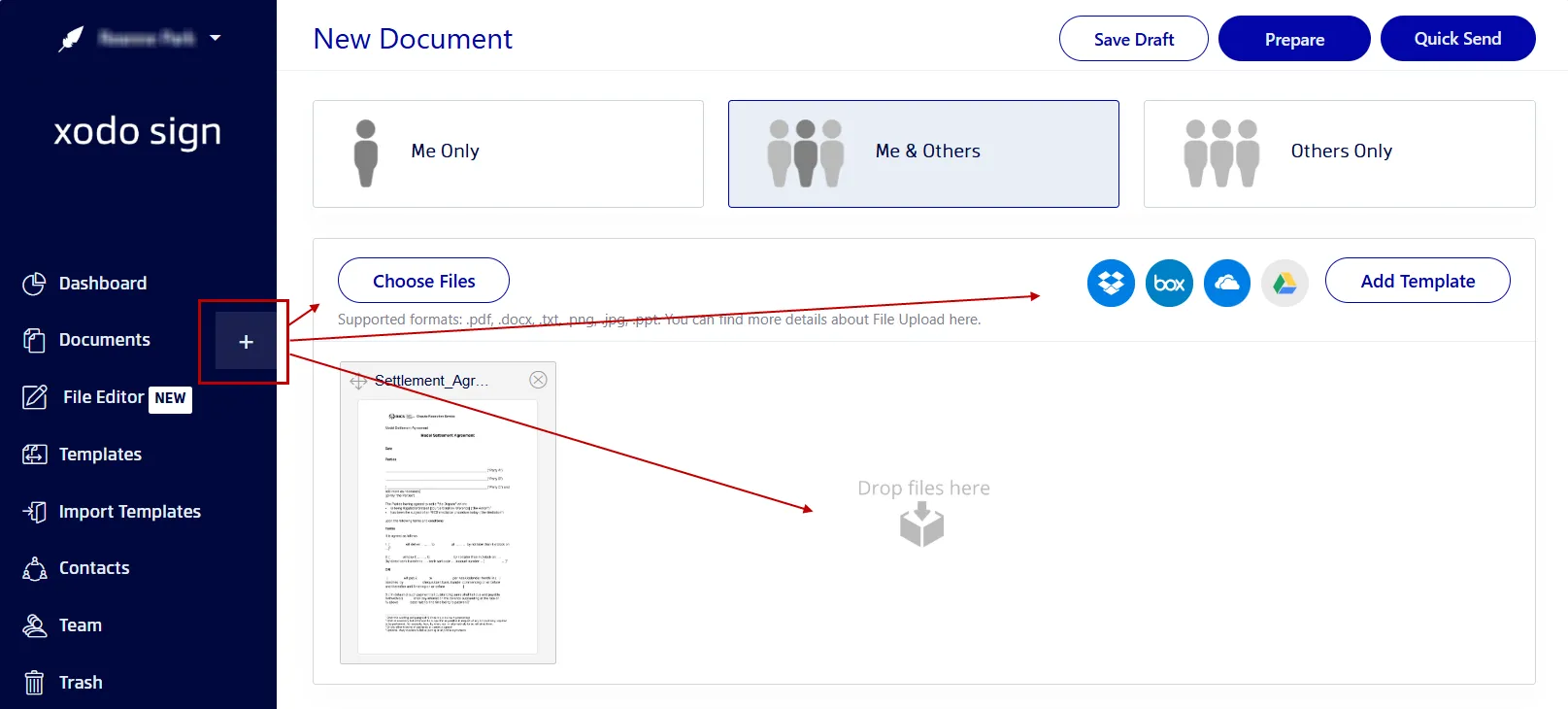
- Go to Documents and click on the + icon.
- Click on Choose Files.
- Locate and select your PDF.
- You can also drag and drop your file or import it from cloud storage.
Most settlement agreements are prepared as PDFs, but Xodo Sign supports Word, PPT, and image files if your workflow needs flexibility.
3. Add your signers
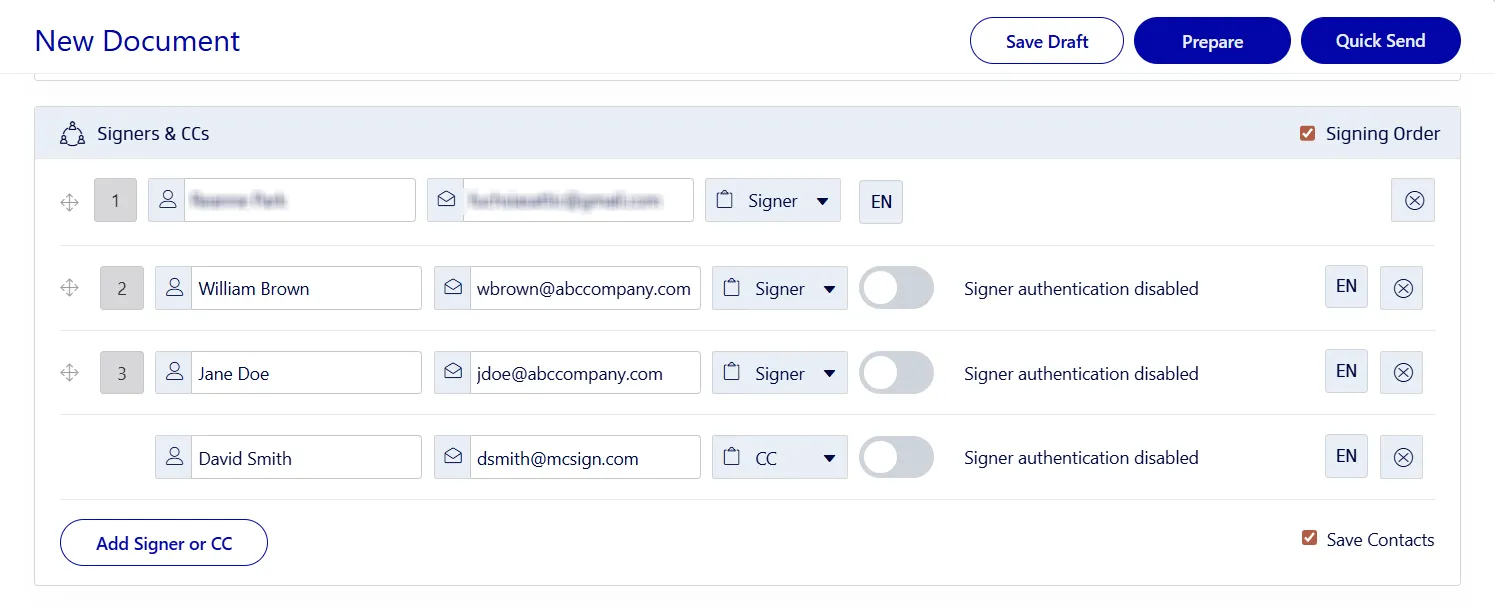
- Select your signing option: Me Only, Me and Others, or Others Only.
- Enter the signers' names and emails.
- Assign a role to each of the parties involved (Signer or CC).
- Enable SMS or PIN code identity checks.
- Set a signing order for organized approvals.
- Include a message with any instructions.
- Set up auto-reminders, completion conditions, or expiration dates.
- Click on Prepare.
4. Add, assign, and place signing fields
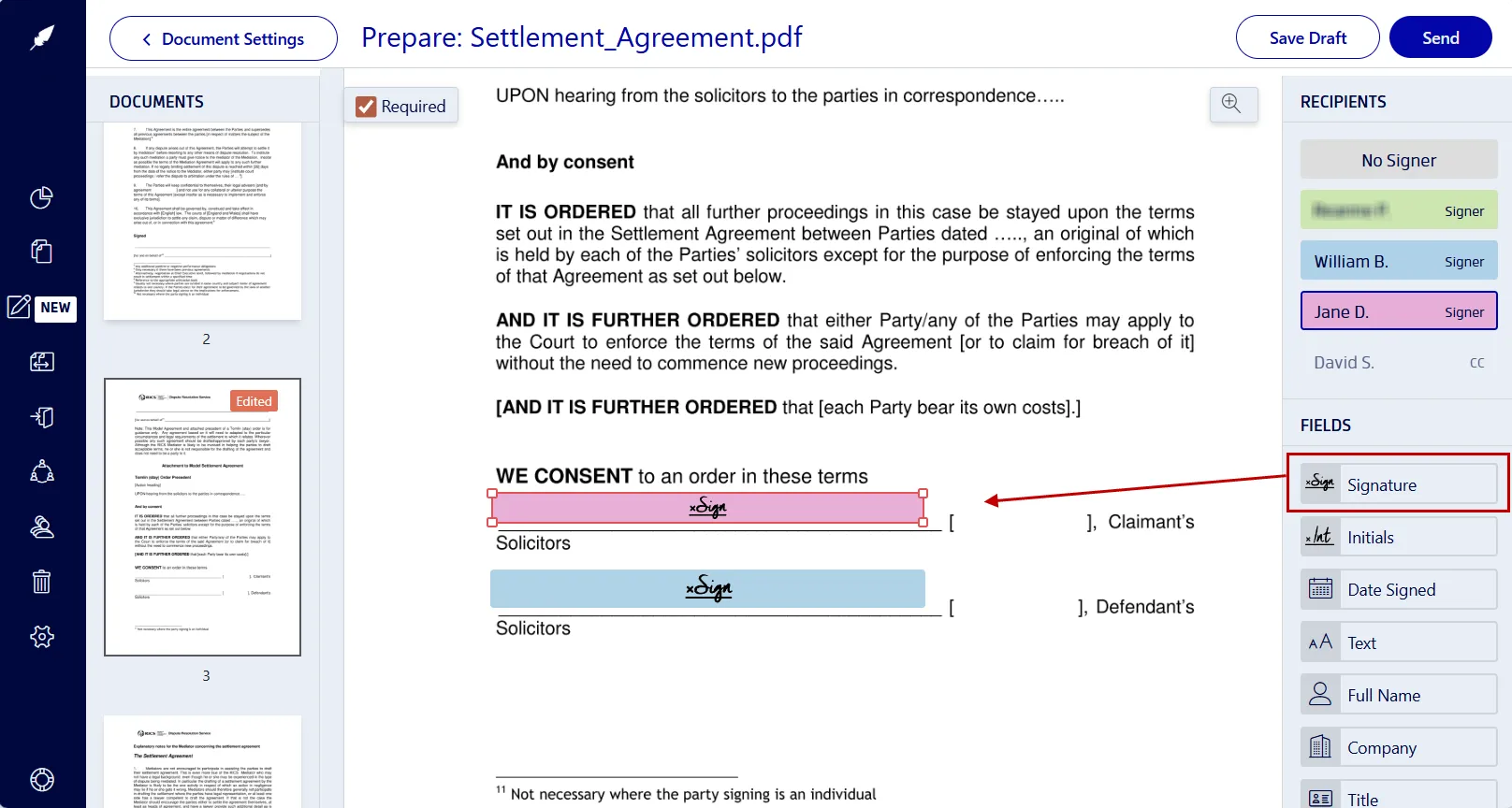
- Select a signer’s name on the right-hand side.
- Insert signing fields: signature, date, initial fields, and more.
- Repeat this for each signer.
- Click your signature field to sign the agreement.
- Type, draw, or upload an image of your signature.
- Click on Sign.
- When everything is set, click on Send.
5. Monitor your document's progress
- Locate your file in the Documents tab.
- Check who has signed.
- View timestamps and identity details in the audit trail.
- Send reminders for others who still need to sign.
- Download the final settlement agreement once all signatures are in.
Why legal professionals use Xodo Sign for settlement agreements
Settlement agreements require accuracy, clear records, and control over who signs and when. Xodo Sign supports these needs with tools built for legal industry professionals.
- Legal validity and compliance
Signatures meet compliance standards such as ESIGN and eIDAS. Each signed agreement becomes a legally binding document supported by a complete audit history. - Security, encryption and data protection
All documents are protected with 256-bit HTTPS encryption and stored in secure servers designed for sensitive legal work. - Comprehensive audit trails
Legal teams can track time stamps, emails, actions taken, and IP addresses of each signature with compliant audit trails. - Multiple signer options and roles
When legal matters involve a number of parties, you can easily add on multiple signers with different roles. - Customizable signing order
Decide in which order the settlement agreement is signed, whether the client signs first or the other party finalizes the document. - Status tracking and automated follow‑ups
Lawyers can send automatic reminders to clients to sign the settlement contract and keep the process moving without manual follow ups.
You can also use Xodo Sign for related documents in litigation, employment disputes, commercial conflicts, personal injuries, and family law. Everything stays organized in one place and easy to track.
Tips for handling settlement agreements
- Summarize agreements with AI tools to quickly review important terms and clauses.
- Set reminders for time‑sensitive documents to ensure you collect all signatures.
- Update payment terms or modify settlement amounts using the File Editor before sending.
- Use Quick Send when you want to attach a pre‑built signing page with fields assigned for each signer.
- Add initial fields next to clauses with settlement terms that require acknowledgment.
- Save the audit trail with the final copy for your records.
Other documents you can sign online
If you are also handling related documents, these guides may help:
FAQs about e-signing settlement agreements
Can a settlement agreement be signed digitally?
Yes. A settlement agreement can be signed digitally if local e‑signature laws are followed. Xodo Sign generates an audit trail to confirm who signed and when if needed in legal proceedings.
Is an electronic settlement agreement legally binding?
Yes. An electronically signed settlement agreement is legally binding as long as all parties agree to the terms and the signature meets laws such as ESIGN and eIDAS.
Who should sign the settlement first?
This depends on the parties. Some firms prefer clients to sign first. Others have the drafting party sign last. Xodo Sign lets you choose the exact order.
What if I need to revise settlement terms after sending?
Cancel the current request, upload the updated agreement, and send a new signing request. This keeps the record clear and avoids confusion.
What if the signer does not receive the email invitation?
Ask them to check their spam folder. If it is not there, confirm the email address and resend the request.
Do settlement agreements need to be notarized?
Some settlement agreements require a notary depending on jurisdiction or the type of dispute. You can download the signed document and use a remote or in‑person notary if needed.
How secure is my data?
Xodo Sign uses industry standard encryption and meets SOC 2 Type 2 requirements to protect against unauthorized access.
Can I authenticate the other signer?
Yes. As an added level of security, you can enable SMS or PIN codes to verify the signer’s identity.
Is there a time limit for signing?
Yes. You can set an expiration date. Once that date passes, the document locks, and you’ll have to resend or extend the signing window.
Do settlement agreements include confidentiality requirements?
Yes. Many settlement agreements include confidentiality clauses that restrict what the parties can share about the dispute or its terms. When you sign the agreement in Xodo Sign, your files stay protected with encrypted storage, which helps keep those terms confidential.
Do I need an attorney to sign electronically?
No. The act of signing can be completed online. Because settlement agreements carry legal and financial consequences, you may want an attorney to review the terms and governing laws before signing.
Move your settlement agreement forward with Xodo Sign
Xodo Sign helps you complete settlement agreements quickly. It's a cost effective solution that can help your team reduce delays and manage the entire process from start to finish.
You can prepare, edit, send, collect electronic signatures from multiple parties, and track every step in one unified platform.
Start a 7‑day free trial to explore Xodo Sign or request a demo to see the workflow in action.