Table of contents
Sign and send unlimited e-signatures with Xodo Sign.
Signing a client engagement letter online helps law firms open new matters with fewer delays. It’s often the first document a client signs, so a simple experience sets the tone for intake and helps both sides start the matter smoothly.
With Xodo Sign, firms can edit, send, and sign engagement letters in minutes. Each completed document includes an audit trail, strong security controls, and a simple workflow clients can follow from any device.
The steps below show you how to sign a client engagement letter online using Xodo Sign.
How to sign a client engagement letter online with Xodo Sign
1. Sign up or log in
- Start a free trial with no credit card required.
- If you already have an account, log in to begin.
2. Upload your engagement letter
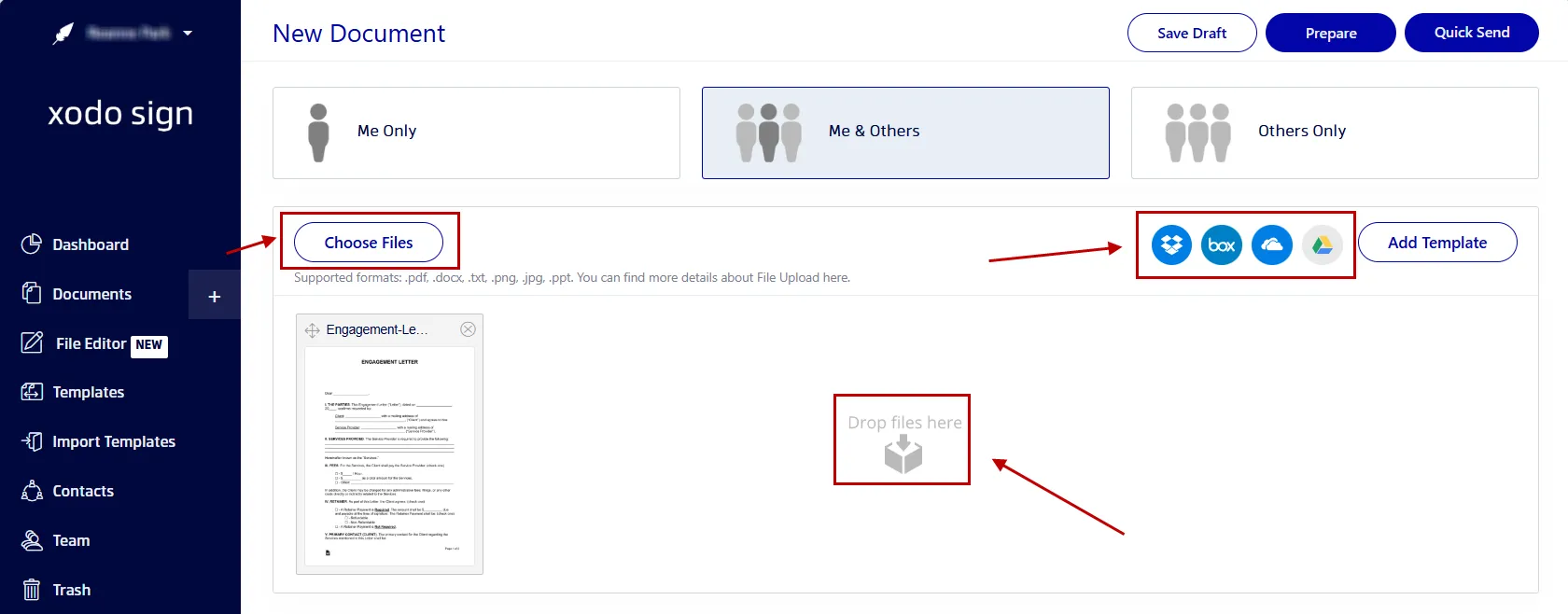
- From your dashboard, click on the + button.
- Click on Choose Files and upload your letter.
- Or drag and drop your file (PDF, Word, PPT, images).
- You can also import documents from cloud storage like Dropbox, OneDrive, and Google Drive.
This also works for tax forms or onboarding packets you need to send to a new client.
3. Add your signers
Add everyone involved in the signing flow. This may include:
- The attorney.
- A client.
- Two clients signing together in family or estate matters.
- Internal reviewers.
Then:
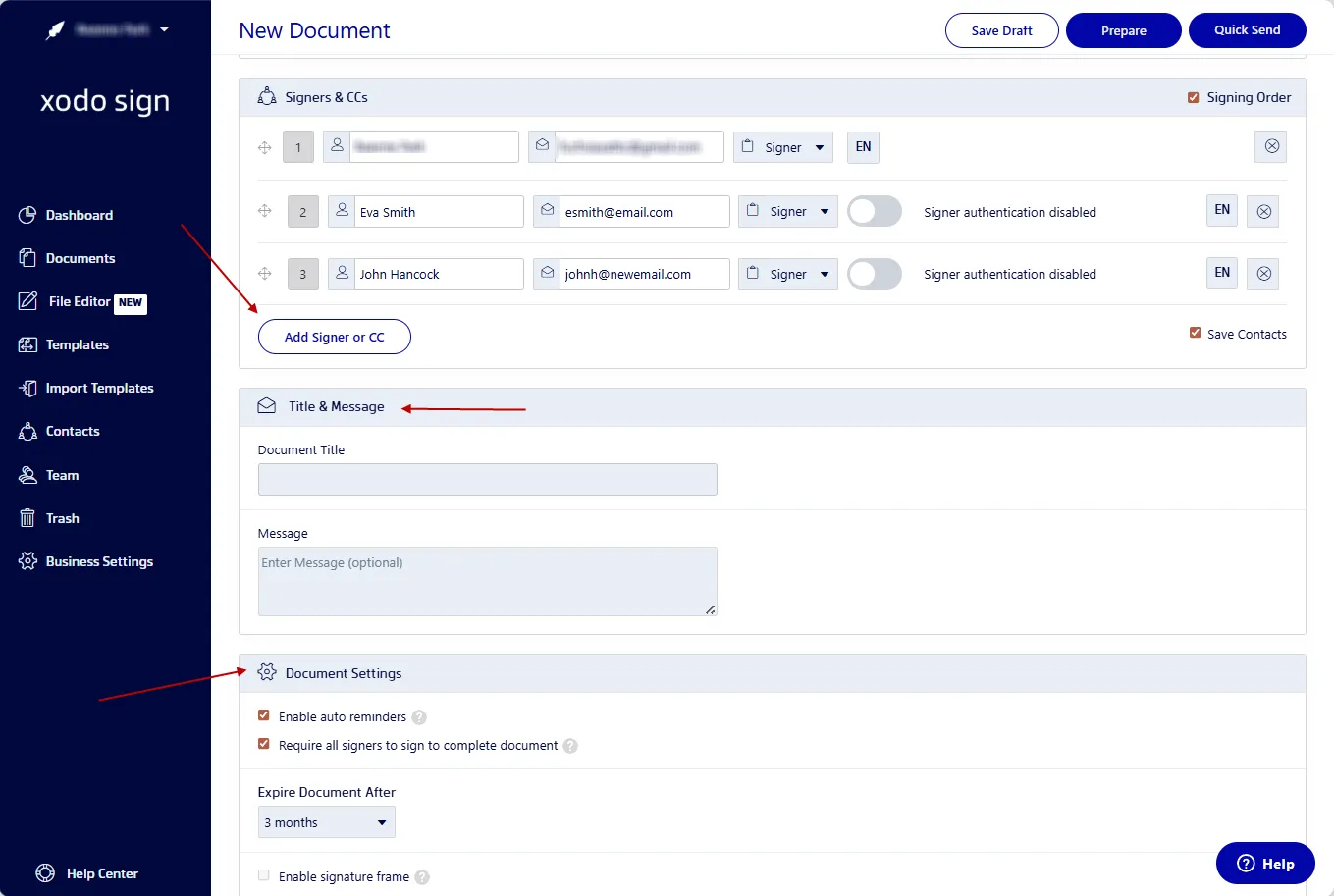
- Pick Me Only, Me and Others, or Others Only.
- Add names and emails.
- Assign roles like Signer or CC.
- Choose a signing order.
- Enable SMS or PIN verification for added protection.
- Write a short message for the recipients.
- Set reminders or expiration rules.
- When the setup is complete, select Prepare.
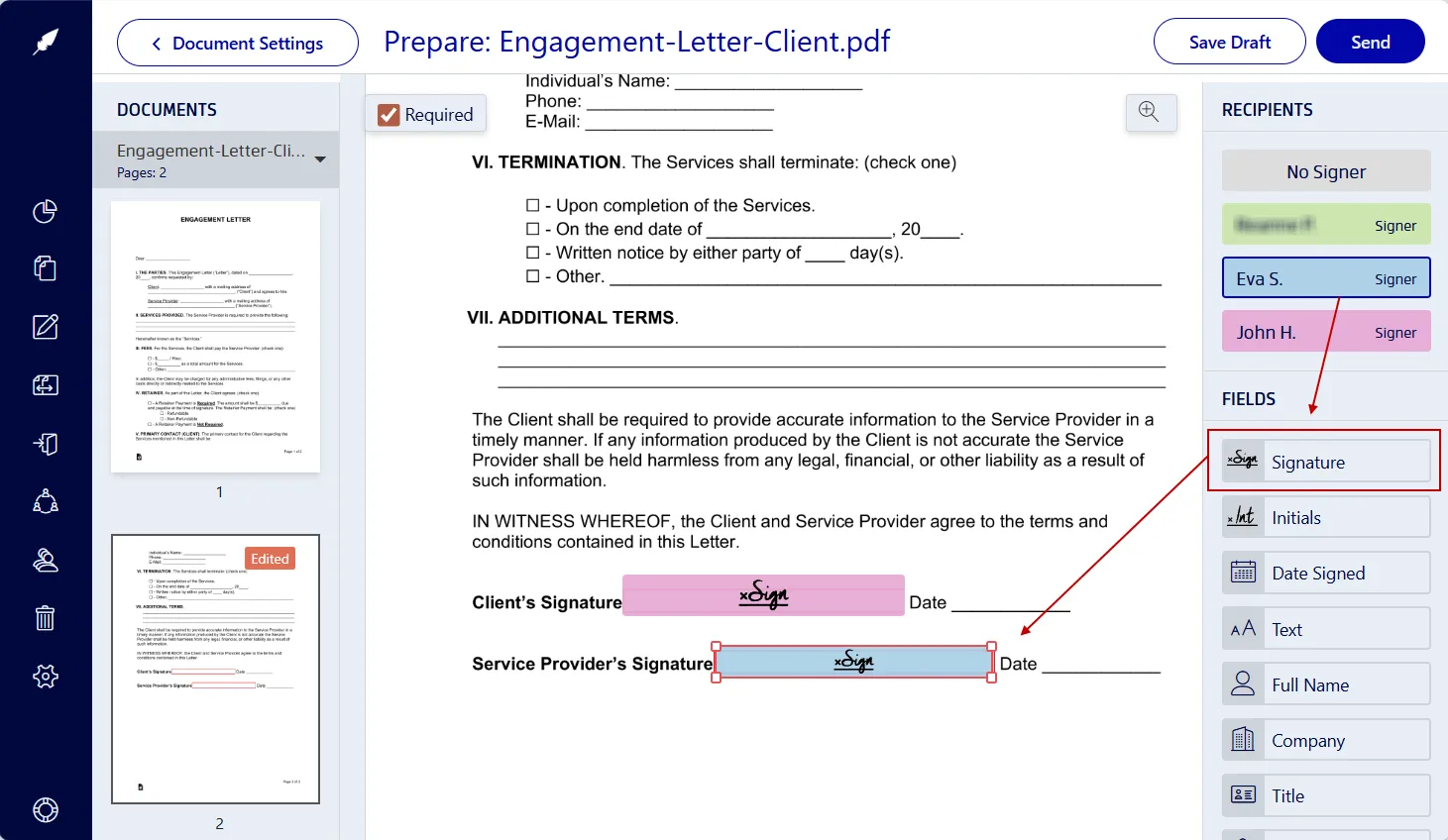
4. Insert signing and form fields
- Click on a signer’s name on the right-hand side.
- Drag the required form fields onto the client intake form.
- Insert fields needed for the client’s signature, initials, date, or other required information.
- Click on your assigned Signature field.
- Draw, type, or upload an image of your signature.
- Click on Sign.
- Once done, click on Send.
Your client receives a secure link and can electronically sign without creating a Xodo Sign account.
5. Track the signing progress
- Go to the Documents tab.
- Open and view the audit trail.
- Send reminders if signatures are overdue.
- When all parties have signed, download a copy.
The audit trail shows timestamps and activity logs, which helps you maintain clear records for compliance and client communication.
Why law firms use Xodo Sign for engagement letters
Xodo Sign includes advanced features that support a predictable intake workflow for many practice areas, including family law, immigration, estate planning, business law, and litigation.
- Templates for repeat workflows
Save standard client intake letters as templates to eliminate re-building forms. - Support for multiple signers and roles
Manage complex client matters that require multiple parties to sign in a set order. - Built‑in PDF editing
Edit text and typos, adjust clauses, or add fields without switching between apps. - Automated reminders and status tracking
Keep your client intake documents efficient and moving without manual follow‑up. - An easy-to-use interface for lawyers and clients
Clients can add electronic signatures within minutes without any steep learning curves.
Tips for managing client engagement letters online
These steps help legal professionals streamline intake while keeping workflows consistent:
- Use the templates feature to create consistent client intake letters and reduce paperwork.
- Enable SMS or PIN codes to protect sensitive client information.
- Set a signing order to avoid confusion.
- Save a copy of the audit trail for your records.
- Automate reminders for outstanding signatures.
- Send signing requests from iOS or Android devices.
- Confirm any jurisdiction rules if your matter requires added signing steps.
Other legal documents you can sign online
If you frequently manage other legally binding documents and approvals, explore our related articles:
Frequently asked questions
Is an online engagement letter legally binding?
Yes. When you use an e‑signature platform like Xodo Sign, the signed engagement letter is legally binding and compliant with ESIGN and eIDAS.
Can multiple people sign the same engagement letter?
Yes. Add all required signers and choose the order in which they sign. This is common in family law, estate planning, and business matters involving co‑clients.
Can I use AI to summarize an engagement letter before signing?
Yes. Xodo includes an AI summarizer that can help you review key points such as scope, fees, and responsibilities, which helps save time on long documents with detailed terms.
How do I handle last-minute changes?
You can use the built-in editor to make updates to the document. If signing has already started, cancel the request, update the document in the editor, and send a new signing invitation. This keeps a clear separation between drafts and final versions.
What if my client does not receive the email invitation?
Ask them to check their spam folder. If it is not there, confirm their email address and resend the invitation.
Is my information safe on Xodo Sign?
Yes. Xodo Sign uses 256‑bit encryption and complies with major security standards to protect your data.
Can I use Xodo Sign for other documents?
Definitely. Xodo Sign also works for NDAs, POAs, settlement agreements, retainer contracts, and a variety of other legal or corporate documents.
Complete engagement letters faster with Xodo Sign
With Xodo Sign, you can finalize a client engagement letter without having to deal with complex practice management software or waiting for printed copies. The platform creates a verifiable, time‑stamped record for every electronic signature.
Give your legal team and clients a smooth onboarding process. Start a free Xodo Sign trial or schedule a demo today.