Table of contents
Sign and send unlimited e-signatures with Xodo Sign.
Electronic signatures are now standard in contracts, financial documents, and everyday business files. But how do you know if a digitally signed document is authentic?
Signature fraud and disputes over authenticity are real risks. In one case, a Florida business was accused of copying and pasting customer signatures onto documents they never approved, including pricing estimates, financing applications, and other files.
Incidents like this expose how easy it is to commit fraud when signatures aren’t properly verified. If you're signing or requesting signatures, you need to know how to verify them.
Let’s walk through how to confirm an electronic signature is real, what signs to look for, and how Xodo Sign helps protect your signed documents with secure, legally binding features.
Why signature verification matters
Verifying digital signatures ensures your documents haven’t been altered and that the signer is who they claim to be. Without proper validation, you risk:
- Data breaches
- Legal disputes
- Invalid contracts
- Financial loss
A valid signature should be backed by identity verification, a digital certificate, and a secure audit trail. These elements confirm the document’s integrity and the signer’s authenticity.
What makes an electronic signature legally valid?
Not all electronic signatures are equal. To carry legal standing, an electronic signature must meet specific criteria. To be legally binding, a valid signature must meet the standards of regulations like:
- ESIGN Act (U.S.)
- UETA (U.S.)
- eIDAS (EU)
These laws define what counts as a qualified electronic signature and outline the requirements for legal validity. Any signed document that meets these standards can hold up in court.
In fact, courts have already ruled in favor of digital signatures when supported by audit trails and identity verification. In one case, a merchant services company presented timestamped eSigning records and email logs to prove a client had signed a contract. The court ruled in their favor.
Solutions like Xodo Sign are designed to meet such standards, offering secure signing workflows backed by digital certificates and detailed audit logs. Validating digital signatures also signals a commitment to compliance, helping you avoid legal disputes and regulatory penalties.
Common types of electronic signatures (and their risks)
Not all electronic signatures offer the same level of protection, though. Here's a breakdown of common signature types and their risks:
1. Image-based signatures
Uploading a scanned image of your handwritten signature is fast, but insecure. These are easy to copy and offer no built-in verification tools. They lack legal standing and are vulnerable to forgery.
2. Basic electronic signatures
Typing your name, drawing a signature, or clicking “I agree” may be legally acceptable in some cases. However, without identity verification, tamper evidence, or audit trails, they’re vulnerable to disputes. Such signatures aren't ideal for contracts or financial documents.
3. Digital signatures with certificates
These signatures use encryption and a digital certificate to validate the signer’s identity and confirm its authenticity. These signatures are more secure and are often used in regulated industries.
How Xodo Sign verifies electronic signatures
Xodo Sign is designed to help you verify if electronic signatures are real. Beyond that, though, it also lets you send reminders, request signatures, edit PDFs, and manage signed documents. You can sign up for a free trial (no credit card required) to begin signing and authenticating e-signatures.
Here's how Xodo Sign helps verify signatures:
Detailed identity verification for every signer
Verification usually begins when a signature request is sent to the signer via email. Clicking on the link in the email, Signers confirm their identity via email. Xodo Sign will log the following details:
- Full name
- Email address
- IP address
- Timestamp of signing
This data helps confirm the signer’s identity and supports legal validity. Xodo Sign also offers SMS or PIN authentication which can be used as an added layer of security. Before a signer accesses the document, they need to input a provided PIN or confirm via SMS, making it harder for unauthorized users to access or misuse the signing process.
Legally binding signature options
With Xodo Sign, there are three ways signers can create their signature. Signers can choose to:
- Draw a signature
- Type a signature
- Upload an image of a signature

With each method Xodo Sign has signers confirm and acknowledge that what they entered or uploaded is a legal representation of their signature before signing. When signing, the signature field is clearly marked, and the signer must acknowledge the document is signed and legally binding before proceeding.

Tamper evidence detection against changes
Once signed, electronic documents are locked. Any post-signing changes are flagged and invalidate the file, protecting it against unauthorized edits. This is essential for maintaining the authenticity of the originally signed document and protecting against fraud.
Encrypted storage for signed files
All signed documents are encrypted and stored securely, reducing the risk of data breaches and unauthorized access. Digital signatures confirm the sender’s identity, preserving the document’s integrity.
Audit trails for legal protection
Every signed PDF includes a detailed audit trail. This trail acts as legal evidence and supports compliance. Details it provides you with include:
- Signer’s name
- Signature timestamps
- IP addresses
- Document access history
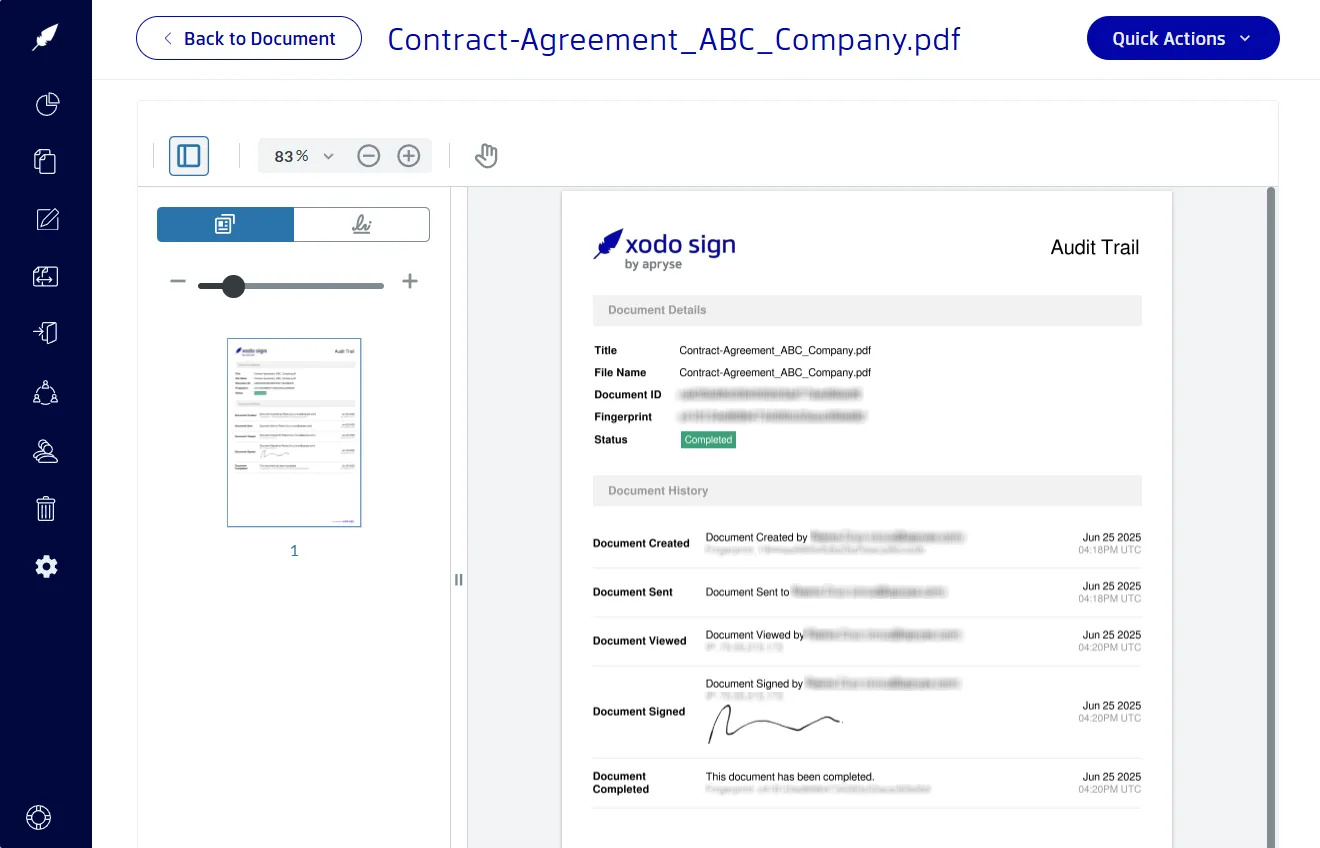
These logs are tamper-proof and can serve as legal evidence in case of disputes. Audit trails capture every action taken on the document, from when the document is created to when it’s accessed, signed, or completed. downloaded.
Signs a digital signature is real
When reviewing a digitally signed document, look for:
- A valid digital signing certificate that confirms the signer's identity.
- Identity verification records like email addresses, IPs, and timestamps.
- Tamper-proof evidence to see if changes were made after the document was signed.
- A complete audit trail recording every action taken on the document.
- Compliance with ESIGN, UETA, or eIDAS to ensure the signature is legally enforceable.
These indicators confirm digital signature validity and authenticity.
Why businesses are moving to secure e-signing
Recent research from MSB Docs highlights why the transition from paper to digital is no longer optional. Companies adopting e-signature solutions cut document handling costs by 85%. Going paperless reduces 90% of processing errors, eliminating delays caused by manual signatures.
These numbers highlight an undeniable trend: secure, e-signature solutions aren’t just about convenience. They’re about staying competitive, efficient, and flexible.
This is why Xodo Sign can be a perfect fit for businesses ready to go digital. With enterprise-grade security, compliance-ready workflows, and seamless integration, Xodo Sign can speed up approvals, reduce costs, and succeed in closing deals effectively and securely.
FAQs
Here are answers to common concerns that help clarify legal validity, security, and how tools like Xodo Sign simplify the process.
Is a typed signature legally binding?
It can be, but only if supported by identity verification and compliance with regulations like the ESIGN Act.
Can electronic signatures be used in court?
Yes, electronic signatures are admissible in court if they meet legal standards such as those outlined in the ESIGN Act, UETA, or eIDAS. Platforms like Xodo Sign can provide audit trails and identity verification that support enforceability.
What is a signing certificate and why does it matter?
A signing certificate is a digital credential that confirms the identity of the signer and the integrity of the document.
Why is digital signature validation important?
Digital signature validation is important because it confirms the signer’s identity. It protects against tampering and ensures the document is legally enforceable.
What makes an electronic signature secure?
Security features like encryption, tamper detection, and identity verification make an electronic signature secure. Xodo Sign includes all of these, along with enterprise-grade compliance, legally binding digital signatures, and detailed audit logs.
How can I tell if a signed PDF is authentic?
Check for a digital certificate, audit trail, and tamper evidence. Tools like Xodo Sign display this information clearly for documents that have been completed and signed.
Can I verify a signed document without downloading it?
Yes. Xodo Sign’s WebViewer Signature Panel lets you view the signing certificate and verify the authenticity of a signed document directly in your browser.
Can someone change a document after it’s signed?
No, not with platforms like Xodo Sign. Any changes after signing invalidate the original document. Xodo Sign will flag modifications immediately, helping prevent fraud and maintain the integrity of the original file.
What types of documents should use secure eSignatures?
Use secure e-signatures on contracts, financial documents, legal agreements, and any file where authenticity and compliance matter.
Choose a signing platform you can trust
Electronic signatures are convenient, but security and legal validity matter. Don’t leave your signed documents vulnerable.
Use a platform, like Xodo Sign, that prioritizes security, compliance, and transparency. It offers legally binding signatures, identity verification, tamper-proof technology, secure storage, and full audit trails.
In other words, you can stay compliant and protected when signing anything from contract agreements to financial documents.
Sign up for Xodo Sign and start verifying digital signatures with confidence.