
Table of contents
Sign and send unlimited e-signatures with Xodo Sign.
Lead-based paint disclosures are an important legal requirement for any sale or lease of housing built before 1978, but managing them can be complex when multiple parties and compliance rules are involved.
The solution? An secure e-signature tool like Xodo Sign.
In this guide, we're showing you how to sign a lead-based paint disclosure online quickly and securely, from start to finish.
Let's begin.
How to sign a lead-based paint disclosure digitally
To securely sign a lead based paint disclosure with Xodo Sign online follow these steps:
1. Sign up or log into Xodo Sign
- Log in to your account at Xodo Sign.
- Or, start a free trial to test out Xodo Sign's e-signature features.
2. Upload your document
- From the Dashboard, go to Documents and click on the + icon.
- Click on the Choose Files button.
- Browse for and upload your lead-based paint disclosure form.
3. Specify signers for your lead-based paint disclosure
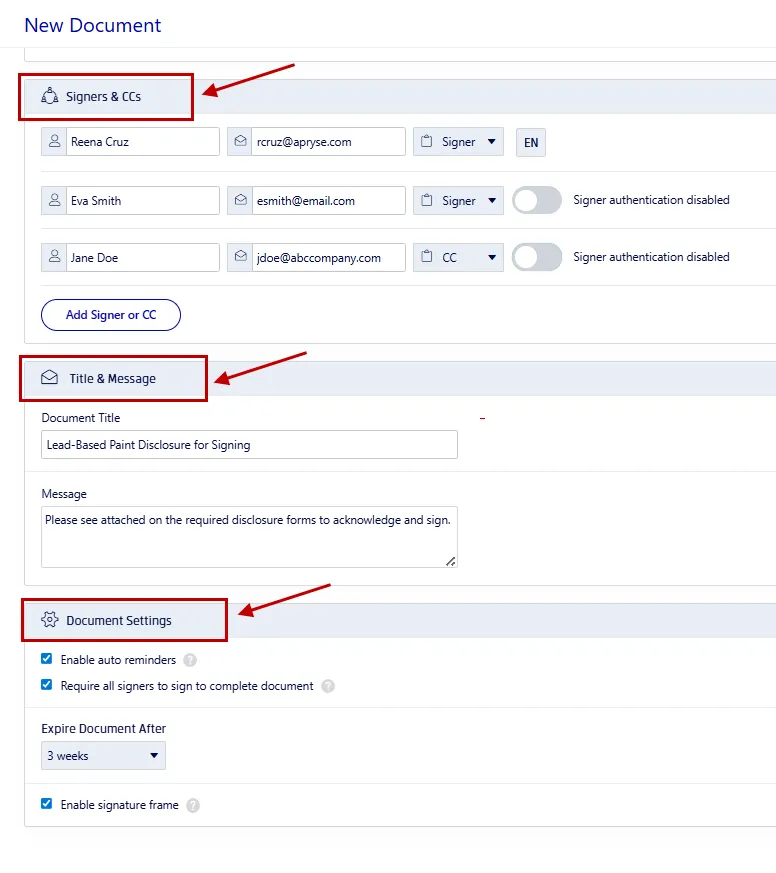
- Select a signing option: Me Only, Me and Others, or Others Only.
- Enter names, emails, and assign roles as Signer or CC recipient.
- If the signatures must follow a sequence, set up a signing order.
- Activate the SMS or PIN authentication option for security.
- Include a custom message and subject line.
- Review settings for auto reminders, completion requirements, and expiration.
- Click on the Prepare button.
4. Insert your signing fields
- Drag and drop your signing fields onto the page.
- E-sign your own signature field by drawing, typing, or uploading an image of your signature.
- Click on the Sign button.
- Ensure that any crucial fields are marked as "Required"
- Click on the Send button.

5. Track signing status
- Navigate to your Dashboard.
- Find and click on your disclosure document to view its progress
- Send reminders manually to those who still need to sign it.
- Once all have signed, you can download the document and check the audit trail.
The Xodo Sign advantage for real estate documents
Xodo Sign is designed for speed, security, and compliance, helping you manage real estate paperwork like lead-based paint disclosures:
- Multiple signers and roles: Add multiple parties who can sign the same form without any version control issues.
- Comprehensive document preparation: Get a wide range of form fields to add signatures, initials, dates, text, and even attachments.
- Legally binding signatures: Xodo Sign e-signatures are in compliance with ESIGN and UETA standards.
- Detailed tracking: Xodo Sign generates a detailed audit trail to ensure compliance.
- Secure authentication: Apply SMS or PIN verification for signers and prevent any unauthorized access.
- Mobile-friendly signing: Send and sign from any device, remotely and conveniently.
Try Xodo Sign and see how the above features streamline your signing workflow. Discover other real estate documents Xodo Sign can help you with:
What information must be included in a lead-based paint disclosure form?
The lead-based paint disclosure form is required by the EPA under the Residential Lead-Based Paint Hazard Reduction Act to protect public health. Before you send it out to be signed, be sure to review the form first.
Here's what should be included:
- Property information: Address and unit number.
- Statement of lead hazards: Whether lead-based paint is present or if there are any known hazards.
- Available records and reports: Include any inspection reports, property records or risk assessment results.
- Acknowledgment by all parties: Buyers, renters, and sometimes agents must sign and initial.
- EPA pamphlet: Attach Protect Your Family From Lead in Your Home so occupants understand the risks and prevention steps.
Because these forms confirm the presence of lead-based paint hazards, providing complete and accurate details is crucial to protecting home buyers and prospective renters from developing health issues.
Frequently asked questions
Is a digital signature legally valid for lead-based paint disclosures?
Yes. Electronic signatures are legally valid under the ESIGN Act and UETA. Using platforms like Xodo Sign ensures compliance and provides an audit trail for verification.
Who needs to sign the lead-based paint disclosure?
Typically, the seller or landlord (lessor) and the buyer or tenant must sign. Landlords, sellers, property managers, and agents are responsible for providing the disclosure before signing the contract. In some cases, real estate agents also sign to confirm they’ve provided the disclosure.
Is a lead-based paint disclosure always needed?
No, it isn't required for every property. Federal law only requires a lead-based paint disclosure for residential housing built before 1978, the year lead-based paint was banned for use in residences.
How long should I keep a signed lead-based paint disclosure?
A signed lead-based paint disclosure (and any other related forms or records) should be kept for at least three years from the date it was completed. Saving them with Xodo Sign is easy and secure with online storage and exporting options.
What happens if the disclosure isn’t signed before closing?
Failing to comply with regulations and rules can result in being charged with legal penalties and delays with the purchase or lease. Always confirm the disclosure is complete before signing any agreement.
What are the legal obligations of the property owners?
According to the EPA, property owners aren't required to remove lead-based paint or conduct and pay for an inspection, but they must give buyers 10 days to inspect the property.
Streamline your real estate workflow with Xodo Sign
Signing a lead-based paint disclosure online is a simple way to stay above board, within regulations, and keep your transactions moving.
eSignature tools like Xodo Sign can help buyers, sellers, and agents complete the process quickly, securely, and without the hassle of printing or scanning.
Protect your records and meet legal obligations with confidence.
Create an account with Xodo Sign today!