Table of contents
Sign and send unlimited e-signatures with Xodo Sign.
Managing rental properties involves a lot of paperwork and documents, one of the most important being a property management agreement.
Unfortunately, handling, printing and mailing them manually wastes a lot of time, paper, and effort. Luckily, property managers and landlords can now use tools like Xodo Sign to take the process online.
Doing so lets them sign electronically online and easily request e-signatures from others as needed. It's faster, more secure, legally valid, and designed to simplify the entire process.
Follow along below as we cover how to sign a property management agreement online.
How to sign a property management agreement online
To electronically sign a property management agreement, follow the steps below:
1. Sign up or sign in to Xodo Sign
- Sign in to your Xodo Sign account
- If you're new to the platform, start a free trial and test out Xodo Sign's e-signature tools.
2. Upload your property management agreement
- Go to the Documents tab, click on the + icon.
- Click Choose Files.
- Locate and upload your document.
- Alternatively, you can drag and drop your file onto the uploading area or access it from your cloud storage.
- Xodo Sign has app integration and connects with popular cloud services: Google Drive, Dropbox, One Drive, and Box.

3. Adding your signers
- First, define who and how many people need to sign: Just You, You and Others, or Others Only.
- Enter your signers' names and emails.
- Designate each one a role as either Signer or CC recipient.
- As options, you can: set a signing order, turn on SMS or PIN authentication, or include a message.
- Adjust the document's settings: enable auto-reminders, make it required to fill all fields, or add an expiration date.
- Click Prepare.

4. Add your electronic signature and add form fields
- Assign form fields to signers by clicking on their name.
- Drag the form fields onto the page: signature, initials, date, full name, text fields, and so on.
- Add a signature field for yourself.
- Draw, type, upload your signature image, or use a saved signature.
- Click Sign.
- Click Send.
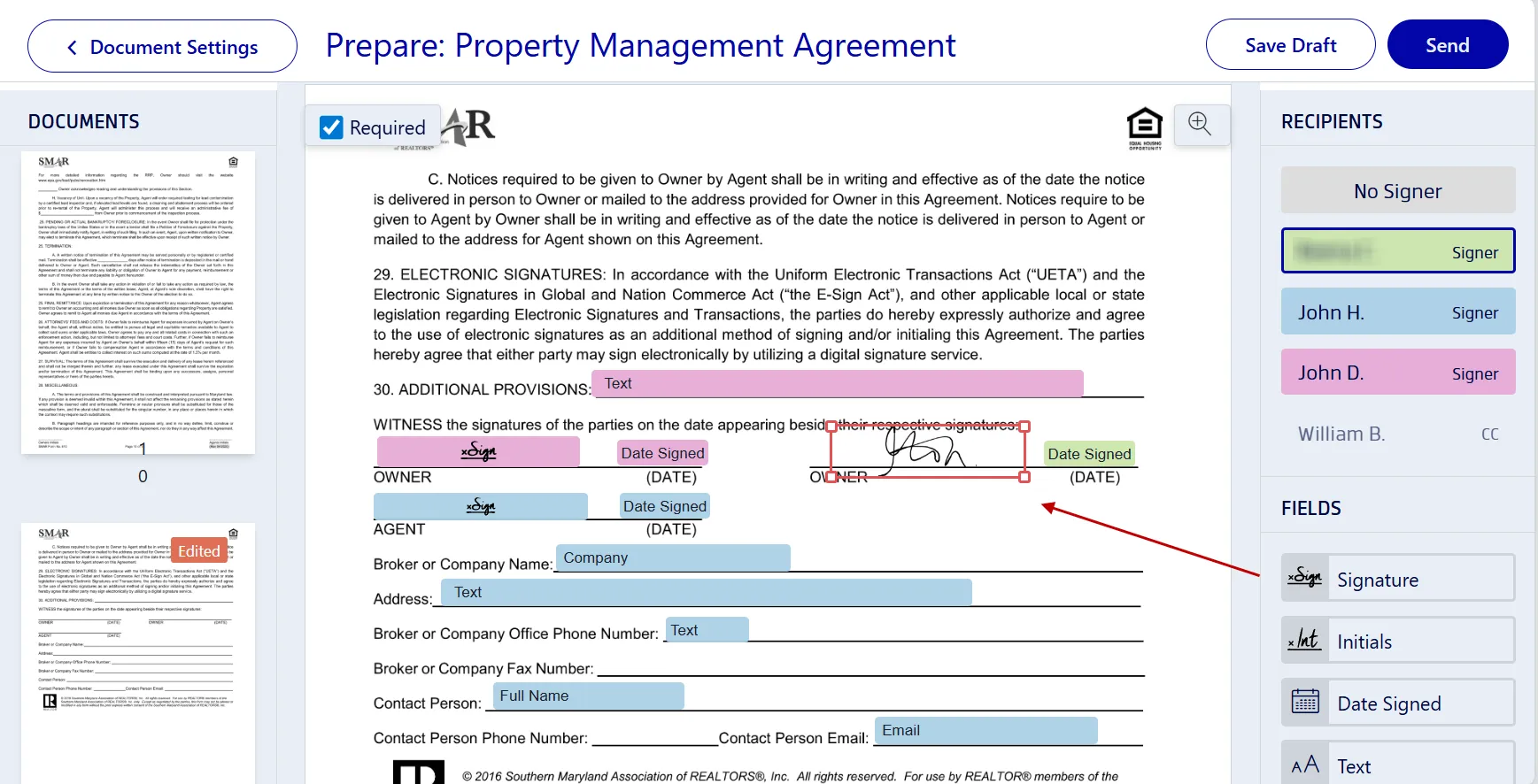
Tip: To avoid missing signatures from other parties, mark form fields as “Required”.
5. Track the agreement's progress
- Monitor the signed document from your Documents dashboard.
- Locate the file and see who has signed and who hasn't.
- Send reminders to electronically sign the form.
Xodo Sign features and advantages
Xodo Sign makes the whole process simple and secure for property managers and landlords alike. Here's how:
- Legally binding e-signatures: Xodo Sign complies with ESIGN and UETA, giving every property management agreement full legal standing.
- Compliant audit trails: Every signed document in Xodo Sign includes a detailed audit trail, making verification simple for any dispute resolution.
- Multi-party signing: You can invite multiple parties to sign without having them create an account, reducing bottlenecks and friction.
- Document security: Xodo Sign encrypts all documents and stores them securely, keeping your data protected during the process.
- Digital signatures: Every e-signature is backed by encryption and compliance standards. Your document is authentic, tamper-proof, and legally binding.
- Cross-device access: Xodo Sign works seamlessly on desktop and mobile, letting you manage and collect signatures anytime.
- Integration options: With app integrations, Xodo Sign connects your account to the apps you already work with.
For property owners, this means managing agreements faster and accessing signed documents securely, all while keeping costs low.
Try Xodo Sign free and see how it works for you.
Explore our other related Xodo Sign guides on signing a rental or lease agreement or, if you handle older properties, digitally signing lead-based paint disclosures.
Reviewing a property management agreement
A property management contract (sometimes called a management agreement or property management contract) is a legally binding document that helps define the property manager's role. It should cover:
- Tasks to manage the property
- Steps to collect rent
- Security deposit and payment policies
- Maintenance and repair responsibilities
- Lease terms for prospective tenants, new tenants and rental agreements
- Monthly rent and payment details
- Termination terms and days notice required
- Insurance requirements for all parties
This entire agreement protects both parties and provides clear legal standing for all obligations.
Frequently asked questions
Is an electronically signed property management agreement legally binding?
Yes. In most states, e-signatures and digital signatures are fully legal when executed through a secure platform like Xodo Sign that is compliant with ESIGN and UETA, verifies identity, and provides an audit trail.
What happens if someone refuses to sign electronically?
If a party declines to sign electronically, you may need to provide a paper version. Always confirm preferences before starting the process to avoid issues.
Can I include additional documents like lead-based paint disclosure forms?
Yes. You can upload multiple files or combine them into one PDF before sending for signatures. This ensures that you meet federal or state requirements.
How do I verify that the signed document is authentic?
Use a platform like Xodo Sign that provides a detailed audit trail. This record confirms the document’s authenticity and legal standing and records every transaction taken on the document.
What should I do if I need to terminate a property management agreement?
Check the termination clause in your agreement. Most require written notice. You can also send termination notices electronically if allowed by the contract.
Start signing smarter today
Switching to e-signatures transforms how you manage property agreements and other real estate documents. You cut down on paper use, speed up deal cycles, and keep every document organized and accessible.
Make property management simpler, safer, and more efficient. Ready to manage and sign your property management agreements online?
Join Xodo Sign for secure, fast, and compliant e-signatures.