
Table of contents
Sign and send unlimited e-signatures with Xodo Sign.
Manually signing real estate documents like a deed of trust or promissory note can often lead to delays, missed signatures, and compliance risks that slow down closings for days or weeks.
With Xodo Sign, though, you can complete legally binding signatures online in minutes instead of days. Digitally singing your deed of trust or promissory note can save time, reduce paperwork, and keep transactions secure.
This guide walks you through every step, from uploading your document to securing and finalizing it.
How to sign a deed of trust or promissory note with Xodo Sign
1. Log in and upload your document
- Log in to Xodo Sign or create an account.
- Or, you can start a free trial (no credit card required) to test out Xodo Sign's e-signing tools.
- Go the Documents tab and click on the + icon.
- Upload your document from your device or cloud storage.
2. Add signers and customize settings for your document
- Select a signing option: Me Only, Me & Others, or Others only.
- Enter the names, emails, and roles (Signer or CC) of all signers.
- If needed, enable electronic authentication for SMS or PIN.
- Set a Signing Order for multiple signers.
- Include a message for your recipients.
- Under Settings, turn on auto reminders, require all signers to sign, and set an expiration date.
- Click on Prepare.

3. Prepare your document for signing
- Insert form fields on your document.
- Drag and drop signature fields, initials, date, company, title, email, text fields and more.
- Assign a signature field for yourself to sign.
- Draw, type, upload an image of your signature, or use a saved signature to esign the document.
- Once done, click on Send to share it with your signers.

4. Track your document
- Your recipients will get an email with a link to the document to sign.
- Go to your Dashboard and click on Documents.
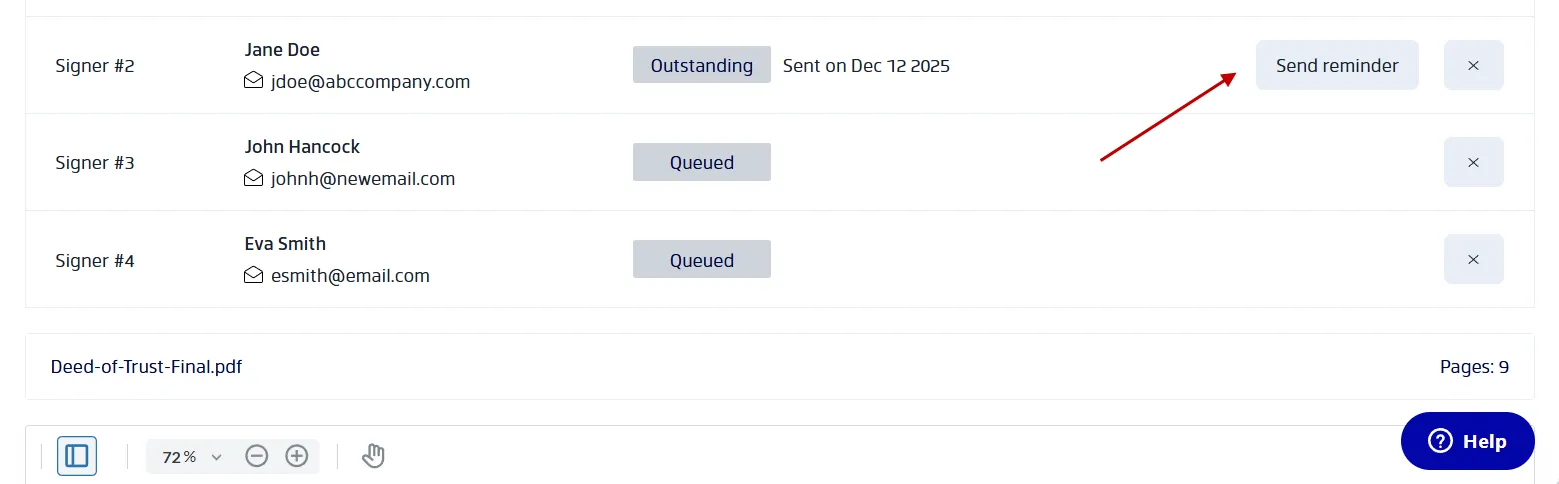
- Find and select your document to view who has signed it.
- You can send reminders to those who still need to add their signature.
5. Download your completed document
- You can download the completed PDF after all parties sign.
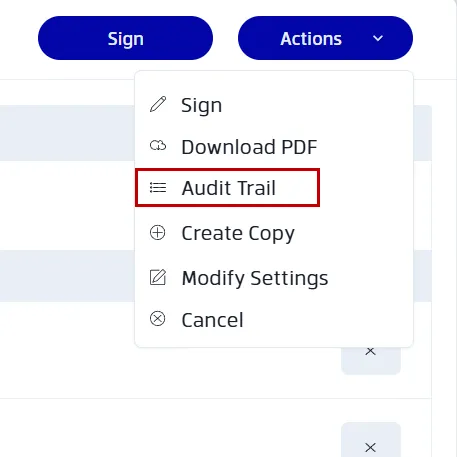
- You can view the audit trail, go to Actions > Audit Trail.
- Save or share the file as needed.
How Xodo Sign keeps your real estate agreements safe and compliant
When handling deeds of trust, promissory notes, or other real estate agreements, security and compliance matter. Here’s how Xodo Sign steps in:
- Signer identity verification: You can use two-factor authentication, preventing fraud and confirming the signer's identity.
- Detailed audit trails: Xodo Sign gives you full transparency on what goes on with your file with timestamps, IP addresses, and authentication steps.
- Compliance with ESIGN and UETA: Xodo Sign ensures compliance, so your electronic signatures are legal and enforceable.
- Encrypted document security: All documents are encrypted with 256-bit security and backed by SOC 2 compliance, keeping your information safe.
Need to sign other real estate forms? Xodo Sign can also help with signing real estate purchase agreements and mortgage applications or loan agreements, as well.
What's the difference between a promissory note and a deed of trust
Although these two documents often appear together in real estate transactions, they serve different purposes:
Promissory note
- A promissory note is a signed document that represents a borrower’s promise to pay.
- It outlines the loan amount, interest rate, repayment schedule, and borrower obligations.
- It is essentially the borrower’s personal commitment to pay back the lender.
- It can exist as a paper promissory note or a digital version.
- Under the Uniform Commercial Code (UCC), an electronic version of a promissory note must be treated as a “transferable record” to qualify as a negotiable instrument. This means there must be a single authoritative copy and it must be readily identifiable as the original.
Deed of trust
- A deed of trust is a security instrument that ties the loan to the property.
- It involves three parties: the borrower, the lender, and a trustee.
- If the borrower defaults, the trustee can initiate foreclosure on behalf of the lender.
- Many states use deeds of trust instead of mortgages for real estate financing.
- Many jurisdictions require electronic notarization or Remote Online Notarization (RON) for deeds of trust
After signing and notarization, the deed of trust and promissory note are submitted to the County Recorder’s Office.
Note that many lenders and law firms may require a wet signature (handwritten signature) for certain official court documents or high-value commercial transactions.
Others will accept digital signatures for lease agreements, deposit accounts, and real property deals. Thus, always confirm state law and lender requirements before signing anything.
Frequently asked questions
Are electronic signatures legally binding for real estate documents?
Yes. Electronic Signatures in Global and National Commerce Act (E-SIGN) and the Uniform Electronic Transactions Act (UETA), electronic signatures are legally recognized for most real estate agreements. Always check state laws and lender requirements beforehand.
What documents cannot be signed electronically under ESIGN and UETA?
Certain documents are excluded, including wills, some estate planning forms, and specific court filings. Also, some counties don't accept electronic deeds of trust for property recording. Ensure you confirm local requirements first.
Can a promissory note be electronically signed and still be enforceable?
Yes, if it complies with the Uniform Commercial Code (UCC). An electronic promissory note must be a transferable record, include a single authoritative copy, and be clearly identified as the original.
Do I need notarization for a deed of trust signed electronically?
Most deeds require notarization. Many states allow Remote Online Notarization (RON), which uses secure video session. Check your state’s rules before proceeding.
Do all counties accept electronic deeds of trust for recording?
No. Acceptance varies by jurisdiction. Some require a physical signature or additional steps for recording. Always confirm with your local recorder’s office.
What happens if a lender requires a wet signature instead of an e-signature?
You’ll need to print, sign, and return the document physically. Many lenders still require wet signatures for deeds of trust or promissory notes to meet investor or state compliance standards.
Secure, compliant digital signing made simple
Digital signatures help you keep transactions secure and organized. With Xodo Sign, you can handle deeds of trust and promissory notes online without delays, lost paperwork, or compliance risks.
If you’re ready to simplify your workflow, Xodo Sign gives you everything you need.
Start signing smarter today. Create your free Xodo Sign account and see how fast and simple digital signing can be.