Table of contents
Sign and send unlimited e-signatures with Xodo Sign.
In 2019, Xodo Sign (formerly eversign) acquired Docracy, a legal document template platform used by individuals and businesses to create, customize, and share common legal documents.
Since then, Docracy has been integrated into Xodo Sign and is no longer available as a standalone service. The previous Import from Docracy option is also no longer available inside Xodo Sign.
This means Docracy documents cannot be downloaded from Docracy today. If you are a former Docracy user, you can only work with files you saved before the service became unavailable.
There are two current ways to bring saved Docracy-related materials into Xodo Sign:
- Import a saved
.jsontemplate file using Import Templates. - Create a new Xodo Sign template from a document file you already saved, such as a PDF or Word document.
Note: Former Docracy users can also use an exclusive 30-day free trial to test Xodo Sign and set up their saved templates before choosing a plan.
How to import saved Docracy templates into Xodo Sign
If you previously saved or exported a Docracy template as a .json file, you can import it into Xodo Sign. Here's how:
- Log in to your Xodo Sign account.
- Select Import Templates from the left-side menu.
- Upload your saved
.jsontemplate file. - Review the imported template details.
- Check signer roles, fields, and settings before using the template.
- Save the template in Xodo Sign.
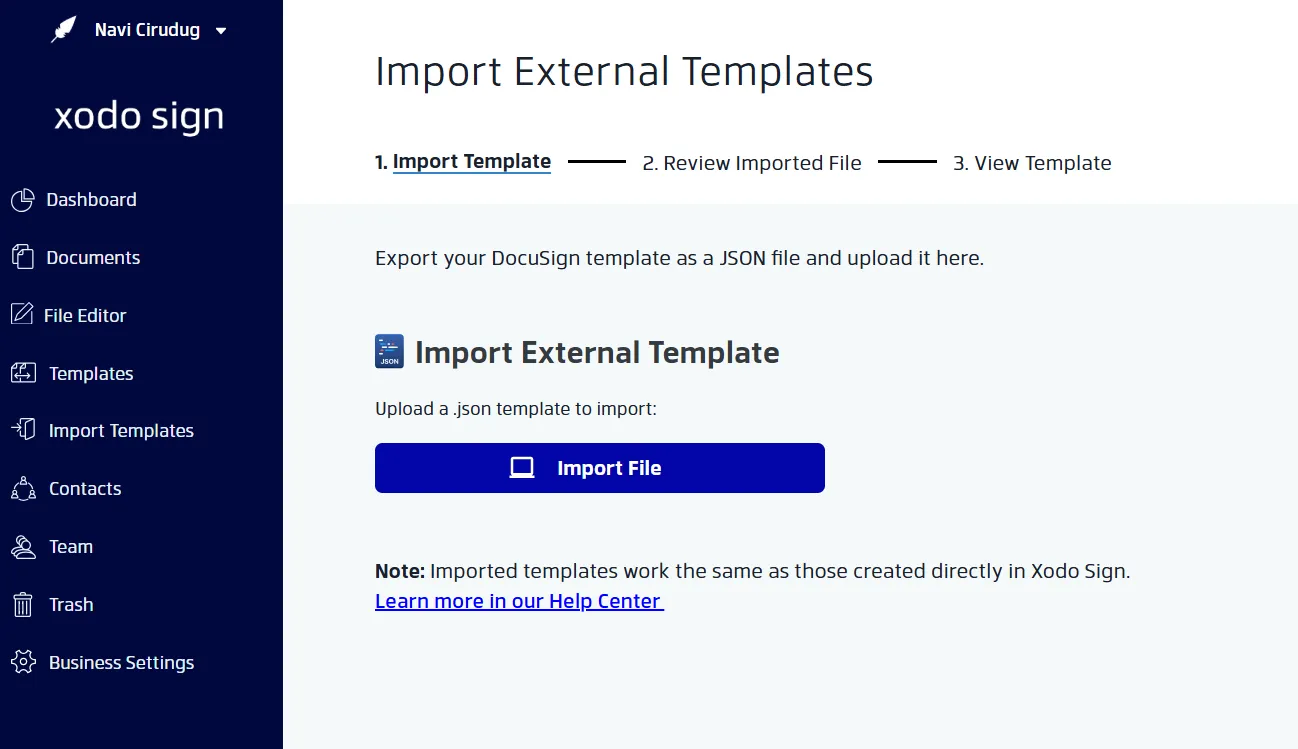
After importing, open the template and review it carefully. Some details may need updates before you send it for signature.
How to create a new template from a saved document
If you do not have a .json template file but you saved the original document, you can create a new Xodo Sign template from that file. Follow these steps:
- Log in to your Xodo Sign account.
- Open the Templates section from your dashboard.
- Click New Template.
- Upload the saved document file from your computer.
- Add the template title, signer roles, signing order, and reusable message.
- Click Prepare to add fields such as signatures, initials, dates, names, text fields, checkboxes, or dropdowns.
- Click Save when the template is ready.
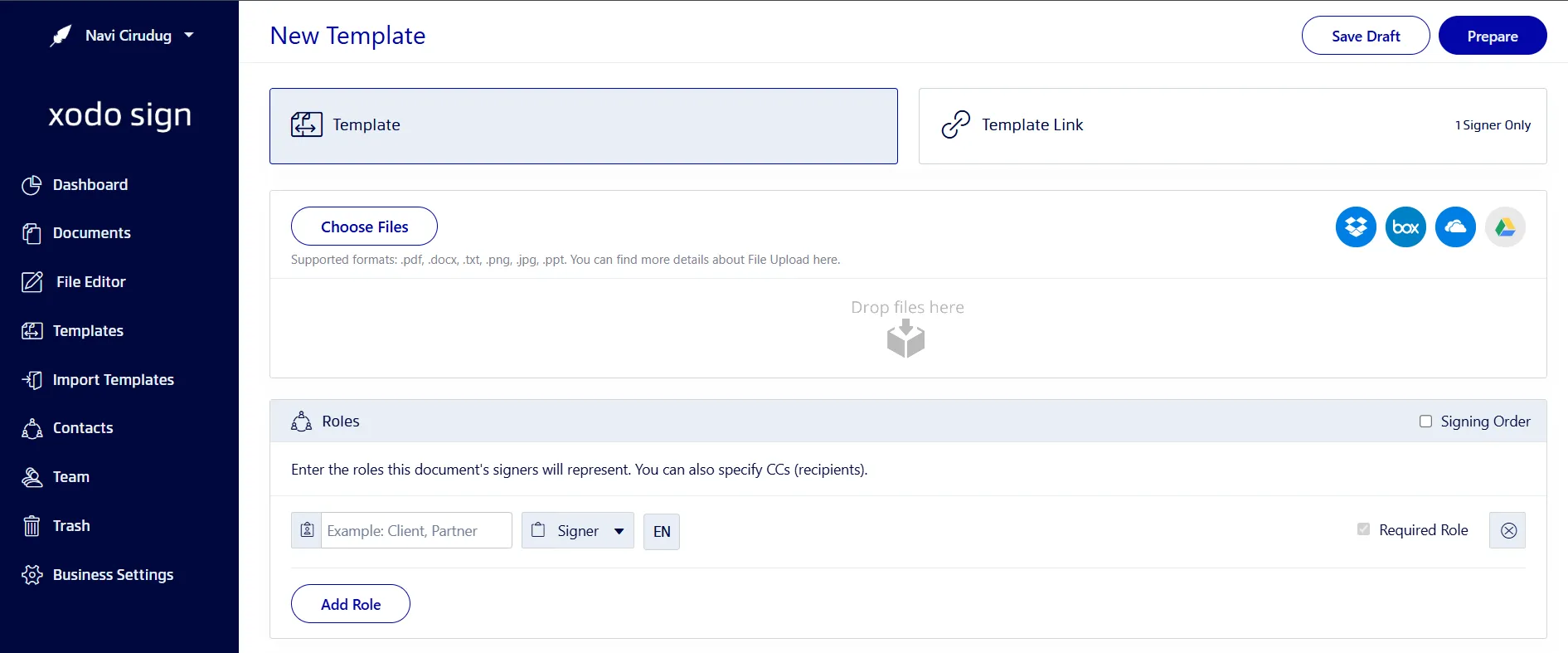
Your saved document is now set up as a reusable Xodo Sign template. You can send it for signature whenever you need it without rebuilding the full workflow each time.
For more help with templates, visit the Xodo Sign help page for templates and workflows.
What changed from the old Docracy workflow?
The original Docracy import workflow is no longer available.
Previously, users could select Import from Docracy inside Xodo Sign. That option has been retired because Docracy is no longer available as a separate service.
The current workflow depends on the files you already have:
- If you saved a
.jsontemplate file, use Import Templates in Xodo Sign. - If you saved the document itself, create a new template from that file.
- If you did not save a copy of the document or template before Docracy became unavailable, it may not be possible to recover it through Xodo Sign.
Frequently asked questions
1. Is Docracy still available as a standalone service?
No. Docracy is no longer available as a standalone service. Docracy-related workflows are now handled through Xodo Sign.
2. Can I download my old Docracy documents now?
No. Docracy documents cannot be downloaded from Docracy now because the standalone service is no longer available. You can only work with Docracy documents or template files you saved earlier.
3. Is there still an “Import from Docracy” button in Xodo Sign?
No. The old Import from Docracy option is no longer available. Former Docracy users should use saved files instead. A saved .json template can be imported through Import Templates, while a saved document can be uploaded when creating a new template.
4. What can I do if I have a saved JSON template file?
Log in to Xodo Sign, go to Templates, choose Import Templates, and upload the saved .json file. After importing, review the template fields, signer roles, and settings before sending it.
5. What can I do if I only have the saved document file?
Create a new template in Xodo Sign. Upload the saved document, add signer roles, place the required fields, then save it as a reusable template.
6. Will my old Docracy fields transfer automatically?
Only saved .json template files may include reusable template structure. If you upload a regular saved document, you will need to add the signing fields again in Xodo Sign.
7. What should I do before uploading a Docracy document?
Review the document text before uploading it. Check for outdated clauses, names, dates, formatting issues, or any legal language that may need review.
8. Can I create reusable templates in Xodo Sign?
Yes. Xodo Sign lets you create reusable templates for documents you send often. After you upload a document, you can add signer roles, signing order, fields, and template settings, then save it for future use.
Keep using saved Docracy documents in Xodo Sign
Docracy is now part of the Xodo Sign ecosystem, and the old direct Docracy import option has been retired. While you can no longer access Docracy as a standalone service, you can still use files you saved earlier.
Once your template is set up, you can reuse it for faster and more consistent e-signature workflows.