Table of contents
Sign and send unlimited e-signatures with Xodo Sign.
SignNow pricing looks simple at first glance. The listed annual prices and plans seem straightforward.
Its current model gives unlimited users on paid plans, while signature invite usage drives part of the effective cost. That can work well for a company with many internal users who send lightly.
It can also require closer forecasting for teams that send agreements, forms, onboarding packets, or payment requests every week.
This guide explains SignNow pricing, invite limits, added invite charges, and plan fit. It also shows how Xodo Sign compares for teams that prefer per-user pricing with unlimited documents on paid plans.
How this pricing guide was researched
This guide is based on information publicly available from the U.S. version of the SignNow website (as of July 2026) and focuses on its main e-signature plans.
Sources were reviewed for prices, billing terms, signature invite allowances, added invite charges, and usage rules, with Xodo Sign pricing checked separately for comparison.
Plan names, prices, limits, and features in this guide are based on SignNow's U.S. offering and may vary by region, promotion, contract, or account type.
How much does SignNow cost and how does its pricing work?
SignNow lists three standard paid plans and a usage-based Site License:
- Business: $8/month (annual billing); $20/month (monthly billing)
- Business Premium: at $15/month (annual billing); $30/month (monthly billing)
- Enterprise: $30/month (annual billing); $50/month (monthly billing)
- Site License: starts at $1.50 /signature invite; volume pricing can vary
The key detail: paid SignNow plans include unlimited users, but standard plans include 100 signature invites per user per year. SignNow doesn't create an added seat fee, and invite usage is shared across the account.
For a team with many users and light sending, unlimited users can be ideal. For regular senders, the better budgeting question is: how many signature invites will the account use each year?
SignNow pricing plans in 2026: a snapshot comparison
Business plan
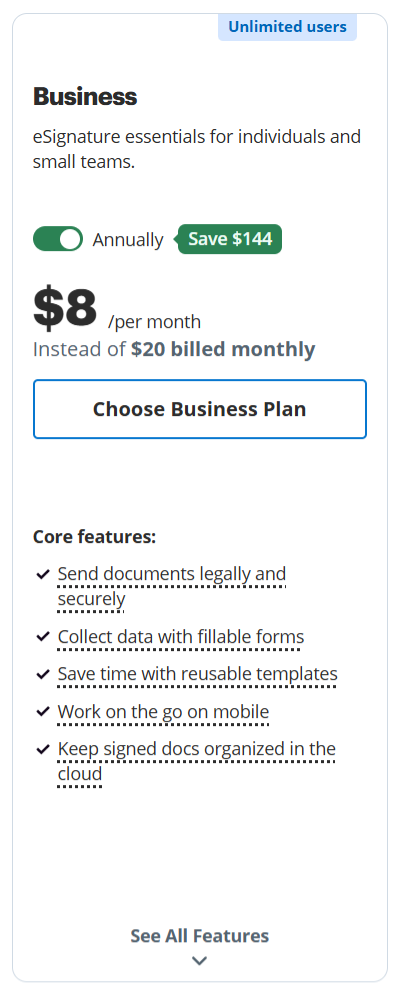
The Business plan is SignNow’s entry level plan. This plan is a fit for individuals and teams that need basic features to send and sign documents without heavier needs. It can be a practical choice for small business owners, admin teams, or solo operators who need routine e-signature workflows.
Pricing:
- $8/month (annual billing)
- $20/month (monthly billing)
Features:
- Legally binding electronic signatures
- Requests to one or multiple recipients
- Custom signing order
- Fillable fields
- Reusable templates
- Mobile apps
- Cloud document storage
Best fit:
- Small teams that send lightly
- Users who need document signing without heavy automation
- Teams that want unlimited users but light invite volume
- Workflows with one or multiple recipients but simple routing
Important to note:
- Added invite usage is billed after the included allowance
- Advanced features may require the Business Premium or Enterprise tiers
- Teams with frequent recurring document volume should estimate total invite usage first
Business Premium plan
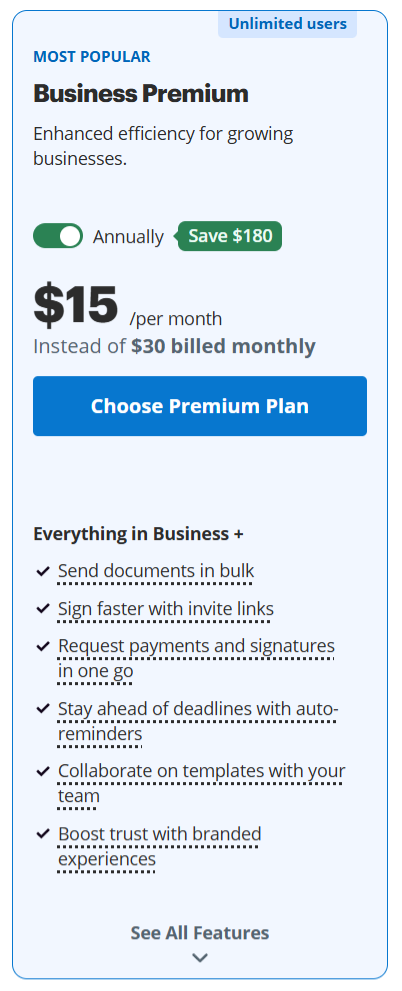
This plan is more relevant for teams that need stronger workflow tools. If sales sends quote approvals, HR sends onboarding forms, or finance needs to request payments directly during signing, the Business Premium plan may fit better than the Business plan.
Pricing:
- $15/month (annual billing)
- $30/month (monthly billing)
Features:
- Bulk signature invitations
- Reusable invite links
- Payment requests
- Automated reminders and notifications
- Shared documents and templates
- Custom branding
Best fit:
- Sales teams sending proposals or order forms
- HR teams sending recurring onboarding packets
- Finance teams that need payment requests
- Teams that want custom branding on signing workflows
- Admin teams using bulk sending to reduce repeat work
Important to note:
- Added invite price is higher than Business plan invite price
- Teams should model annual invite volume, especially for bulk sending
Enterprise plan
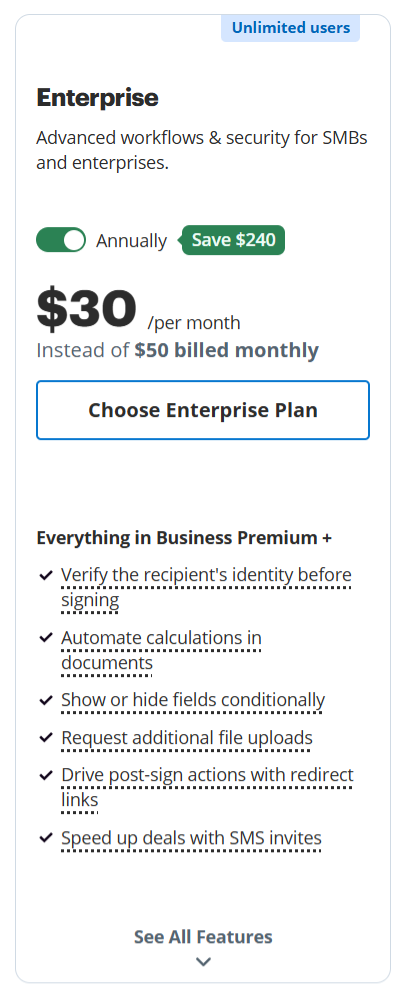
SignNow’s Enterprise plan is best for businesses that need more control, scale, and flexibility in their signing workflows. Its main advantage is that it supports more complex signing processes. It can be a stronger fit when basic e-signature tools are no longer enough and the team needs signing to fit into a broader document management process.
Price:
- $30/month (annual billing)
- $50/month (monthly billing)
Features:
- Password, SMS or phone-based signer authentication
- Conditional fields
- Formula fields
- Signer attachments
- Signer redirects
- SMS document invitations
Best fit:
- Legal operations teams with multi-step routing
- Procurement teams with repeat approvals
- Organizations that need advanced reporting
- Teams that need stronger controls around document management
- Companies with custom integrations or more complex approval paths
Important to note:
- Added invite pricing is highest on the Enterprise plan
- Enterprise features may be more than a small team needs
- Free developer account offered for testing and building with SignNow
Site License: when it may make sense
The Site License plan is a usage-based option for organizations with high document volume and unlimited users. This plan may make sense when a company wants broad internal access, central usage control, and a billing model tied to invite volume. It can also be relevant for large teams that don't want to ration accounts across departments.
Price:
- Flexible price
- $1.50 per signature invite
- Contact sales
Best fit:
- Large teams with many internal users
- Organizations sending across multiple departments
- High volume users who can forecast invite volume
- Teams that need custom integrations
- Buyers that want volume discounts or enterprise pricing discussions
Features:
- Unlimited users
- Full API access
- Premium integrations
- SSO
- Centralized workspace management
- Industry-specific compliance options
- Volume discounts
Important to note:
- The figure may not reflect volume discounts or custom contract terms
- Treat any cost example as illustrative unless based on a live quote
If your team is unsure which SignNow plan fits best, this guide on how to choose the best e-signature software can help you decide how to evaluate what matters most before committing.
How SignNow’s unlimited-user and signature-invite model works
SignNow takes a different approach from a standard per-user model. The current model separates users from signature invite usage.
A quick summary:
- Paid plans allow unlimited users at no extra user charge.
- Account holders pay for documents (signature invites) signed.
- Added users can get their own login and workspace access.
- Paid plans include 100 signature invites per user per year.
- Usage is shared across free seats on the subscription.
- Unused invites reset annually and don't roll over.
- Additional signature invites are billed after the included allowance is exhausted.
In short, the pricing structure focuses on a different behavior pattern: many users, lighter sending.
Let's break this down even further.
What counts as a signature invite?
A SignNow signature invite is counted by invite or signing link, not simply by recipient count. One unique invite or signing link counts as one invite, regardless of how many recipients or documents are included. This applies to web and mobile invites.
Examples:
- One document sent to two signers counts as one invite
- One document group with five documents sent to three signers counts as one invite
- SMS invites count the same way as email invites
- Kiosk mode signing counts as an invite
This distinction matters when forecasting usage. The number of recipients is not always the same as the number of billable invites.
What doesn't count as a signature invite?
Some follow-up actions don't use the invite allowance. Actions that don't use invite allowance:
- Replacing a signer
- Forwarding an invite
- Resending an existing invite
- Sending a reminder
- Emailing a document copy
- Self-signing through specified web or mobile workflows
One detail matters for operations teams: Canceling an invite doesn't return it to the available balance. If you cancel and send a brand new invite for the same document, it counts as another invite from your limit.
For teams with recurring workflows, checking recipients, fields and routing before sending can reduce avoidable usage.
What happens when the included invite allowance is used?
Once the included allowance of 100 signature invites per user per year is used, users can keep sending on a pay-as-you-go basis. Added invite prices:
Some plans may offer discounted invite packages and bundles, such as 100 extra invites for $180 on Business Premium.
This isn't a hard sending stop. It's a cost forecasting issue. Your team can continue sending, but the effective cost may change once the included usage is fully used.
How to estimate SignNow’s effective cost
Start with the plan price, then add usage. Don't stop at monthly cost. The monthly subscription plan may start low, but the actual cost may increase depending on actual usage and additional invite cost.
What SignNow cost can look like in practice
Here’s how the cost for a team could work in simple scenarios.
i) A small team with high usage
A two-person team on SignNow Business Premium would pay a base subscription cost of $360 per year with annual billing (2 users x $15/month x 12 months). The plan includes 100 signature invites/year, giving the team 200 included invites annually.
Usage scenario:
If the team sends 300 signature invites per month, that equals 3,600 invites per year. After the first 200 included invites, the remaining 3,400 invites would be billed at the Business Premium added-invite rate of $1.80 each, adding $6,120 (3,400 x $1.80) in usage charges.
Total cost:
The team’s estimated annual cost would rise from $360 to about $6,480 before taxes or other contract terms.
ii) A large team with low usage
A 25-person team on SignNow Business Premium may still have a low annual cost if most users only need access and the team sends lightly.
With annual billing, the base plan cost is $180 per year: $15/month x 12 months with the 100 included invites per year.
Usage scenario:
If the account has 100 included signature invites per year and the team sends 6 invites per month, that equals 72 invites per year. No added invite charges would apply. The estimated annual cost would stay at $180 before taxes or contract-specific terms.
If usage rises slightly to 12 invites per month, the team would send 144 invites per year. After the first 100 included invites, the remaining 44 invites would be billed at the Business Premium added-invite rate of $1.80 each, adding $79.20 (44 x $1.80) to the base Business Premium subscription plan.
Total cost:
In that case, the estimated annual cost would be $259.20 before taxes or other terms.
A guideline to estimating SignNow costs
With the above possibilities in mind, use this checklist as a guideline to estimate costs more accurately:
- Count active senders and occasional users.
- Estimate annual signature invite volume.
- Separate regular sends from seasonal spikes.
- Identify bulk sending campaigns.
- List required features, such as payment requests, custom branding, advanced reporting, document automation, and API access.
- Check the included signature invite allowance.
- Estimate added invite charges after the allowance is used.
- Confirm annual and monthly billing terms, renewal terms, and how added usage is charged.
An alternative approach to e-signature pricing: Xodo Sign
Xodo Sign uses a more traditional per-user pricing model. For teams evaluating a SignNow alternative, its approach differs by centering pricing around users rather than signature invite usage. Its paid plans are built around users and unlimited documents.
That makes the pricing easier for teams that send agreements, forms, approvals, and client paperwork on a regular basis:
Basic plan
Includes unlimited documents, 3 reusable templates, mobile sign and send, app integrations, and support access. It can fit teams that need a straightforward way to send, sign, and track documents without a larger workflow setup.
Professional plan
Adds more room for repeat work. It includes everything in Basic, plus unlimited templates, 10 bulk-sending credits per user, 10 SMS credits per user, advanced PDF editing, AI document summarization, custom branding, and in-person signing.
The main contrast is not simply that one product costs less. It may or may not, depending on user count, and required features. The clearer advantage is predictability for regular senders. See the pricing page to directly compare Xodo Sign plans.
SignNow vs Xodo Sign: which pricing model fits your team?
The difference between Xodo Sign vs. SignNow is their pricing model and what it means for your team.
SignNow may be a better fit:
- When many employees need access.
- If only a smaller proportion of users send frequently.
- When your annual invite usage can be forecast accurately.
- If your team team needs SignNow-specific advanced workflows.
- When the Site License offering matches your organization’s web and API activity.
Xodo Sign may be the better fit:
- When a smaller number of users send documents regularly.
- If unlimited paid-plan document volume is more valuable than unlimited users.
- When your team wants a straightforward cost tied to paid users.
- For contracts and forms that often require PDF editing before sending.
- If reusable templates, audit trails, reminders and tracking are part of daily work.
If SignNow’s invite-based model doesn't match how your team sends documents, it may be worth comparing other tools with different billing structures. Start with this guide to the best SignNow alternatives for teams before narrowing your shortlist.
Frequently asked questions
1. Is SignNow free?
No. SignNow isn't a fully free e-signature platform for ongoing business use. However, it offers a free trial. After the trial ends, users need a paid plan to continue using standard signing features.
2. How long is SignNow free trial?
SignNow offers a 7-day free trial. During the trial, users can test the platform before choosing a paid plan. Note that trial details may vary by region, promotion, or account type.
3. Does SignNow charge per user?
No. SignNow’s standard paid plans include unlimited user seats. Usage is based on a yearly allowance of signature invites per user, rather than a traditional per-user seat charge.
4. How many signature invites does SignNow include?
SignNow paid plans include 100 signature invites per user per year, shared across the account. Unused invites do not roll over.
5. What counts as one SignNow invite?
One unique invitation or signing link generally counts as one invite, even when it contains multiple documents or recipients. Email invitations count when sent, while a signing link counts after the recipient completes the required fields and finishes signing.
6. Does SignNow stop sending after 100 invites?
No. SignNow doesn't stop sending after 100 invites. You can continue sending after the included allowance is exhausted. Additional invites will be billed at the plan’s applicable rate.
7. What are SignNow’s overage fees?
SignNow additional invites cost $0.96 on Business, $1.80 on Business Premium and $3.60 on Enterprise. Discounted packages or negotiated volume rates may also be available.
8. Is SignNow suitable for high-volume sending?
SignNow can be suitable for high-volume sending, particularly through a negotiated Site License or by using its native bulk-send features.
Match your e-signature plan to real document volume
SignNow’s starting prices are competitive, but the real cost depends on more than the plan tier. Teams should also factor in account structure, annual signature-invite usage, added invite charges, and the features needed to support daily work.
It may be a strong option for an organization that wants many employees to access the platform while only a limited number of documents are sent.
For small and growing teams that send documents consistently, Xodo Sign offers a different kind of predictability that may be worth checking out. Start a free Xodo Sign trial to test a real recurring workflow before committing.