
Table of contents
Sign and send unlimited e-signatures with Xodo Sign.
If you're researching Signeasy pricing, you're probably looking for more than just the monthly cost.
Sending limits, included features, template allowances, and team capabilities can all affect which plan makes sense for your workflow.
Signeasy offers 4 primary e-signature plans: Free, Personal, Business, and Business Pro, along with a custom-priced option for larger teams and organizations.
In this guide, we'll break down what each plan costs, what's included, and the key limits that can influence upgrade decisions. For readers also considering a Signeasy alternative, we'll highlight where Xodo Sign's pricing differs later in the guide.
Signeasy pricing overview: plans, limits, and best fit
Key takeaways:
- Business is the practical starting point for high-volume and repetitive workflows.
- Business Pro focuses on providing admin control and visibility on plan usage.
- Custom pricing can be a good for growing teams, enterprise customers, and higher-volume workflows.
- Document volume and templates can quickly become upgrade triggers to higher tiers.
How we researched this pricing guide
This guide is based on the English version of Signeasy’s website. It references current public pricing and support pages for list prices, sending allowances, annual billing, custom-plan treatment, and add-ons. They were last checked on October 5, 2026.
Only standard e-signature subscriptions are compared here. Signeasy’s API and Intelligent Contract Management products have separate prices and usage models and are not included.
Signeasy pricing plans explained
Signeasy offers plans for occasional signing, individual users, growing teams, and larger organizations. Here's what each plan includes, where the limits change, and when it may make sense to upgrade.
Free access and trial availability
Signeasy currently offers both a free plan and a free trial, giving you two entry plans to evaluate Signeasy free.
Free trial
For users who want to test Signeasy
If you plan to send multiple agreements, evaluate integrations, try document tracking, or see how Signeasy works across your teams, the free trial provides a more complete view of the platform's paid capabilities before you decide which plan is the best fit.
Pricing:
- 0$ (no cost)
- No credit card required
Signature requests:
- Unlimited signature requests
- Full access to features
Included features:
- Includes tracking, notifications, and integrations
Key limits:
- Lasts for 14-days
- Features are only available during the trial version
Best for:
- Small teams evaluating Signeasy before committing to a paid plan
- Businesses comparing e-signin platforms and testing real workflows
- Sales teams testing document tracking, reminders, and signer notifications
Free plan
For users who need occasional signing capabilities
The Free plan is a practical option if you sign or send a few documents per month. It also gives prospective users a chance to explore the platform, test the signing experience, and determine if Signeasy fits their workflow before upgrading.
Pricing:
- 0$ (no cost)
- No credit card required for sign up
Signature requests:
- Send/sign up to 3 documents
Included features:
- Core e-signing capabilities
Key limits:
- Basic tools
- The 3-document limit is a total usage allowance
Best for:
- Individuals who only need to sign or send a couple of documents
- Freelancers testing the platform before upgrading
- Small business owners with infrequent signing needs
Personal plan
For individual use with limited sending
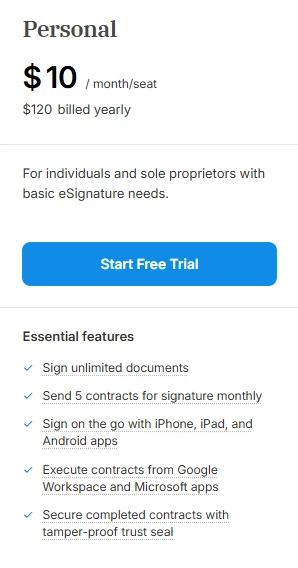
The Personal plan is aimed at individual professionals who regularly sign documents but only need to send a small number of signature requests each month. It works well for freelancers, consultants, sole proprietors, and anyone managing occasional agreements without a team.
Pricing:
- $10 per month per seat when billed annually ($120 per seat per year)
- $15 per month per seat when billed monthly ($180 per seat per year)
- Single-user plan only
Signature requests:
- Up to 5 documents sent for signature per month
- Unlimited self-signing
- Supports standard signer workflows and signer editing before sending
Included features:
- Mobile apps, tablet and desktop access
- Google Workspace integration
- Microsoft 365 integrations
- In-person signing support
- Audit trail and legally binding signatures
- Secure document storage and tracking tools
Key limits:
- 5 signature requests per month
- No team collaboration tools or shared template management
- No admin dashboard or user management features
- Not designed for recurring team workflows
Best fit for:
- Freelancers
- Independent consultants
- Sole proprietors
- Low-volume contract sending
- Users who send 5 or fewer signature requests per month
Business plan
For small teams that need unlimited sending
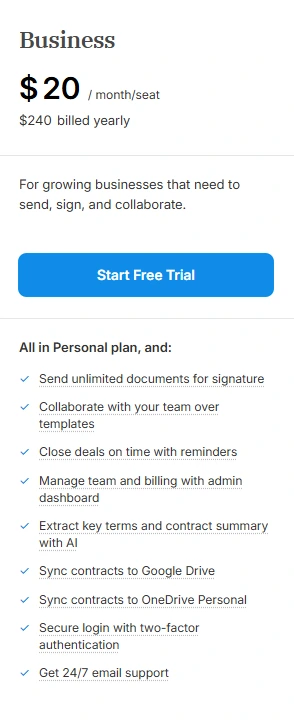
Business is where Signeasy transitions from individual signing to collaborative document workflows. It removes the Personal plan's sending cap and introduces team-oriented features for organizations that often send contracts, onboarding forms, approvals, and recurring documents.
Pricing:
- $20 per month per seat when billed annually ($240 per seat per year)
- $30 per month per seat when billed monthly ($360 per seat per year)
- Per-user pricing model
Signature requests:
- Unlimited document sending
- Unlimited self-signing
- Multi-document envelopes supported
- Signature reminders included
Included features:
- Everything in the Personal plan
- Team collaboration on templates
- Admin dashboard for billing and user management
- AI-powered contract summaries and key-term extraction
- Google Drive and OneDrive integration
- Two-factor authentication (2FA) and 24/7 email support
Key limits:
- Maximum of 5 reusable templates per account
- Advanced approval workflows require higher tiers
- Advanced reporting and permissions controls are limited
- Some compliance capabilities require add-ons or custom plans
Best fit for:
- Small businesses
- Operations teams
- Growing organizations
- Teams that send documents daily or weekly
- Companies with recurring agreements that fit within 5 reusable templates
Business Pro plan
For teams that need advanced controls and unlimited templates
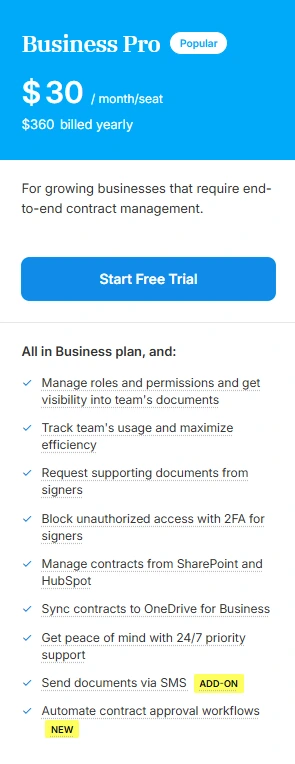
Business Pro targets organizations that need greater visibility, governance, workflow automation, and integration depth. It adds administrative controls and removes the template cap that exists on the Business tier.
Pricing:
- $30 per month per seat when billed annually ($360 per seat per year)
- $40 per month per seat when billed monthly ($480 per seat per year)
- Per-user pricing model
Signature requests:
- Unlimited document sending
- Unlimited self-signing
- Advanced workflows and approval processes
- Advanced signer authentication capabilities
Included features:
- Everything in Business
- Unlimited reusable templates
- Roles and permissions management
- Team usage reporting and analytics
- Approval workflows
- HubSpot and SharePoint integration
Key limits:
- Subject to fair-use limits on unlimited sending
- Some compliance and enterprise requirements remain as add-on
- Costs scale on a per-user basis as teams grow
Best fit for:
- Teams using SharePoint or HubSpot
- Businesses managing large template libraries
- Teams requiring role-based document controls
- Managers who need reporting and visibility into signing activity
- Companies with complex approval and review processes
Build Your Plan
Custom plan for enterprise use
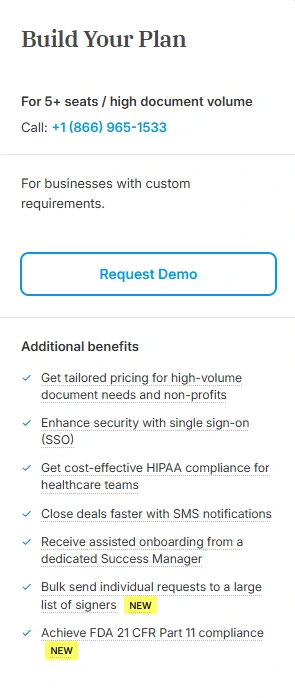
Build Your Plan is Signeasy's custom enterprise offering for larger organizations, regulated industries, and high-volume document workflows. Pricing is quote-based and tailored to seat count, compliance needs, support requirements, and usage volume.
Pricing:
- Custom quote
- Intended for organizations with 5+ seats or specialized requirements
- Pricing varies based on seats, volume, compliance needs, and add-ons
Signature requests:
- High-volume document workflows
- Unlimited sending subject to negotiated terms and fair-use policies
- Bulk-send capabilities available
Included features:
- Everything in Business Pro
- Single sign-on (SSO) options
- Bulk sending functionality
- SMS notifications for signers
- Support for teams needing HIPAA and 21 CFR Part 11 workflow support
Key limits:
- No public pricing transparency
- Features may be packaged differently between organizations
- Some capabilities are structured as paid add-ons
- Requires direct sales engagement for final pricing and configuration
Best fit for:
- Organizations with 5+ users
- High-volume signing environments
- Teams requiring HIPAA controls and 21 CFR Part 11 support
- Companies needing SSO and centralized identity management
- Businesses with custom workflow, security, or compliance requirements
Which limits have the biggest effect on Signeasy cost?
i) Sending volume
For most users, sending volume is the first limit they'll encounter.
Personal allows 5 sends per month. Business, Business Pro, and the custom tier offer unlimited sending with fair-usage restrictions.
A freelancer sending a few client agreements each month may never hit the Personal limit. A small business sending multiple contracts or approval forms each week could outgrow it quickly.
Teams with high document volume should confirm usage expectations with sales, as "unlimited" is subject to fair-use policies. For growing teams, unlimited sending can help avoid frequent plan upgrades.
ii) Number of paid users
Team plans charge per user or seat, so costs rise as more employees need access. At annual prices, this is what those costs could look like:
*For 5+ seats, Signeasy will upgrade your team toward its Build Your Plan custom-pricing option, so actual costs may differ. The figures are for comparison purposes only.
From the table, the significance in costs can easily be seen:
- Moving from Business to Business Pro adds $120 per user per year.
- For a 3-person team, Business Pro costs 50% more than Business ($1,080 vs. $720).
- For a 4-person team, the difference grows to $480 per year.
Before upgrading, identify which users need to prepare, send, or manage documents versus those who only need visibility into completed agreements.
If you're interested in seeing the differences between Personal vs Business instead, see our plan breakdown that compares cost, limits and best fit.
iii) Templates
Templates can have a surprisingly large impact on long-term efficiency.
Business includes 5 reusable templates, while Business Pro offers unlimited templates. If your organization primarily sends a handful of standard documents, such as service agreements, NDAs, and onboarding forms, 5 templates may be sufficient.
Most teams grow, and, document libraries grow with them.
Sales, HR, operations, finance, and legal teams may each require their own forms, contracts, and approval documents. At that point, template capacity becomes more about maintaining repeatable workflows.
iv) Authentication, branding, and advanced controls
Feature requirements can drive costs just as much as usage limits.
For example:
- A small business sending straightforward agreements may not need reporting or approval workflows.
- A larger organization with multiple departments and compliance requirements may need advanced administrative controls.
- A sales team sending high volumes of contracts may want branded communications to maintain a consistent customer experience.
Common upgrade drivers include:
- Security: Signer authentication, SSO, SMS verification
- Administration: Roles, permissions, reporting
- Workflows: Approval processes and document routing
- Branding: Customized signing experiences and communications
- Compliance: Industry-specific controls and requirements
These capabilities are typically reserved for higher-tier plans or available as add-ons. If you expect your workflows to become more complex, Business Pro may provide better long-term value than upgrading later.
Now that we've covered all Signeasy pricing tiers, it's worth comparing them with an alternative option like Xodo Sign.
When is Xodo Sign a better-value alternative?
Xodo Sign may be worth considering when unlimited document sending or team seats matter at a lower entry price.
Consider the costs of both Xodo Sign's pricing plans:
Basic plan
- $10 per user per month billed annually
- $20 per user per month billed monthly
- Includes unlimited documents, 3 templates, mobile signing and sending, and app integrations
- Additional paid seats are supported
That makes Basic a potential fit for a freelancer or small team that would outgrow Signeasy Personal's 5-send limit but doesn't need the broader Business Pro control set.
See our Xodo Sign vs Signeasy comparison to find out how both platforms handle preparing documents, sending signature requests, and managing recurring agreements.
Xodo Sign Professional
- $16 per user per month billed annually
- $32 per user per month billed monthly
- Free trial available. No CC required
- Includes everything in Basic. Plus unlimited templates, advanced PDF editing, custom branding, in-person signing
- 10 bulk-send credits, and 10 SMS credits per selected seat
At $16 per user per month, Xodo Sign Professional costs $4 less than Signeasy Business a 20% price difference. Even with the lower price, Xodo Sign Professional includes the core and advanced signing features teams need.
For more than basic e-signatures and workflow tools in a single platform, Xodo Sign may offer stronger overall value and a lower total cost as usage grows.
Frequently asked questions
1. How much is Signeasy per month?
With annual billing, Signeasy costs are as follows billed in USD:
- Personal: $10 per seat per month (billed annually) or $15 per seat per month (billed monthly)
- Business: $20 per seat per month (billed annually) or $30 per seat per month (billed monthly)
- Business Pro: $30 per seat per month (billed annually) or $40 per seat per month (billed monthly)
- Build Your Plan: Custom pricing based on team size, volume, and enterprise features
2. Does Signeasy have a permanent free plan?
Yes. Signeasy offers a Free plan that allows up to 3 documents to be sent or signed.
3. How many documents can I send with Signeasy Personal?
You can send up to 5 documents for signature per month with Personal. Note that signing documents yourself is unlimited.
4. Does Signeasy Business include unlimited sends?
Yes. Signeasy Business offers unlimited signing and sending, with fair-usage restrictions.
5. How many templates are included?
Signeasy Business includes up to 5 templates on the Business plan. Business Pro and higher tiers include unlimited templates.
6. What happens when a Signeasy team reaches 5 seats?
When your team meets 5 seats or more, you'll need to upgrade toward Build Your Plan and custom pricing. The quote may account for volume, security requirements, support, and paid add-ons.
7. Are Signeasy API and contract-management prices included here?
No. Signeasy API and Intelligent Contract Management have separate plans, prices, minimums, and usage allowances. They should be evaluated separately from the standard Personal, Business, Business Pro, and Build Your Plan tiers.
Choose a plan based on your workflow, not just price
Signeasy's plans are designed for different stages of document signing, from occasional use to collaborative, high-volume workflows.
While pricing is an important factor, it's worth looking at how often you send documents, who needs access, and which features support your day-to-day process.
Taking a few minutes to map your current and future requirements can help you choose a plan that fits today and still works as your workflows evolve.
If you're still evaluating your options, you can try Xodo Sign and explore the platform firsthand.