
Table of contents
Sign and send unlimited e-signatures with Xodo Sign.
When considering an e-signature platform like DocuSeal, users can choose between a managed cloud service, a free open-source deployment, a paid self-hosted Pro edition, or an API for embedded signing.
Each option comes with a different pricing model and different responsibilities.
Yet what does the total cost mean beyond the advertised plan price?
This guide explains how DocuSeal pricing works in 2026, what each pricing path includes, and the factors to consider when deciding whether a self-hosted e-signature platform or a managed alternative best fits your team.
How this pricing guide was researched
This guide is based primarily on DocuSeal's official pricing, developer documentation, and publicly available product information as of July 2026. In this guide, we evaluate:
- Cloud subscription costs
- Open-source deployment options
- Pro On-Premises licensing
- API and embedded signing fees
- Usage-based costs
- Operational considerations (hosting, maintenance, monitoring, and support)
The goal is to help you understand both the listed price and the broader cost of operating an open-source e-signature solution.
How much does DocuSeal cost in 2026?
DocuSeal costs $0 to start, but pricing depends on the deployment model. There are several pricing paths depending on whether your team wants a hosted plan, a self-hosted deployment, or API-based signing:
- Free Cloud plan (no monthly cost)
- Cloud Pro plan ($20 per user/month billed annually)
- Free Open Source version (no monthly cost)
- Pro On-Premises ($20 per user/month billed annually, or $240/year per user annual license)
- API and embedded signing (requires a Pro plan + $0.20 per completed signed document)
DocuSeal pricing plans at a glance
DocuSeal offers four primary pricing paths. Let's take a look at each one.
1. DocuSeal Cloud
For organizations that don't want to manage servers or infrastructure, DocuSeal offers a hosted cloud service with free and paid plans. The cloud path is typically the simplest way to start because DocuSeal manages the application environment while customers focus on sending and signing digital documents.
1.1) Free Cloud plan
The Free plan provides access to DocuSeal's hosted platform for individuals or small teams with modest signing needs.
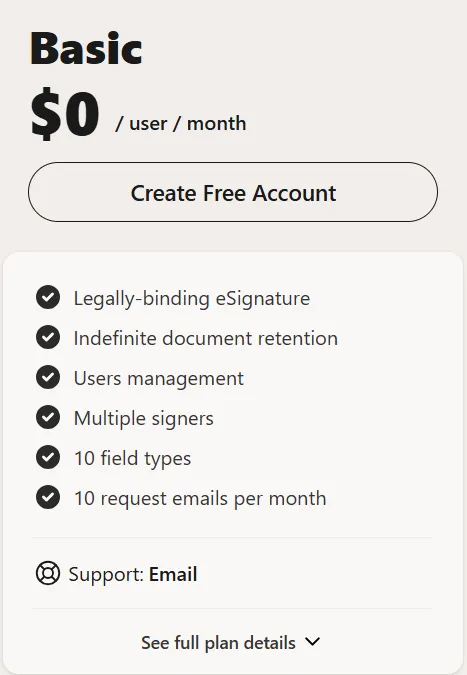
Price:
- Free
Features included:
- Legally binding eSignature
- Unlimited templates and folders
- 10 Signature request emails/month
- Audit logs and trusted signing certificate
- Shared link and in-person signing
Best fit:
- Freelancers
- Small businesses testing the platform
- Internal approvals
- Occasional contracts
Main value:
The Free plan includes core electronic signing functionality and allows organizations to evaluate the product before committing to a paid subscription.
Cost considerations:
The Free plan includes usage limits and doesn't include production API access or embedded signing capabilities. Organizations expecting higher document volume or software integrations will likely quickly outgrow it.
Buyer check:
Confirm that the included monthly signing allowance matches your expected document volume before relying on the free tier for business-critical workflows.
Example
A consultant sending 1-5 client agreements each month may find the Free plan useful during the evaluation stage.
Tip: If you’re comparing DocuSeal against other free e-signing tools, check out our guide on the best free and low-cost e-signature software for small businesses to evaluate plan limits, document caps, and paid upgrade paths.
1.2) Cloud Pro plan
Cloud Pro removes many of the usage limitations found in the Free plan while adding advanced features designed for business teams.
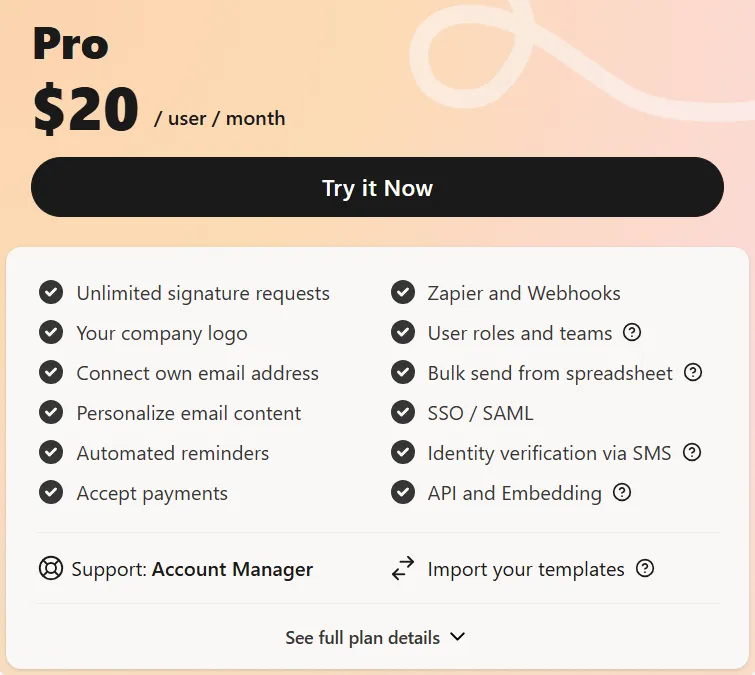
Price:
- $20 per user/month (billed annually)
Features included:
- Unlimited signature requests and automated reminders
- Bulk send from spreadsheet
- Company logo, branding, and email
- Import from DocuSign
- API and embedding
Best fit:
- HR teams
- Finance departments
- Sales teams
- Operations teams
- Growing businesses
- Teams that want a managed signing tool without self-hosting
Main value:
Cloud Pro includes unlimited signature requests, templates, team management features, custom branding, and access to production API keys. It is designed for organizations that need scalable document workflows without hosting the platform themselves.
Cost considerations:
Subscription pricing is only one part of the overall cost. Organizations planning to build embedded signing experiences or API-driven workflows should also account for usage-based API fees.
Buyer check:
If multiple employees need access, calculate the total subscription cost based on the required number of seats. Teams using API integrations should also estimate expected completed signed document volume.
Example:
An HR department onboarding employees throughout the year can standardize offer letters and policy acknowledgements using reusable templates while avoiding the operational work of maintaining a self-hosted deployment.
2. DocuSeal Open Source
One of DocuSeal’s biggest differentiators is its open-source edition. DocuSeal allows organizations to download and run the software on their own infrastructure. For developer-led organizations, this means control over deployment, configuration, and infrastructure.
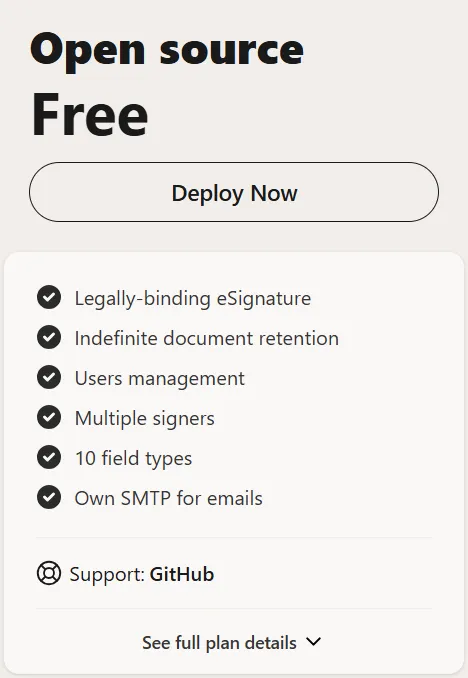
Price:
The software is free to download and self-host. There is no application license fee for the core open-source edition.
Features included:
- Legally binding eSignature
- Unlimited signature request emails, storage, and templates
- Audit trails and in-person signing
- Self-signed trusted signing certificate
- Webhooks, sandbox testing, and GitHub support
Best fit:
- Engineering teams
- SaaS companies
- Organizations with DevOps resources
- Businesses requiring infrastructure control
- Teams with existing self-hosted environments
Main value:
The open-source deployment gives organizations flexibility over hosting, configuration, and upgrades while avoiding recurring subscription fees for the core software. However, "free" refers to the software license and not necessarily the total cost of operating the solution.
Cost considerations:
The main cost consideration with DocuSeal Open Source is the operational work required to run the software reliably. A self-hosted e-signature setup may require:
- Server hosting and database management
- Storage and backups
- Application updates and security reviews
- Monitoring and uptime management
- Internal documentation, troubleshooting and support
- Engineering, IT, or DevOps resources
Buyer check:
Before choosing the open-source path, teams need to confirm who will own hosting, updates, user support, backups, and troubleshooting.
Example:
A SaaS company with an in-house DevOps team may choose DocuSeal Open Source to keep signing infrastructure under its own control.
3. DocuSeal Pro On-Premises
The Pro On-Premises option is for teams that want to self-host DocuSeal while accessing Pro features. It includes features such as white-label branding, personalized email content, automated reminders, user roles and teams, SSO/SAML, identity verification via SMS, and API and embedding.
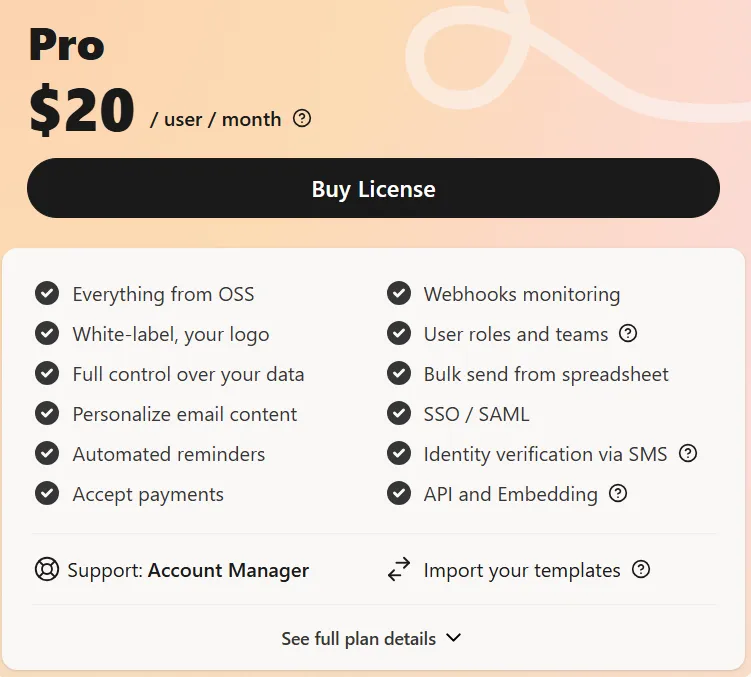
Price:
- $20 per user/month (billed annually)
- $240/year per user (annual license)
Features included:
- White-label branding
- User roles and teams
- SSO/SAML
- API and embedding access
- Unlimited usage
Best fit:
- Technical teams that want to run signing workflows on their own servers
- Organizations with internal infrastructure requirements
- Teams that want Pro features while keeping deployment self-hosted
- SaaS or product teams that want more control over their signing setup
- Businesses that already have IT or DevOps resources available
Main value:
The main value is control. Pro On-Premises gives teams access to Pro capabilities while allowing them to manage their own deployment environment. This can be useful for organizations with specific infrastructure, data handling, or internal document policy preferences.
Cost considerations:
The Pro license is only one cost layer. Teams should also account for hosting and any internal process work required to keep the system running.
Buyer check:
Confirm:
- How many internal users need DocuSeal app access
- Whether production API access is needed
- Expected monthly API or embedded signing volume
- Who will manage hosting, backups, monitoring, and updates
- Whether SSO, user roles, branding, or team management are required
- Whether support expectations fit the deployment model
Example
A legal team that needs self-hosting and SSO may find Pro On-Premises useful. A small HR or finance team without internal technical support may prefer a managed e-signature platform instead.
4. DocuSeal API and embedded signing costs
DocuSeal’s API and embedded signing pricing is especially important for developers, SaaS teams, and product teams evaluating signing workflows inside their own applications.
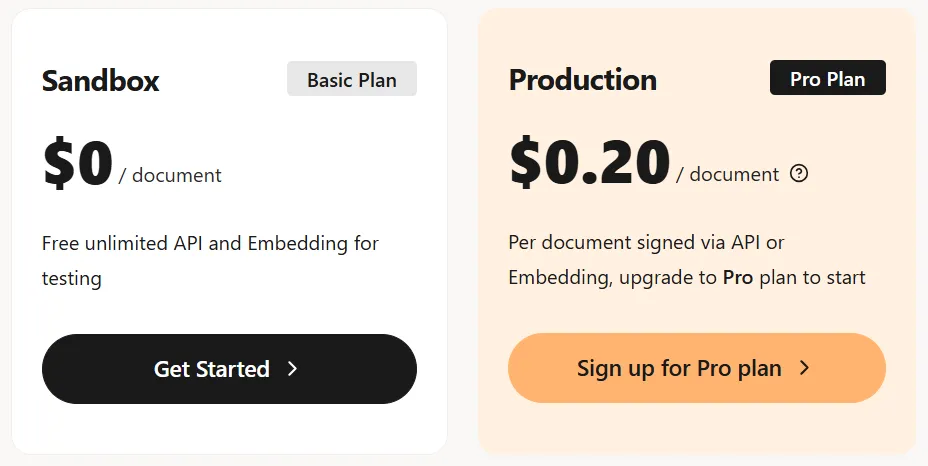
Price:
- Sandbox: $0 per document
- Production: $0.20 per signed document (Pro plan at $20/month required)
DocuSeal API and embedding are part of the Pro plan. At least one Pro seat is needed to access API and embedding license keys.
The $0.20 usage fee is based on completed signed documents (A single document submission may include multiple files and multiple signers, but it counts as one completed document).
Features included:
- Production eSignature API
- Embedded signing
- Free sandbox for development and testing
- Webhooks
- Embedded form builder
Best fit:
This pricing path is best for SaaS companies, product teams, developers, and operations teams that want to automate document signing or embed signing directly into customer, employee, vendor, or client workflows.
Main value:
The main value is automation and product integration. Teams can trigger signing workflows, manage document submissions, support multi-signer processes, and create embedded signing experiences without relying only on manual sending.
Cost considerations:
API costs depend on both Pro access and completed document volume. Teams should also account for engineering time, and any added fees for SMS, identity verification, or premium signing features.
Tip: For a deeper breakdown of API pricing models, usage fees, and volume planning, see this guide on how much an embedded e-signature API costs.
Buyer check:
Before estimating API cost, define:
- Number of Pro users or tenant admins needed
- Expected monthly completed signed documents
- Whether signing is embedded in your app or triggered from internal systems
- Expected SMS, identity verification, or premium signature usage
- Engineering effort for integration, testing, monitoring, and maintenance
- Whether a managed API plan would reduce operational ownership
Learn more about e-signature API vs. e-signature software in detail before deciding which model fits your needs.
Example:
A SaaS company may use DocuSeal API to let customers sign onboarding agreements directly inside its platform.
What hidden costs exist beyond the listed plan price?
DocuSeal pricing for open source, and API paths can be clear at the plan level, but the total cost depends on other considerations and hidden costs you should consider.
- Hosting and infrastructure
Self-hosted deployments require servers, databases, storage, SSL, monitoring, and backups. For technical teams, this may be routine. For business teams, it can create new technical ownership. - Maintenance and updates
Open-source and self-hosted software needs updates, bug fixes, security patches, dependency checks, and version testing, especially when signing supports critical workflows. That's when maintenance planning becomes crucial.
- Backups and document retention
You'll need clear rules for storing, retaining, backing up, restoring, and accessing signed documents. Your team should define how audit logs, and attachments are handled, especially for HR, finance, legal, or regulated workflows.
- Internal support
Self-hosted tools may require internal support for failed links, access issues, broken templates, misconfigured fields, or webhook problems, which can involve both business process help and technical troubleshooting.
- Engineering time
API and embedded signing may require work on document creation, templates, signer routing, webhooks, audit logs, and support tooling. This is useful when signing is core to the product, but unnecessary if your team only needs standard sending and tracking.
- Compliance and security review
Teams should review audit trails, signer authentication, data handling, permissions, retention, and access controls. The key question is who owns configuration, monitoring, review, and documentation.
- SMS, identity verification, and premium signing
DocuSeal has extra usage-based fees for features such as ID card verification, EU Qualified Signature, and knowledge-based authentication. Include these when identity assurance is required.
What self-hosted signing can cost in practice
Here’s an illustrative example of how costs can break down:
i) Scenario
A SaaS company embeds e-signing into its product and processes 500 signed documents per month. One internal admin manages templates and tracks status.
ii) Assumption
- On DocuSeal self-hosted (open source), the software license is free
- API access and embedding still require one Pro seat at $20 per month
- The per-document API fee of $0.20 still applies
The above factors on paper work out to roughly $120 per month in e-sign software costs.
iii) Reality
Self-hosted doesn't mean zero infrastructure cost. Your team also needs to budget for hosting, storage, backups, monitoring, security patching, and engineering time to maintain the deployment.
iv) Total real cost
The total realistic cost can land somewhere between $370 and $520 per month, or roughly $4,440 to $6,240 per year, with the variability sitting in operational work the team has to plan for.
The above example isn't a custom quote, but shows how pricing plans and actual numbers add up. Here's a look at how the base usage costs at different volumes and usage:
When to consider Xodo Sign as a managed DocuSeal alternative
Xodo Sign is worth considering when your decision is centered around simplifying operations and costs.
Operation considerations
Xodo Sign may be relevant when:
- Business users need to send and track documents without technical setup
- Teams want templates, audit trails, tracking, bulk send, and signing workflows in one managed platform
- HR, finance, legal, and sales teams don't want to rely on engineering for e-signature work
- SaaS or product teams want API access but prefers vendor-managed infrastructure
- The team wants to reduce infrastructure ownership across updates, monitoring, backups, and maintenance
For many small businesses and operations teams, a managed e-signature platform like Xodo Sign can reduce operational work while still supporting everyday signing workflows. Explore our Xodo Sign vs. DocuSeal comparison guide for an in-depth look at why managed e-signature workflows can be the stronger choice.
Developers and product teams comparing API options can also review the Xodo Sign API to see how managed e-signature workflows, embedded signing, and API-based document sending can work without maintaining the full signing infrastructure.
Cost considerations
Xodo Sign's sticker prices may look different than DocuSeal's, but the total cost can land in the same range once operational work is included. It can offer a more predictable cost option.
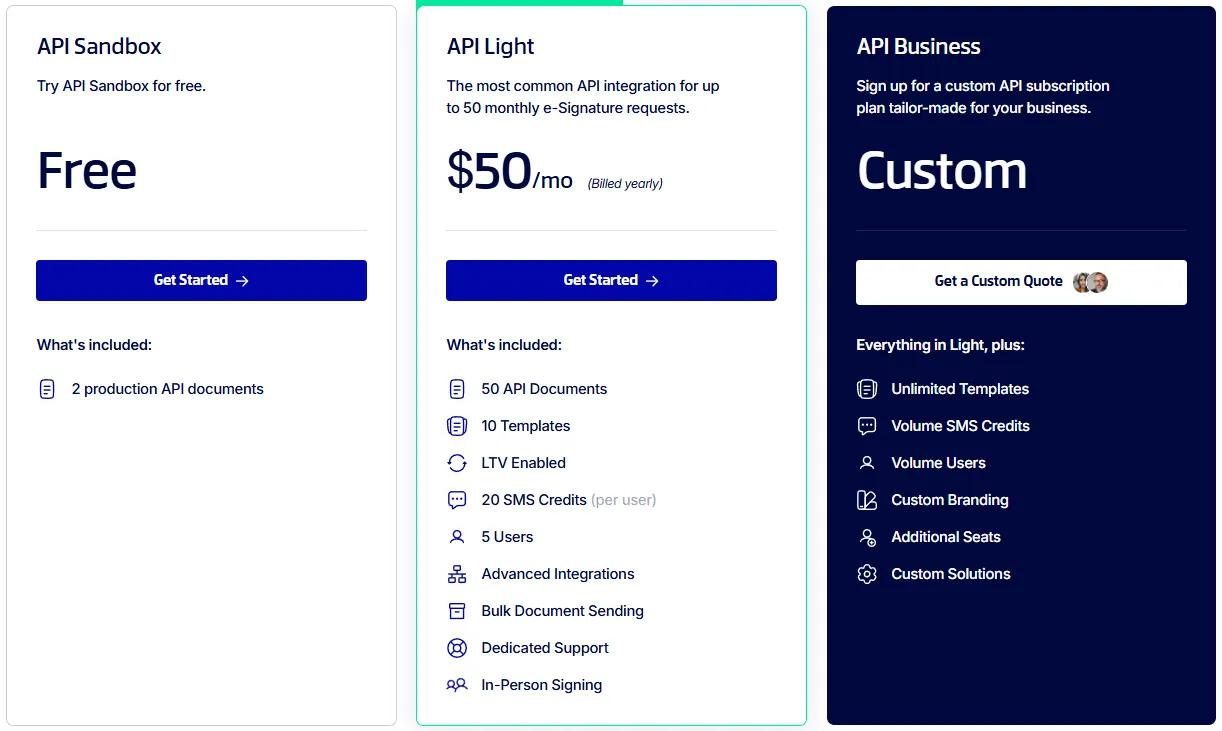
Xodo Sign’s managed plans include unlimited documents on paid plans:
- Basic: $10/user/month billed yearly
- Professional: $16/user/month billed yearly
- API Light: Starts from $50/month with 50 monthly e-signature requests
- API Business: A custom plan tailor-made for your business
If your team processes 500 signed documents per month, your decision should include more than the per-document fee.
For example:
With Xodo Sign API, a managed rate of $0.60 per envelope would put that volume at $300 per month, or $3,600 per year, with hosting, patching, monitoring, and uptime handled as part of the setup.
All figures are based on currently published Xodo Sign pricing. Teams comparing managed e-signature costs can review Xodo Sign pricing plan options to compare included usage, and paid features against the operational costs of a self-hosted setup.
If your team likes DocuSeal’s flexibility but wants managed signing workflows instead of self-hosted infrastructure, the Xodo Sign DocuSeal alternative page can help compare templates, audit trails, API access, and support in more detail.
Frequently asked questions
1. Is DocuSeal free?
Yes, DocuSeal has a free Cloud Basic plan and a free open-source self-hosted option. The free cloud plan includes usage limits, while the open-source version requires your team to manage hosting, updates, backups, and support.
2. How much does DocuSeal cost?
DocuSeal offers multiple transparent pricing paths:
- Cloud Basic: Free
- Cloud Pro: $20 per user/month (annual billing)
- Open Source: Free to self-host
- Pro On-Premises: $20 per user/month (annual billing)
- API and embedded signing: $0.20 per signed document in production (Pro plan required).
3. What is included in DocuSeal Open Source?
DocuSeal Open Source includes core self-hosted functionality, including legally binding e-signature features, indefinite document retention, user management, multiple signers, field types, and use of your own SMTP for emails. Support is GitHub-based.
4. Does DocuSeal charge for API access?
DocuSeal’s API and embedding features require a Pro plan. Production API and embedded signing are billed at $0.20 per signed document. The API sandbox is listed as free for development and testing.
5. How does DocuSeal API pricing work?
DocuSeal API pricing is based on completed signed documents. A single document submission can include multiple files and multiple signers, but it counts as one completed document for the $0.20 fee. At least one Pro seat is required for API and embedding license keys.
6. Is DocuSeal API pricing the same for Cloud and On-Premises?
Yes. DocuSeal API and embedding features are available in both Pro Cloud and Pro On-Premises, and that the same per-document API and embedding fees apply to both deployment models.
7. Does DocuSeal have an API sandbox?
Yes. DocuSeal lists its API and embedding sandbox at $0 per document for development and testing.
8. Is DocuSeal cheaper than a managed e-signature platform?
DocuSeal can be cheaper in some scenarios, especially when a technical team uses the open-source version and already has infrastructure resources. But listed software price is not the same as total cost. Teams should compare user seats, API volume, hosting, engineering time, maintenance, support, and compliance review before deciding.
Final thoughts
DocuSeal pricing is only part of the decision.
Its open-source and self-hosted options can work well for technical teams that want control, but the total cost may also include hosting, updates, backups, monitoring, support, and engineering time.
For teams that want managed e-signature workflows, templates, audit trails, API access, and support without owning the infrastructure, Xodo Sign may be the easier path.
See how Xodo Sign compares to DocuSeal or schedule a personalized demo to discuss your e-signing needs.