%201.webp)
Table of contents
Sign and send unlimited e-signatures with Xodo Sign.
Printing, scanning, and emailing contracts back and forth slows offers down and frustrates candidates. Remote hiring changes everything.
Electronic signatures fix that.
With an e‑signature platform like Xodo Sign, contracts move forward in one place. Every step is logged. Every signature is traceable. No paper. No guessing who signed and when.
For HR and recruiting teams, that means:
- Tamper‑evident documents
- Legally recognized electronic signatures
- Time‑stamped audit trails
- Faster offers and onboarding
Below is a step‑by‑step walkthrough using Xodo Sign.
How to sign an employment contract online with Xodo Sign
1. Access Xodo Sign
- Start a free trial.
You’ll get access to all the e‑signing features needed for efficient online contract signing.
2. Upload your employee contract
From the dashboard, select New Document.
Upload your PDF contract using any of these options:
- Upload from your computer
- Drag and drop the document
- Import from cloud storage
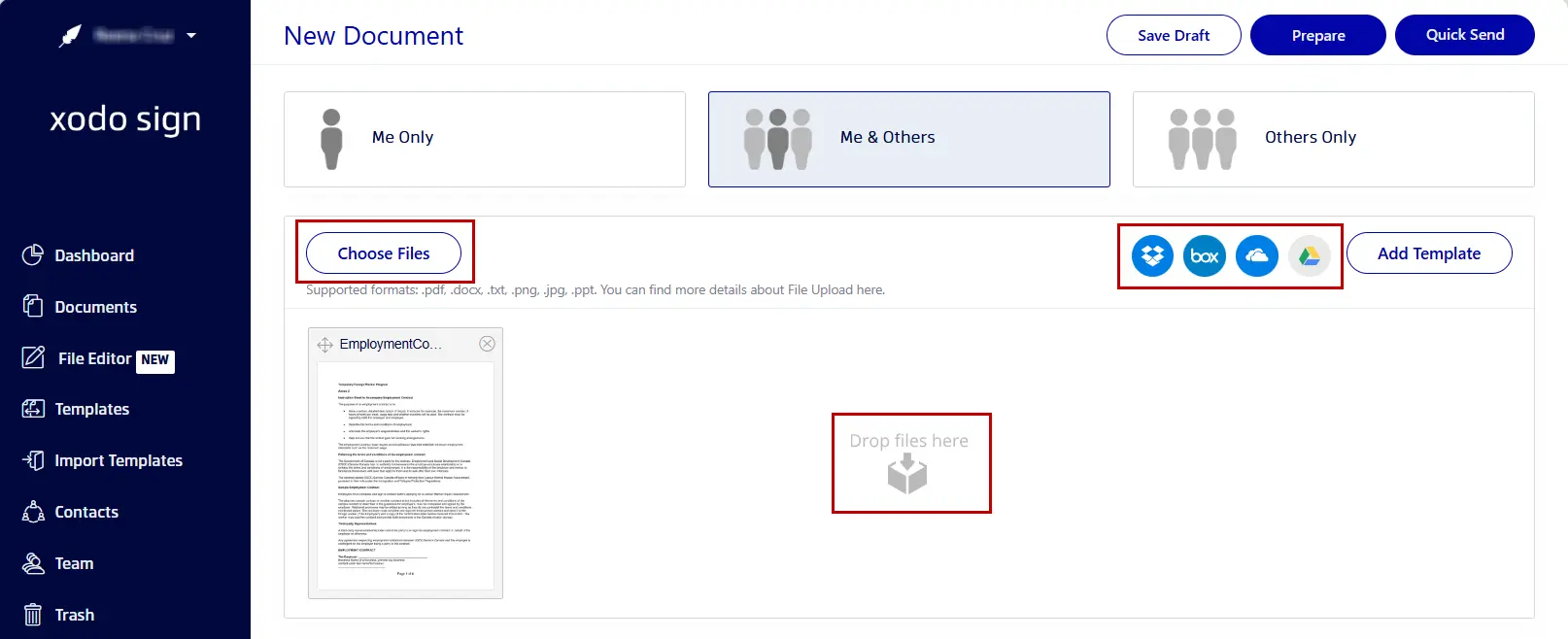
You can also upload Word documents and images. These formats are supported and are automatically converted to PDF during upload.
3. Set up signature requests
Next, define who needs to sign.
- Choose: Just You, You and Others, or Others Only
- Enter the name and email address for each person signing.
- Assign roles to each person as Signer or CC recipient.
- Set a signing order if signatures from the employer and new hires must occur in sequence.
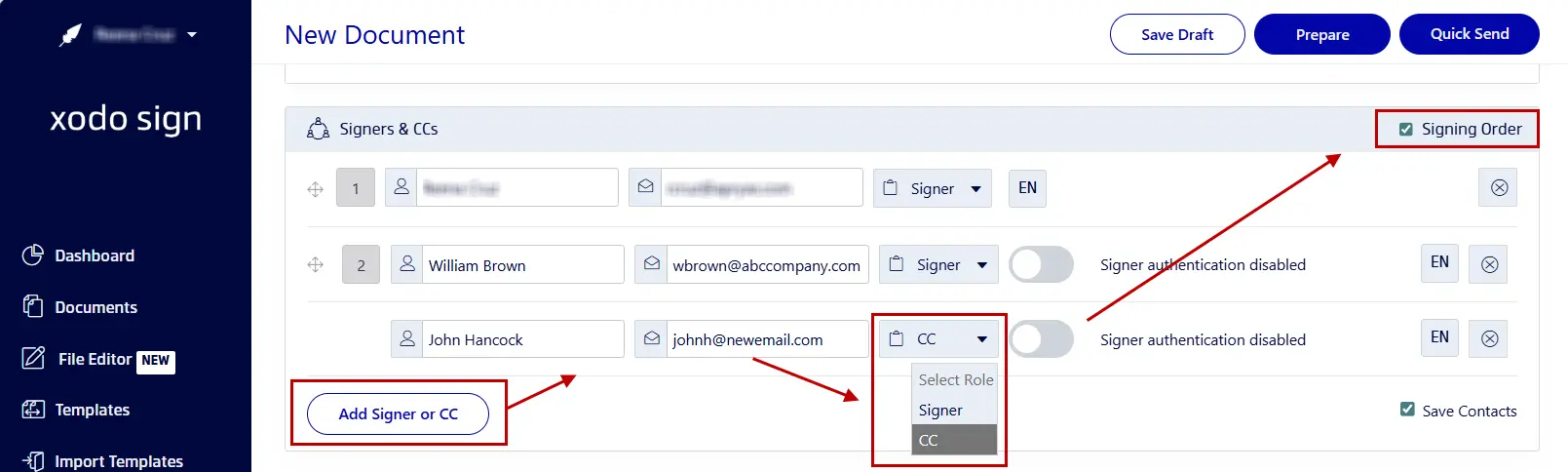
This keeps the entire signing flow clear and controlled.
4. Specify advanced signing settings
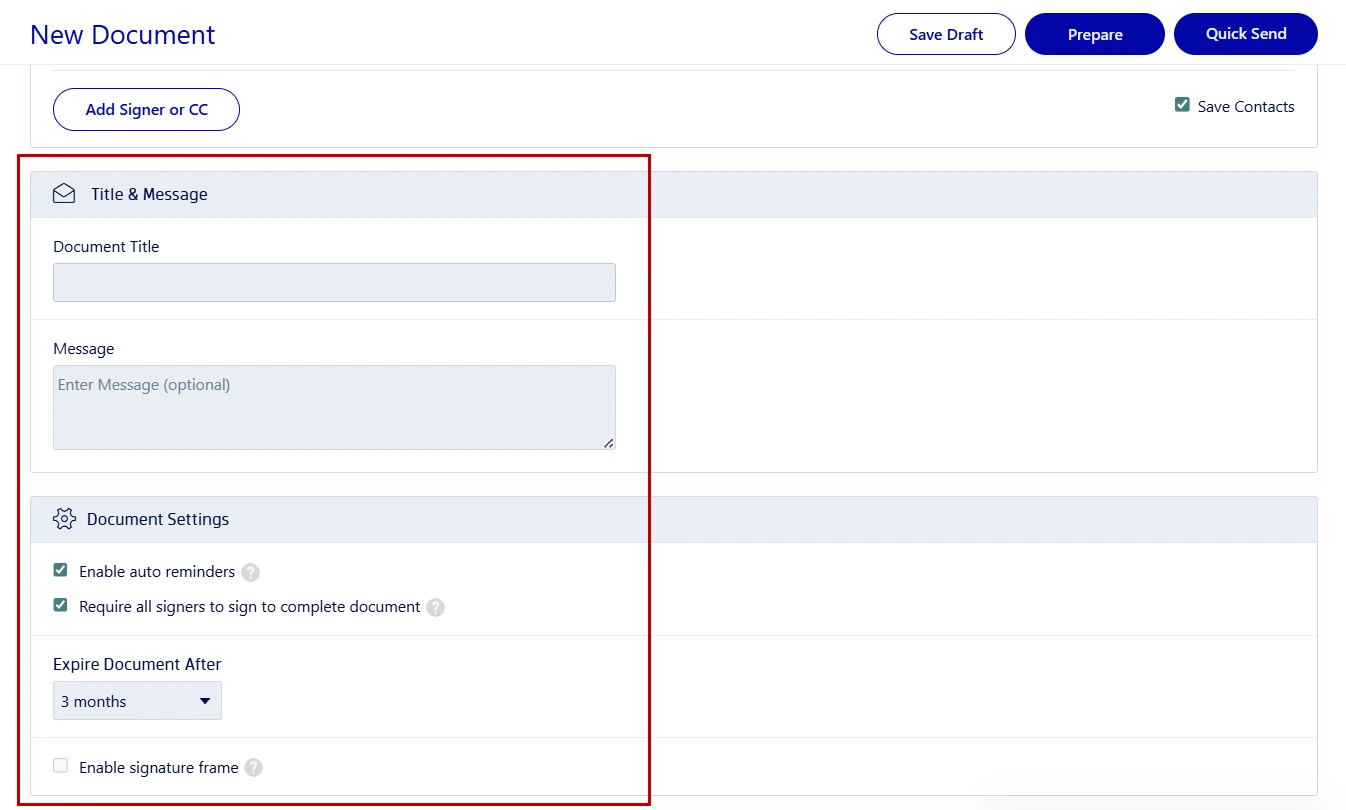
Configure optional controls when contracts are sensitive or time‑bound:
- SMS or PIN authentication to verify your signer's identity.
- A custom email message with directions or reminders.
- Automated reminders, completion requirements, and expiration dates.
Click Prepare when finished.
5. Assign fillable fields for signers
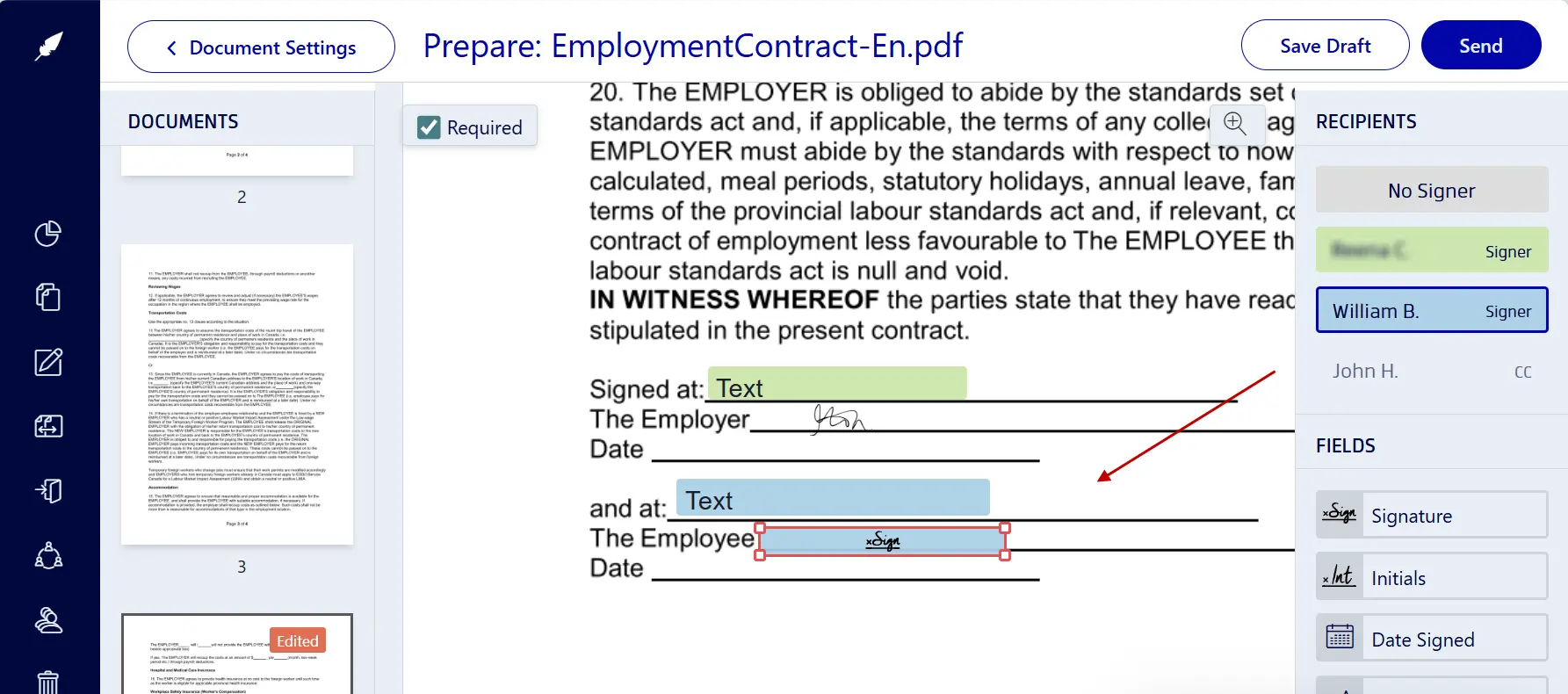
Now define what each signer must complete:
- Select a signer from the right‑hand panel.
- Drag a signature, date, initial, text, or other form fields onto the page.
- Mark fields as Required where needed.
- Repeat for every signer or entry field needed.
- Add your own signature field, click Sign, and apply your signature.
Once all fields are in place, click on Send.
Xodo Sign emails each signer a secure link with clear instructions. Reminders are sent automatically until signing is complete.
6. Monitor and collect signatures
After sending the signature request, everything stays visible in one place.
- Go to Dashboard > Documents to check the document's status.
- See who has signed and who hasn’t.
- Trigger and send auto-reminders if deadlines are missed.
- Review timestamps and IP addresses in the audit trail.
- Track signature status updates at a glance.
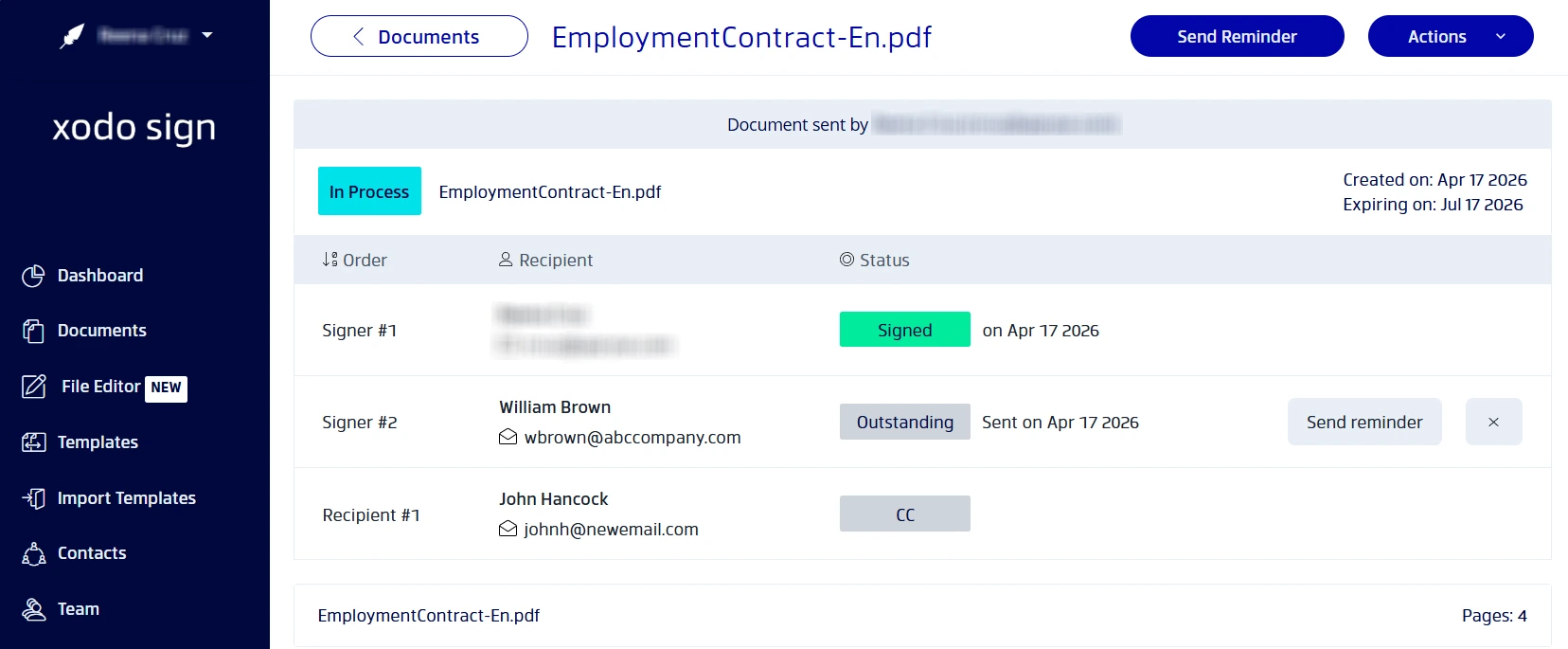
Once all signatures are collected, download the completed contract.
Best practices for managing employment contracts
HR teams often manage multiple candidates, offer letters, and start dates at once. These practices help keep things moving when signing contracts online.
- Use templates
Create reusable employment contract templates. This ensures digital contracts are consistent and HR teams are efficient. - Verify your signer's identity
Use PIN or SMS codes as authentication methods for sensitive contracts or remote hires. - Set auto-reminders
Enforce clear deadlines and auto-reminders to reduce delays with start dates and onboarding timelines. - Store and back up signed contracts securely
Save the signed PDF and its audit trail in your HR system to avoid issues with legal requirements, and employment regulations.
If you also handle paperwork for new employees, see our guide on signing onboarding forms.
Frequently asked questions
1. What makes an electronic signature legally binding?
An electronic signature becomes legally binding when all parties consent, show intent to sign, and can be identified. Xodo Sign generates electronic signatures with audit trails that meet E-SIGN and eIDAS requirements.
2. Do e‑signature laws differ by country?
Yes. While many countries recognize simple electronic signatures, some require advanced digital certificates or witnessing. Always check your local e-signature regulations first.
3. Can I control signing order for HR and employees?
Yes. You can assign roles and set signing orders so HR departments, management, and employees sign in the correct sequence needed.
4. Is it possible to sign on mobile devices?
Yes, it's possible to sign documents on mobile devices. Xodo Sign allows signers to review and sign employment contracts from iOS and Android devices.
5. What if a signer misses the deadline?
If a signer doesn't sign and complete the document in time, you can send reminders, extend deadlines, or cancel the request.
6. How is document integrity protected after signing?
Once complete, the document is locked. Any change invalidates the signatures. The audit trail records signer details, IP addresses, and timestamps.
7. Can I revert or void a contract after sending?
Yes. You can void or cancel a document at any point before all parties sign. If all parties have already signed, you’ll need to resend a new version instead of editing the original.
Turn employment agreements into a one‑step process
When paired with a well-defined employment contract, online signing removes friction from hiring. With Xodo Sign, HR teams get legally valid signatures, built‑in tracking, and one place to manage every agreement.
Send offers faster.
Track every action.
Keep contracts organized.
Start your free trial and manage employment contracts without printing or follow‑ups.