%201.webp)

Table of contents
Sign and send unlimited e-signatures with Xodo Sign.
If you work in HR, recruiting, or hiring, onboarding paperwork can slow everything down. Contracts, tax forms, policy acknowledgements. All waiting on signatures.
By handling onboarding paperwork in an electronic signature platform, you reduce manual work across key HR processes and move new hires through onboarding faster. It’s easier for HR, and better for employees.
Switching to e-signatures lets you send and collect employee onboarding forms online. No printing, no scanning. No chasing people by email. Just send the documents, let employees sign from any device, and store everything securely in one place.
This guide walks through the full digital process using Xodo Sign, from setup to tracking signed documents.
How to sign an employee onboarding form with Xodo Sign
1. Set up your Xodo Sign account
- Start with a free trial and create a Xodo Sign account.
- If you already have one, log in and open the Documents dashboard.
2. Upload employee onboarding forms
To upload an onboarding form:
- Click on New Document.
- Select the document from your computer or cloud storage, or drag it into the upload area.
To send multiple forms to one employee:
- Click on New Document.
- Select and upload multiple documents at once.
- Click and drag your documents where needed to reorder them.
- Xodo Sign will merge them into a single file for signing.
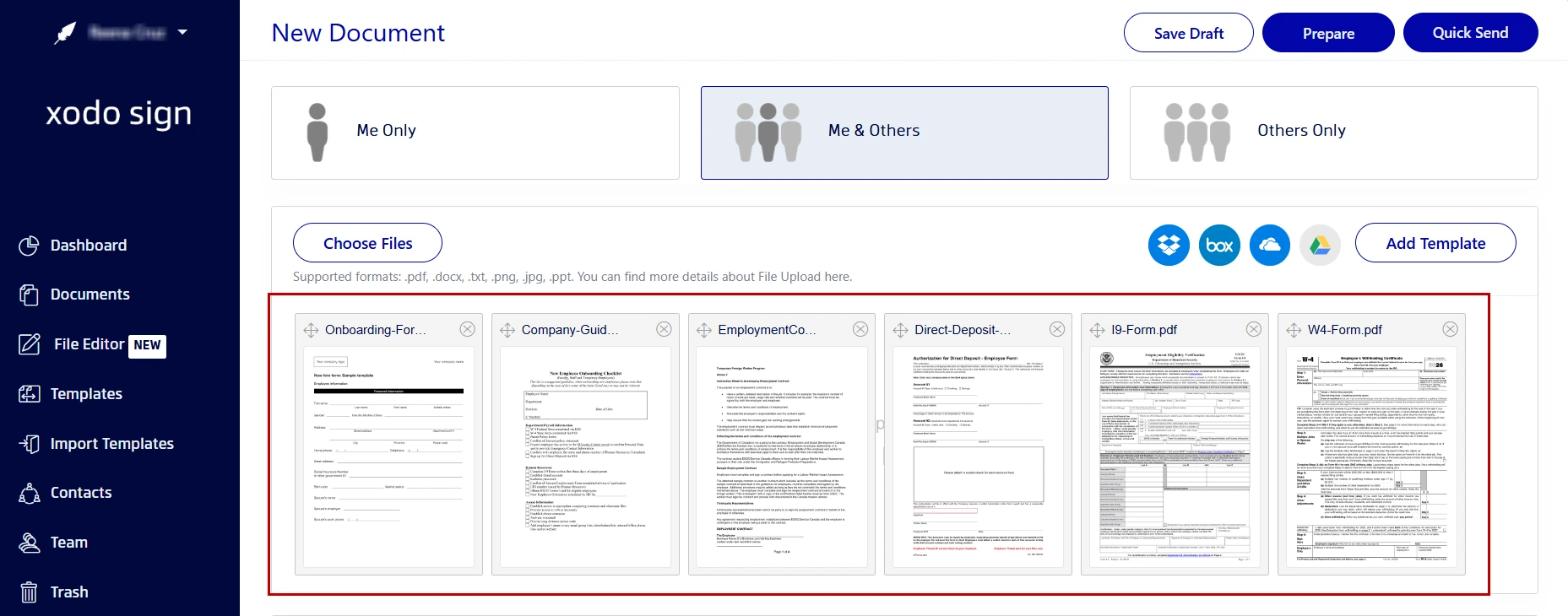
Be sure to include all employee documents your new hire needs to complete:
- Tax forms
- Employment contracts
- Direct deposit authorizations
- Employee handbooks
- Policy acknowledgements
If you miss a form, you'll need to send another signature request.
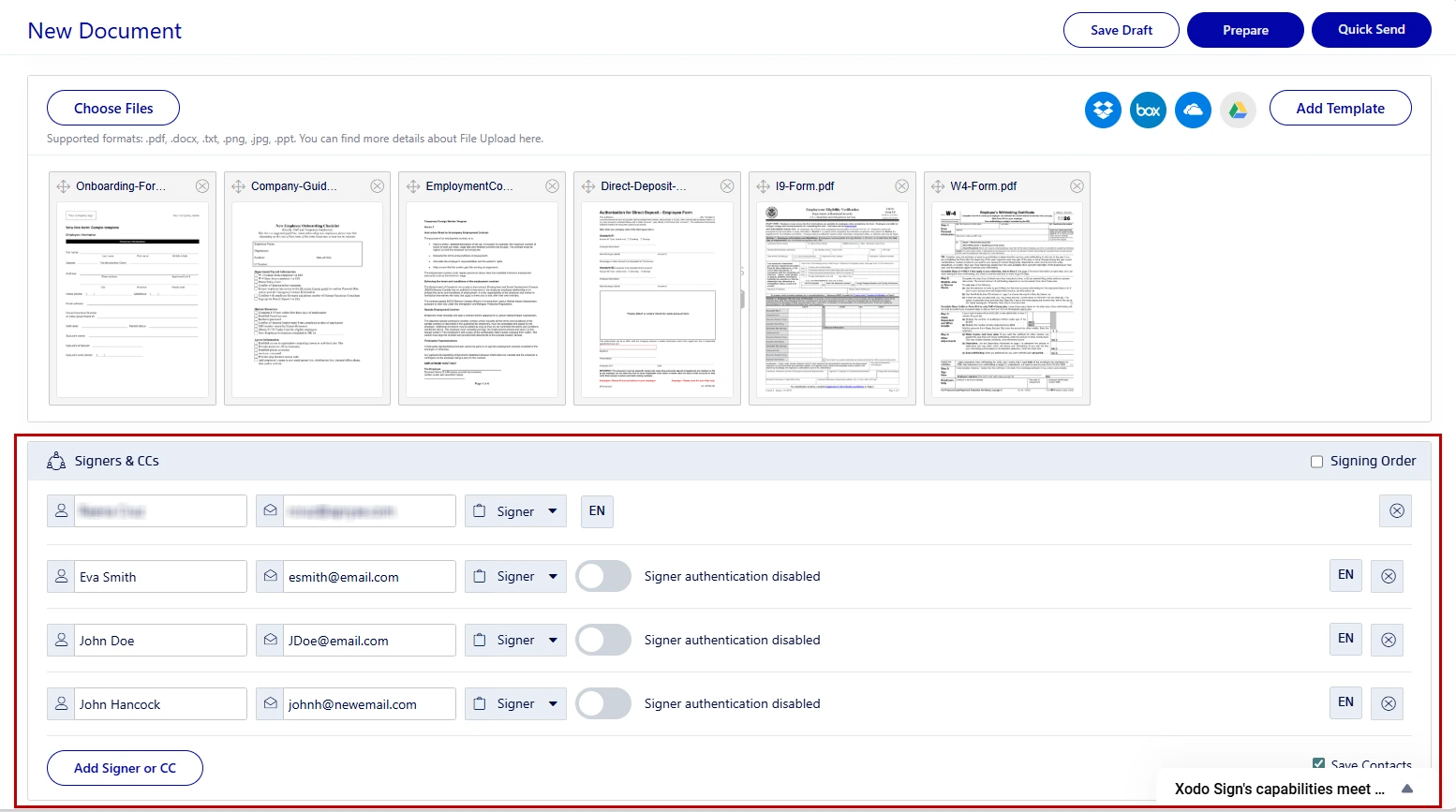
3. Add employees as signers and set options
Next, define who needs to sign:
- Choose You and Others or Others Only signing option.
- Enter each signer’s name and email address
- Assign roles (Signer or CC)
- Set the signing order if more than one person is involved.
- Configure advanced options: SMS/PIN verification, custom message, auto-reminders, expiration dates.
- When ready, click Prepare.
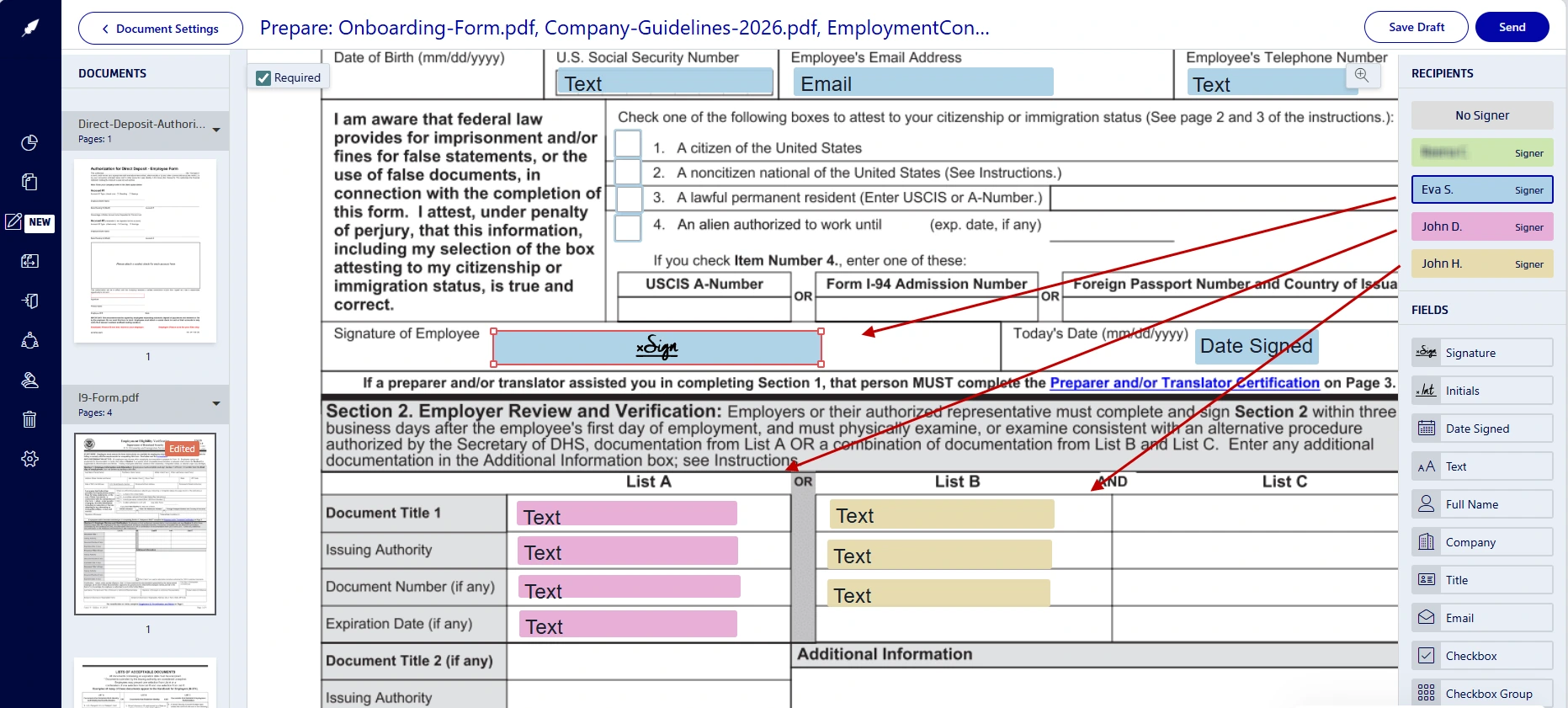
4. Place required signing fields
- Select a signer from the list on the right hand side.
- Drag and drop required fields onto the pages: signature, date, initials, text boxes.
- Add your own signature field.
- Draw, type or upload your signature and click on Sign.
- When all fields are in place, click on Send.
Xodo Sign will email the signature requests immediately.
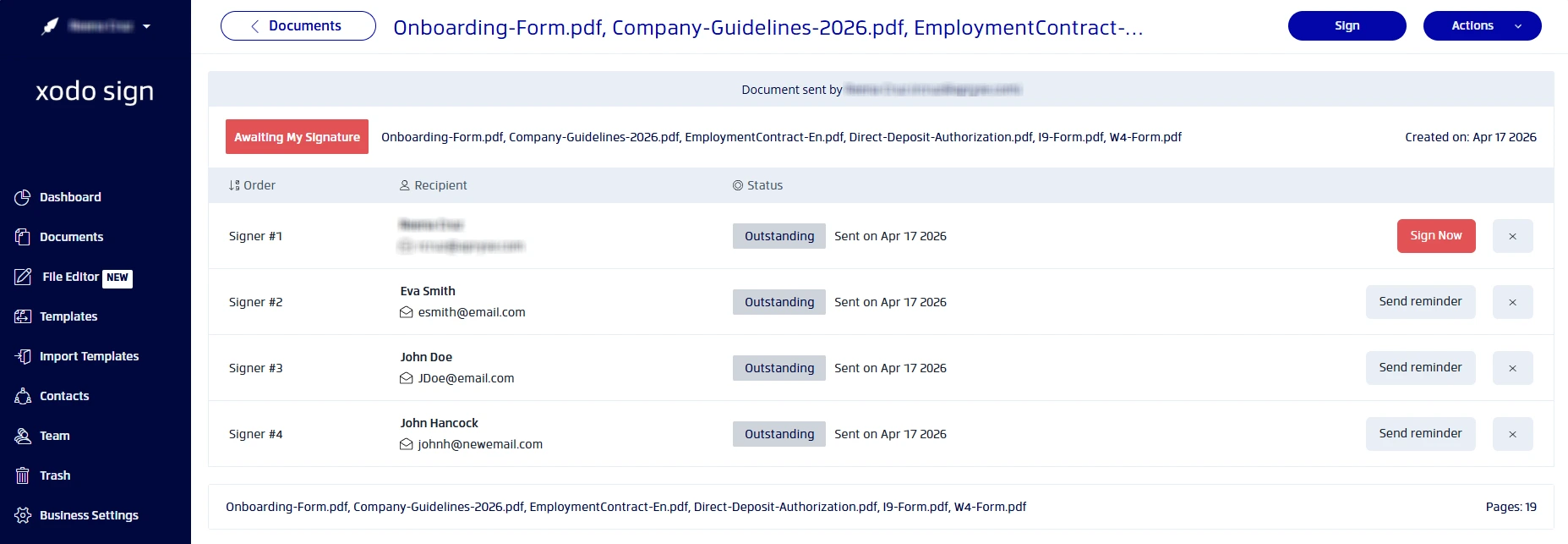
5. Monitor onboarding form status
- Open Documents in your dashboard.
- Check whether the employee has viewed or signed the forms.
- Send them a reminder if nothing was signed.
- Once all signatures and details are collected, download and save electronically signed documents for your records.
If you also need to send an offer letter, see our guide on signing offer letters for step-by-step instructions.
Why should HR teams move to paperless onboarding process
Using an electronic signature solution for onboarding paperwork simplifies the entire hiring process. With Xodo Sign, HR teams can:
- Shorten time-to-hire
Send and sign employment contracts the same day an offer is accepted. No need for scanning documents. - Repeat the onboarding process easily
Reusable templates mean repeating the onboarding process with fewer manual checks and no missed steps. - Prevent missing information
Setting fields as "Required" can prevent missing signatures, dates, or initials. - Support remote and global hires
New hires can electronically sign onboarding documents on any desktop or mobile device, anywhere. - Keep records audit-ready
Every action can be tracked with comprehensive audit trails recording timestamps, IP addresses, and activity logs. - Secure sensitive HR documents
HR departments can securely sign multiple forms with legally binding signatures.
Frequently asked questions
1. Are e-signatures legally binding?
Yes. Electronic signatures created in Xodo Sign comply with ESIGN and eIDAS regulations in most regions and are legally valid for employee onboarding documents.
2. Can employees sign forms without a Xodo Sign account?
Yes, employees can sign onboarding forms without a Xodo Sign account. They receive a secure email link and can sign electronically and enter their information as required.
3. What file formats does Xodo Sign support for onboarding forms?
Xodo Sign supports PDF, DOCX, and common image formats such as JPEG and PNG. Non-PDF files are automatically converted to PDF during upload.
4. How can I remind employees to complete onboarding paperwork?
You can schedule automatic reminders in Xodo Sign. Reminders are sent after a set number of days, reducing manual follow‑ups.
5. What if an employee declines to sign a form?
If an employee declines to sign, you'll receive a notification. If changes are needed, you can cancel the request, update the document using Xodo Sign's PDF editor, and send an updated request.
6. Can I send onboarding forms to multiple employees?
Yes. You can reuse onboarding templates and send the same set of documents to multiple employees individually. Each employee receives a unique signing link and audit trail.
7. How secure are employee onboarding documents?
Xodo Sign uses encrypted storage and secure access controls. Every signed onboarding form includes a full audit trail, helping HR teams keep records protected.
A simpler onboarding workflow for HR teams
Digitally signing employee onboarding forms turns a slow, paper-based task into a simple online HR workflow.
With Xodo Sign, you upload documents, place fields, send requests, and track progress from one dashboard. No IT setup. No complicated training. No paperwork involved.
Ready to simplify your onboarding process?
Try Xodo Sign today and start your digital signature workflow in minutes.