
Table of contents
Sign and send unlimited e-signatures with Xodo Sign.
Docusign remains one of the best known e‑signature platforms, but its pricing can be difficult to understand. Envelope limits, per‑user billing, and plan variations often make it difficult for buyers to estimate real cost.
We explain Docusign’s pricing in clear terms and provide an alternative like Xodo Sign for users who want predictable or lower‑cost plans with unlimited documents.
How this pricing guide was researched
This guide uses publicly available Docusign pricing from the U.S. version of the Docusign website (as of October 2026). The scope is limited to Docusign’s esignature plans rather than API, IAM, or other higher‑tier products.
Additional references were used to confirm envelope limits, feature availability, and common plan behaviors. Plan names and prices refer to U.S. offerings and may differ in other regions.
Docusign pricing plans in 2026
Docusign’s e‑signature pricing is organized into several tiers aimed at individuals, small teams, and larger organizations. Each tier changes both the monthly cost and how many envelopes you can send per user.
Docusign’s 2026 e-signature plans include:
- a Free plan (no monthly fee)
- a Personal plan ($15 per month, $10 per month with upfront annual billing, or $11 per month with an annual commitment billed monthly)
- a Standard plan ($45 per month, $25 per month with upfront annual billing, or $30 per month with an annual commitment billed monthly)
- a Business Pro plan ($65 per month, $40 per month with upfront annual billing, or $45 per month with an annual commitment billed monthly)
- Enhanced plans with custom pricing, customizable envelope limits, and additional enterprise features
Note: Docusign's annual billed monthly option is still a 12-month commitment. It simply spreads the annual subscription across monthly payments. After the 30-day cancellation period, customers who cancel are responsible for the remaining annual balance.
If you want to test Docusign, some paid plans include a limited free trial so you can review advanced features and workflows before committing to an annual contract.
Docusign Free plan
Best for occasional users who only need sign and store their own documents.
Price range: Free
Sending limits: The free account is designed for signing and storing your own documents. To send documents to other people for signature, Docusign directs users to a free trial of a paid plan.
What’s missing:
- Templates
- Advanced form fields
- Bulk sending
- Workflow automation
- Most admin controls
The free account is best suited to individuals who need to sign, return, and store documents rather than collect signatures from others.
Docusign Personal plan
Best for individuals with light needs.
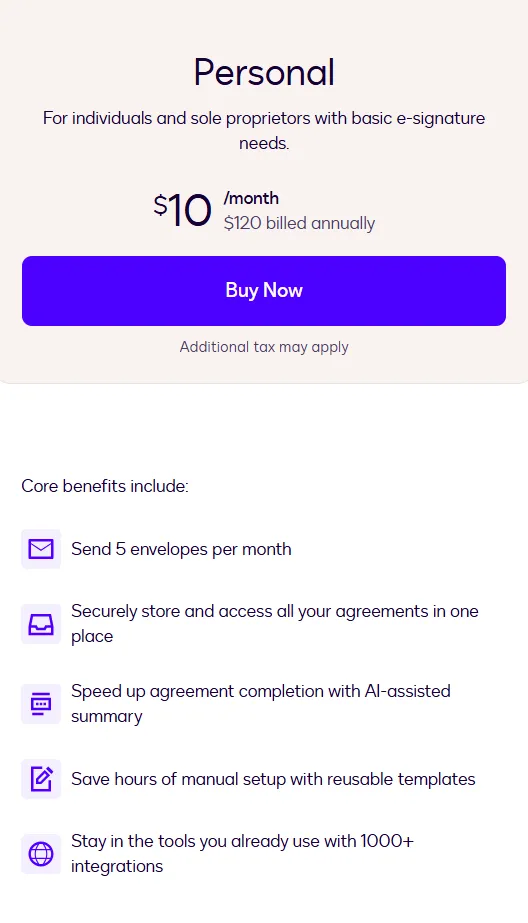
Price range: $15/month with monthly billing, $10/month with upfront annual billing ($120 billed annually), or $11 per month with an annual commitment billed monthly ($132 in total).
Features included:
- Send up to 5 envelopes per month
- A centralized repository to store and access your documents
- Basic reusable templates
- Real‑time audit trails
- Basic form fields (signature, date, initials)
- Mobile app access
What’s missing:
- No multi‑user support or team features
- No advanced tools or collaborative commenting
- No payment collection, conditional logic, or advanced recipient routing
- Limited suitability for business workflows that require multi‑step approvals
The Personal plan is not suitable for small teams because it has a fixed 5‑envelopes‑per‑month limit and does not support multiple users.
How Docusign envelopes and limits work
Docusign uses envelopes to measure usage. Each send counts as one envelope, even if several documents or recipients are included.
The Personal plan includes 5 envelopes per month. Standard and Business Pro annual plans (including annual subscriptions billed monthly) include up to 100 envelopes per user per year. Month-to-month Standard and Business Pro plans include up to 10 envelopes per user per month. If Standard or Business Pro customers exceed their allowance, additional envelopes are billed on a pay-as-you-go basis, or customers can pre-purchase additional envelope capacity.
Docusign Standard plan
Best for small teams, but per‑user pricing means total cost grows with every seat added.
Price range: $45/month with monthly billing, $25/month with annual billing ($300 billed annually), or $30 per month with an annual commitment billed monthly ($360 in total).
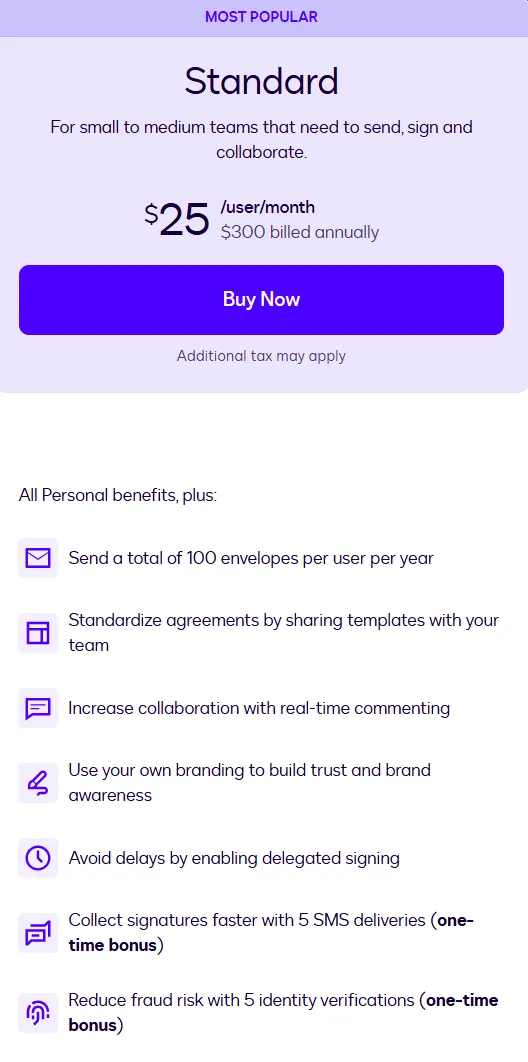
Docusign Standard pricing plan details
Features included:
- Everything in the Personal plan
- A total of 100 envelopes per user per year
- Real‑time commenting
- In‑person signing
- 5 SMS deliveries and 5 identity verifications (one‑time bonus)
What’s missing:
- No built‑in payment collection
- No conditional logic for complex forms
- Limited advanced recipient routing
- No access to some higher‑tier automation and integration options
The Standard plan suits small internal teams or a sales team that sends a moderate number of agreements but does not yet need the full range of advanced solutions available in higher tiers.
Docusign Business Pro plan
Best for teams that need advanced form fields, bulk sending, web forms, data validation, and payment collection inside their signing workflows.
Price range: $65/month with monthly billing, $40/month with annual billing ($480 billed annually), or $45 per month with an annual commitment billed monthly ($540 in total).

Features included:
- A total of 100 envelopes per user per year on annual plans
- Collect payments
- Advanced form fields
- Mobile-friendly web forms
- Real-time data validation
- PowerForms and bulk send
Key limitations to be aware of
Before choosing a Docusign plan, it helps to estimate how many envelopes your team will send each month and how many users need access. Envelope caps and per‑user billing can make costs rise faster than expected, especially for teams that send large volumes of contracts or need advanced routing.
Common limitations:
- Envelope caps
- Per‑user pricing
- Limited PDF editing
- Additional cost for advanced workflows
- Lowest advertised per-user rates require a 12-month commitment
These limits matter even more when Docusign is used alongside other workplace integrations and tools, because each new user or workflow can add to your overall subscription cost.
Tip: Want to see what these pricing differences mean for your team? Use our e-signature cost calculator to compare estimated Xodo Sign and Docusign costs based on your plan, team size, and document volume.
When Docusign pricing feels high, consider Xodo Sign
Buyers who compare multiple e‑signature platforms often look for predictable pricing, fewer usage restrictions, or built‑in editing. Xodo Sign is a frequent alternative for teams that want unlimited documents or lower‑cost plans without complex envelope rules.

Some reasons users switch to Xodo Sign:
- Lower price per user
- Unlimited documents on paid plans
- Built‑in PDF editing (edit text, pages, redact, annotate, and more) without separate software
- Simple pricing without envelope caps
- Strong ratings on G2 and Capterra
These differences are most noticeable for small to medium teams and high‑volume senders.
Docusign plans and pricing compared to Xodo Sign
Xodo Sign keeps pricing straightforward with unlimited documents on paid tiers, while Docusign relies on per‑user billing and envelope limits. For teams that send many documents or that want built‑in PDF editing, Xodo Sign often results in lower and more predictable monthly costs.
Per‑user pricing increases quickly as teams grow.
For example, a 10‑person team would pay:
- $4,800/year for Docusign Business Pro when billed annually upfront ($40/user/month)
- $5,400/year for Docusign Business Pro with an annual commitment billed monthly ($45/user/month)
- $1,920/year for Xodo Sign Professional when billed annually ($16/user/month)
That makes Xodo Sign Professional 60% less expensive than Docusign Business Pro when comparing their upfront annual billing options. You can start a Xodo Sign free trial and explore its Professional e-signature and PDF editing features.
Which option is right for you?
Choose Docusign if:
- You need enterprise‑grade workflows
- You rely heavily on Salesforce or advanced integrations
- You require complex routing or industry‑specific compliance as part of broader contract lifecycle management
Choose Xodo Sign if:
- You want predictable pricing
- Your team needs unlimited documents
- You want built‑in PDF editing at no extra cost
- You prefer a simpler, more direct signing process
Frequently asked questions
1. How much does Docusign cost in the US?
In the U.S., Docusign Personal costs $15/month on a monthly plan, $10/month equivalent when paid annually upfront, or $11/month with an annual commitment billed monthly. Standard costs $45, $25, or $30 per user per month respectively. Business Pro costs $65, $40, or $45 per user per month respectively. Enhanced plans use custom pricing based on business requirements.
2. What are Docusign envelopes?
An envelope is a package of documents sent to recipients for signature. One send equals one envelope, even if several documents or multiple signers are involved. Docusign uses envelopes to track usage and set limits across its plans.
3. Does Docusign charge per envelope?
Docusign plans include an envelope allowance rather than charging separately for every envelope from the start. Personal includes 5 envelopes per month. Standard and Business Pro annual plans include up to 100 envelopes per user per year, while their monthly plans include up to 10 envelopes per user per month. Standard and Business Pro customers who exceed their allowance can be charged for additional envelopes on a pay-as-you-go basis.
4.What’s the cheapest Docusign plan?
The Personal plan is the lowest‑priced Docusign paid plan. It costs $15/month with a monthly plan, $10/month with an upfront annual plan ($120 billed annually), or $11/month with an annual commitment billed monthly ($132 in total).
5. Is Docusign available for free?
Yes. Docusign offers a free signer account where you can sign and store documents. To send documents for signature, you will have to start a free trial.
6. Does Docusign include PDF editing?
Docusign includes Quick Edit for lightweight document changes such as editing text, repositioning text or image blocks, and adding, deleting, or reordering pages. Xodo Sign Professional provides a broader PDF editor that also includes features such as annotation and permanent redaction.
7. Is there a cheaper service than Docusign?
Yes. Alternatives such as Xodo Sign offer lower per‑user pricing and unlimited documents on paid plans, which can reduce costs for teams that send many documents.
8. How does Docusign pricing compare to Xodo Sign?
Docusign uses per-user pricing with envelope allowances and offers monthly billing, annual billing paid upfront, and annual commitments paid in monthly installments. Xodo Sign also uses per-user pricing but includes unlimited standard e-signature documents on its paid plans, which can make costs more predictable for teams with higher sending volumes.
Final thoughts on Docusign pricing and alternatives
Docusign offers a wide set of features across several tiers, but pricing varies depending on user count, envelope usage, and required workflows. Understanding these limits helps estimate real cost.
For teams exploring more predictable or lower‑cost options, Xodo Sign provides unlimited documents, built‑in PDF editing, and simpler pricing that can be easier to budget for over time.