Table of contents
Sign and send unlimited e-signatures with Xodo Sign.
If you're researching Docusign for REALTORS® or comparing real estate-specific e-signature plans, the biggest differences aren't just price.
Eligibility, envelope limits, access to association forms, transaction workspaces, and brokerage controls can dramatically change which plan makes sense.
Which Docusign Real Estate plan should you choose?
This guide compares the plans, costs, limits, and use cases to help you choose.
How we researched Docusign Real Estate pricing and limits
This guide uses publicly available U.S. pricing for Docusign Real Estate plans as of October 2026. It covers Real Estate Starter, Real Estate, REALTORS®, and Enhanced plans.
We verified pricing, envelope allowances, NAR eligibility, and real estate features using Docusign’s official pricing and product pages. The website was last checked on October 19, 2026.
Note: For details on Docusign Personal, Standard, or Business Pro plan, see our dedicated Docusign pricing guide instead.
Comparing Docusign Real Estate pricing plans
A simple rule of thumb based on agent type and transaction needs:
- Real Estate Starter: New or part-time solo agents with low signing volume
- Real Estate: Active agents who need association forms and transaction workspace features
- REALTORS®: Eligible NAR members with frequent signing needs
- Enhanced: Brokerages that need custom limits, visibility, and administrative controls
Docusign Real Estate plans explained
Each Docusign Real Estate plan serves a different type of agent, from low-volume solo users to larger brokerages. Here’s how each plan compares on pricing, envelope limits, features, and use cases.
Real Estate Starter
Best for low-volume solo agents
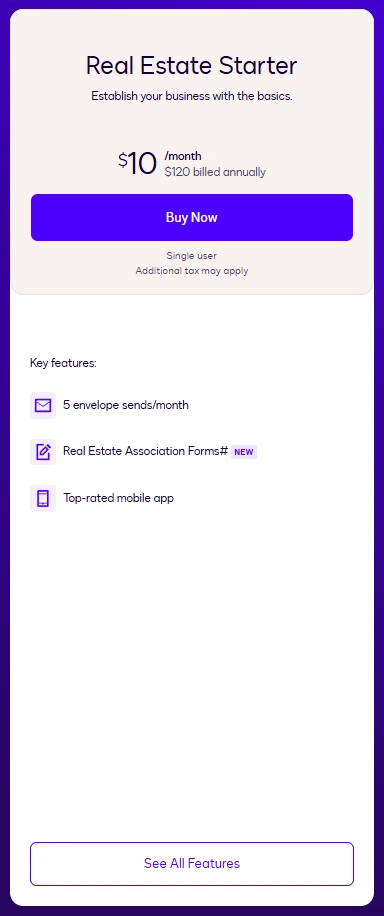
Real Estate Starter is the entry-level option for solo agents with low signing volume. Its main draw is access to real estate-specific tools and association forms while keeping annual costs down for agents who only send a few envelopes each month.
Pricing:
- $10 per month billed annually ($120 per user annually)
- $15 per month billed monthly ($180 per user annually)
Signature Requests:
- 5 envelope sends per month
Included features:
- Mobile signing
- Access to Real Estate Association Forms where available
Key limitations:
- Single user only
- 5 envelopes per month
- Limited fit for agents with an active transaction pipeline
- Association-form availability varies by market
Best for:
- New solo agents handling a few transactions
- Part-time agents sending fewer than five signing packages monthly
- Agents who need supported real estate forms and agreements but only one seat
- Low-volume deals with few separate signing events
Real Estate Starter fits agents handling only a few signing packages each month. Once deals generate separate offers, disclosures, multiple amendments, or counteroffers, the 5-envelope limit can become restrictive and trigger an upgrade to the next tier.
Real Estate
Best for active real estate agents
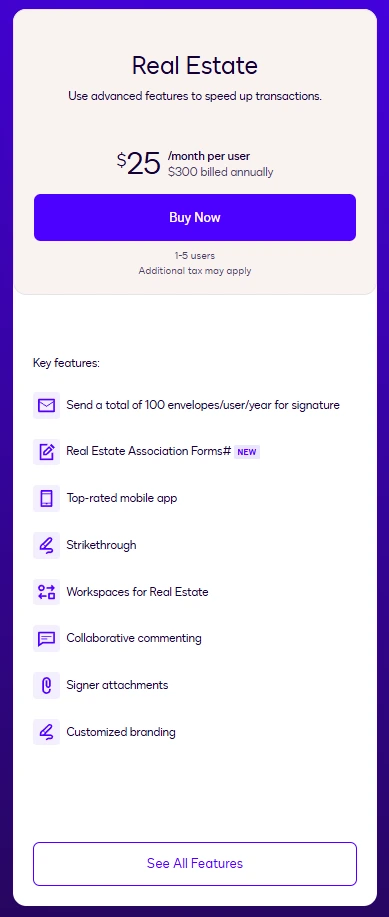
Real Estate gives active solo agents and small teams more room to manage transactions and collaborate. It adds real estate workflow tools such as signer attachments, commenting, and custom branding, making it better suited to agents handling deals regularly.
Pricing:
- $25 per user per month billed annually ($300 per user annually)
- $45 per user per month billed monthly ($540 per user annually)
Signature requests:
- 100 envelopes per user per year
Included features:
- Workspaces for Real Estate
- Collaborative commenting
- Signer attachments
- Custom branding
- Real Estate Association Forms (where available)
Key limitations:
- 100 envelopes per user per year
- $300 per user per year
- Limited to 1–5 users
- High-volume teams may need custom envelope limits
Best for:
- Full-time solo agents who can stay within the envelope allowance
- 2–3 agent teams collaborating on transactions
- Agents using attachments, comments, and association forms
- Small teams that need Docusign's real estate workflow tools
100 envelopes annually averages roughly 8 envelopes per month. That may be sufficient for agents with moderate transaction volume. For higher-volume agents, however, the annual cap can become a planning consideration during busy selling seasons.
REALTORS®
Best for Eligible NAR Members
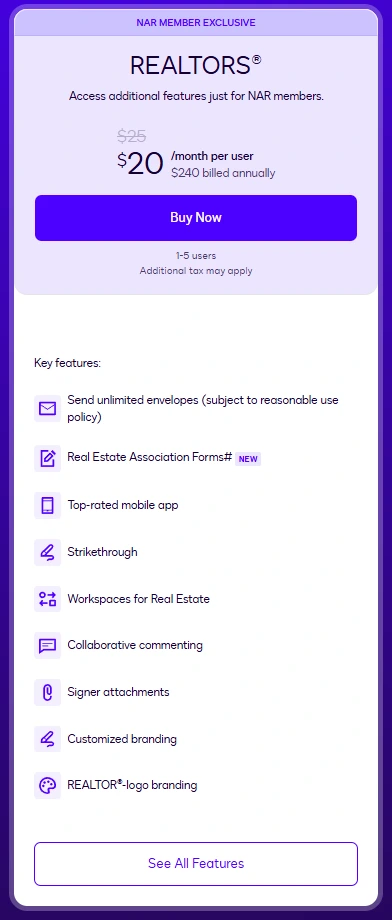
The REALTORS® plan stands out for eligible NAR members with higher signing volume. Its unlimited envelope sending, subject to Docusign’s Reasonable Use Policy, makes it particularly relevant for agents regularly sending offers, disclosures, amendments, and other transaction documents.
Pricing:
- $20 per user per month billed annually ($240 per user annually)
- $35 per user per month billed monthly ($420 per user annually)
Signature requests:
- Unlimited envelopes per user per month
Note: Envelopes remain subject to its Reasonable Use Policy. This means that under Docusign’s Reasonable Use Policy, “unlimited” use is still subject to usage conditions. Docusign may charge additional fees or restrict service when usage falls outside plan allowances or materially affects its systems.
Included Features:
- Real Estate Association Forms
- Workspaces for Real Estate
- Collaborative commenting
- Custom branding
- REALTOR®-branded experience
Key limitations:
- Only for eligible NAR members
- Unlimited sending is subject to Docusign's Reasonable Use Policy
- Per-user costs rise as agents are added
- Less relevant if you don't use REALTOR®-specific benefits
Best for:
- Busy NAR-member agents sending more than 100 envelopes a year
- Agents frequently sending counteroffers, disclosures, and amendments
- Small NAR-member teams with higher signing volume
- Agents who regularly use association forms and REALTOR® benefits
For eligible NAR members with steady transaction volume, the REALTORS® plan offers more sending flexibility than the standard Real Estate plan. The value is strongest for agents who regularly rely on association forms and send multiple document packages per deal.
Enhanced plans
Best for brokerages managing agents and transactions at scale
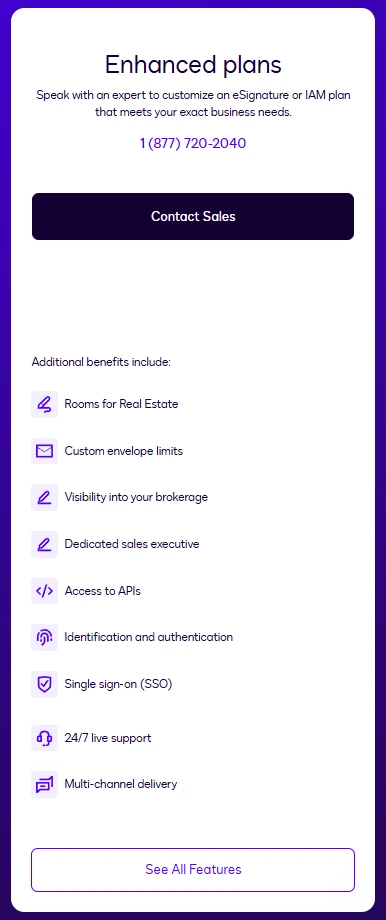
Docusign Enhanced plan's main selling point is customization, with options such as custom envelope limits, Rooms for Real Estate, brokerage visibility, APIs, dedicated sales support, and centralized controls. These are customized and pricing is provided directly by Docusign sales.
Pricing:
- Custom pricing, contact sales
Signature requests:
- Custom envelope limits
Included features:
- Rooms for Real Estate
- Brokerage visibility tools
- API access
- Single sign-on (SSO)
- Identification and authentication capabilities
Key limitations:
- Custom pricing with no fixed public rate
- Requires contacting Docusign sales
- May be more than a solo agent or small team needs
- Envelope limits and costs depend on the agreement
Best for:
- Broker-owners managing multiple agents and transactions
- Brokerages that have outgrown 1–5 user plans
- High-volume teams needing custom envelope limits
- Brokerages needing Rooms, APIs, SSO, or centralized controls
For brokerages managing multiple agents, transactions, and compliance requirements, these administrative capabilities often matter more than per-seat pricing.
What to consider before choosing a Docusign Real Estate plan
Price alone doesn’t tell you which Docusign Real Estate plan fits your business.
Before choosing, look at how signing process, envelope limits, transaction volume, and association-form availability line up with the way you handle deals.
Limitations that can change your plan fit
A plan that looks affordable upfront may be less suitable once you factor in how often you send documents and which real estate tools you need.
Before subscribing, consider these limitations against your workflow:
- Sending volume
Heavy transaction activity can make those allowances a deciding factor. - REALTORS® eligibility
The REALTORS® plan is a NAR-member-exclusive option, so its pricing and features are not available to every real estate professional. - Reasonable-use terms
The REALTORS® plan has unlimited envelope sending, but Docusign makes that usage subject to its Reasonable Use Policy. - Association-form availability
Access to supported forms can vary, making local availability worth checking before you choose a plan primarily for its real estate forms. - Brokerage requirements
Teams that need brokerage visibility, custom envelope limits, Rooms for Real Estate, SSO, or API access may need an Enhanced plan rather than one of Docusign’s self-service tiers.
Understanding Docusign envelope limits
An envelope is one signing transaction. An envelope can contain:
- One document or multiple documents
- One signer or multiple signers
- Supporting information and audit details
No matter how many documents or signers are included, sending that package counts as a single envelope. Consider the following document sending scenarios:
This distinction is important because transaction-heavy agents often send multiple signing events for a single deal.
What about association forms?
One of the primary reasons agents choose Docusign's Real Estate plans is access to supported association forms.
However, note that form availability isn't universally available and depends on geographic location, state associations, and local partnerships. If association forms are central to your workflow, confirm availability in your market first.
An alternative that may fit your real estate workflow: Xodo Sign
Not every agent needs association-form integrations. Many already work from brokerage-approved PDFs, transaction templates, or forms provided through other systems. In such cases, this is where Xodo Sign may be a better alternative.
Why agents may prefer Xodo Sign
Using Xodo Sign for real estate can be practical for professionals who already get contracts and forms through their brokerage, MLS, or another system and mainly need to prepare documents and collect signatures.

Xodo Sign Basic is an affordable option for solo agents who need legally binding electronic signatures for contracts and forms they receive from their brokerage or another platform.
It supports unlimited document sending, 3 reusable templates, mobile signing, and integrations, making it a good fit for straightforward e-signature workflows.
Xodo Sign Professional is ideal for agents who prepare their own PDFs before sending them for signature in one place. You can try it today with a free trial - no CC required.
It includes unlimited documents and templates, plus advanced PDF editing, custom branding, and bulk sending credits, making it a good fit for high-volume agents and small teams.
Here's a look at Xodo Sign's pricing plans:
Note that Xodo Sign doesn’t replace DocuSign’s real estate-specific features. But if you only need to prepare, send, and sign documents, Xodo Sign can help you avoid paying up to 60% more for features you don’t need.
A real cost comparison: 1 agent vs. 3-agent team
For solo agents and small teams, annual costs make pricing differences easier to see.
Here’s how both e-signature solutions compare at 1 and 3 users when billed annually, before accounting for envelope limits, real estate features, and eligibility.
Annual plan costs for solo real estate agents
Key takeaway:
- Real Estate Starter and Xodo Sign Basic share the lowest annual price at $120.
- Xodo Sign Professional costs $108 (36%) less per year than Docusign Real Estate.
- REALTORS® at $240 costs 20% more than Xodo Sign Professional, but its value depends on NAR eligibility and how much you send.
- Real Estate at $300 per user per year versus Professional at $192 is a 36% annual price difference.
Annual plan costs for a 3-agent real estate team
Key takeaway:
- With Xodo Sign Professional at $576 and REALTORS® costing $720, 3-agent teams can save $144 annually with Xodo Sign.
- When choosing between Xodo Sign Professional and Docusign Real Estate, 3-agent teams can save $324 per year with Xodo Sign Professional.
Important: Subscription prices only tell part of the story. Team size, document volume, and paid features can all factor into the cost of e-signature software for real estate.
Docusign is only one option for handling real estate signatures. Agents who want to compare different workflows and pricing models can also explore other e-signature tools for real estate agents before choosing a platform.
Frequently asked questions
1. Can non-REALTORS® buy the REALTORS® plan?
No, they can't buy the REALTORS® plan. The plan is intended for eligible National Association of REALTORS® members. Eligibility must be verified through Docusign's program requirements.
2. Do recipients need a Docusign account to sign real estate documents?
No, recipients don't need to have a Docusign account to sign real estate documents. Recipients can receive, sign, and complete a document without creating a Docusign account.
3. What happens if I reach my Docusign envelope limit?
When you reach your envelope limit, your options depend on your subscription. For eligible plans, account administrators can check Admin > Plans and Billing to add capacity. Customers with Enhanced plans should contact their account team about adding envelopes.
4. Does correcting a Docusign envelope count as another envelope?
No. Correcting an envelope after it has been sent does not count as another envelope because it was already counted when its status changed to Sent.
5. Does a declined or incomplete envelope still count toward my allowance?
Yes. Once you send an envelope, it counts toward your allowance even if the recipient does not sign or complete it. Draft envelopes do not count because they have not been sent.
6. Can I upload my own real estate forms to Docusign?
Yes. Docusign Workspaces for Real Estate supports adding documents like purchase and sale agreements, leases, contract amendments, agent onboarding documents, as well as forms and templates to a workspace.
7. When should a brokerage consider a custom Docusign plan?
A custom plan is worth considering when a brokerage needs capabilities beyond the self-service tiers, such as custom envelope limits, Rooms for Real Estate, brokerage visibility, APIs, SSO, or dedicated support.
8. Can I change Docusign Real Estate plans as my transaction volume grows?
Plan changes are possible, but the available upgrade or downgrade path depends on how the account was purchased and the plan involved. Docusign can manage eligible changes through the main admin dashboard, while some plan transitions have restrictions.
Which Docusign Real Estate plan should you choose?
For most real estate professionals, the decision comes down to two questions:
- Do you need Docusign's association-form ecosystem and transaction workspaces?
- How many envelopes do you realistically send each year?
Before choosing, pay special attention to envelope allowances. Many agents compare features but overlook how quickly envelope limits can affect costs and workflows.
If association forms, NAR-specific benefits, and real estate workflows are central to your business, Docusign's Real Estate and REALTORS® plans can be strong options.
If you primarily work with your own PDFs and want unrestricted document sending with a lower annual software cost, try Xodo Sign.
Agents who want to compare different options can also explore the best e-signature tools for real estate before choosing a platform.